Code
suppressPackageStartupMessages(library(sparklyr))
suppressPackageStartupMessages(library(tidyverse))
suppressPackageStartupMessages(library(arrow))
suppressPackageStartupMessages(library(DBI))

The sparklyr package provides an R interface to Apache Spark, enabling users to perform distributed data processing and analysis using familiar R syntax. This tutorial covers the installation and setup of sparklyr, connecting to a Spark cluster, importing data, performing data wrangling, visualization, modeling, and building machine learning pipelines. We will use the NYC Yellow Taxi dataset (January 2023) as an example to demonstrate various functionalities of sparklyr.
The sparklyr package is an R interface for Apache Spark, designed to enable R users to leverage the power of Spark’s distributed computing capabilities directly from R. It provides a dplyr-compatible backend, allowing users to manipulate large-scale data using familiar R syntax while harnessing Spark’s scalability for big data processing. With sparklyr, you can connect to local or remote Spark clusters, perform data manipulation, run machine learning workflows, and integrate with other Spark components like Spark SQL and MLlib.

Key features of sparklyr include:
Seamless Connection: Easily connect to Spark clusters from R, whether running locally or on platforms like Databricks, AWS, or Azure.
dplyr Integration: Use dplyr verbs (e.g., filter(), group_by(), summarise())to write intuitive data manipulation code that translates to Spark SQL.
Machine Learning: Access Spark’s MLlib for scalable machine learning tasks, such as regression, classification, and clustering, directly from R.
Extensibility: Extend functionality with custom R code, Spark extensions, or integration with other R packages like tidyr and ggplot2. Performance: Leverage Spark’s in-memory processing for efficient handling of large datasets.
Whether you’re a data scientist or analyst working with big data, sparklyr bridges the gap between R’s user-friendly environment and Spark’s robust infrastructure, making it an ideal tool for scalable data analysis.
In previous section we have show how to insatll Apache Spark and use sparklyr package in R.
install.packages("sparklyr")
library(sparklyr)
spark_install(version = "3.5") # Specify the Spark versionlibrary(sparklyr)
#spark_install_remove(version = "3.5.0") # Remove existing installation
spark_install(version = "3.5.0")To connect to Apache Spark using sparklyr in R, you need to establish a connection to a Spark cluster (local or remote) using the spark_connect() function. This is a critical step for distributed data processing . Below is a concise guide to connecting to Spark with sparklyr, addressing potential issues like the spark-submit error and memory constraints you encountered earlier, and incorporating best practices for a stable connection.
# Connect to Spark local
sc <- spark_connect(master = "local")

# Disconnect from Spark
spark_disconnect(sc)
To connect to any other Spark cluster:
# Connect to Hadoop YARN
sc <- spark_connect(master = "yarn")

# Connect to Mesos
sc <- spark_connect(master = "mesos://host:port")

# Connect to Kubernetes
sc <- spark_connect(master = "k8s://https://server")

# Connect to Apache Livy
sc <- spark_connect(master = "http://server/livy", method = "livy")Create a configuration to allocate sufficient memory (to avoid OutOfMemoryError from your earlier issue) and connect to Spark in local mode:
config <- spark_config()
config$spark.driver.memory <- "4g"  # 4GB for driver
config$spark.executor.memory <- "4g" # 4GB for executor
sc <- spark_connect(master = "local", version = "3.5.0", config = config)Importing data into Apache Spark using sparklyr in R is a critical first step for distributed data processing and analysis, enabling you to work with large datasets. sparklyr provides intuitive functions to load data from various sources (e.g., Parquet, CSV, JSON) into Spark DataFrames, leveraging Spark’s distributed computing capabilities. Below is a concise guide on data import with sparklyr, tailored to your context of analyzing large datasets, addressing potential issues (e.g., file path errors, memory constraints), and incorporating best practices from your prior interactions.
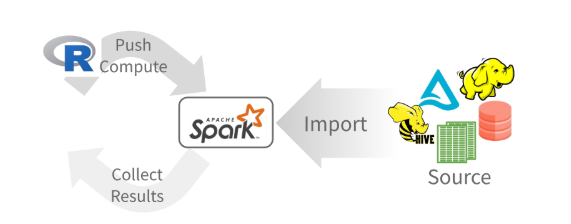
sc, name, path, options=list(), repartition=0, memory=TRUE, overwrite=TRUE
CSV: spark_read_csv(header = TRUE, columns = NULL, infer_schema = TRUE, delimiter = ",", quote= "\"", escape = "\\", charset = "UTF-8", null_value = NULL)
JSON: spark_read_json()
PARQUET: spark_read_parquet()
TEXT: spark_read_text()
DELTA: spark_read_delta()
dplyr::tbl(scr, ...) - Creates a reference to the table without loading its data into memory
dbplyr::in_catalog() - Enables a three part table address
x <- tbl(sc,in_catalog("catalog", "schema", "table"))Supported in Databricks Connect v2
dplyr::copy_to(dest, df, name)Apache Arrow accelerates data transfer between R and Spark. To use, simply load the library
Supported in Databricks Connect v2
Translates into Spark SQL statements
copy_to(sc, mtcars) |>
  mutate(trm = ifelse(am == 0, "auto", "man")) |>
  group_by(trm) |>
summarise_all(mean)pivot_longer() - Collapse several columns into two. (Supported in Databricks Connect v2)
pivot_wider() - Expand two columns into several. (Supported in Databricks Connect v2)
nest() / unnest() - Convert groups of cells into list-columns, and vice versa.
unite() / separate() - Split a single column into several columns, and vice versa.
fill() - Fill NA with the previous value.
-   `ft_binarizer()` - Assigned values based on threshold

-   `ft_bucketizer()` - Numeric column to discretized column

-   `ft_count_vectorizer()` - Extracts a vocabulary from document

-   `ft_discrete_cosine_transform()` - 1D discrete cosine transform of a real vector

-   `ft_elementwise_product()` - Element- wise product between 2 cols

-   `ft_hashing_tf()` - Maps a sequence of terms to their term frequencies using the hashing trick.

-   `ft_idf()` - Compute the Inverse Document Frequency (IDF) given a collection of documents.

-   `ft_imputer()` - Imputation estimator for completing missing values, uses the mean or the median of the columns.

-   `ft_index_to_string()` - Index labels back to label as strings

-   `ft_interaction()` - Takes in Double and Vector columns and outputs a flattened vector of their feature interactions.

-   `ft_max_abs_scaler()` - Rescale each feature individually to range \[-1, 1\] (Supported in Databricks Connect v2)

-   `ft_min_max_scaler()` - Rescale each feature to a common range \[min, max\] linearly

-   `ft_ngram()` - Converts the input array of strings into an array of n-grams

-   `ft_bucketed_random_projection_lsh()`

-   `ft_minhash_lsh()` - Locality Sensitive Hashing functions for Euclidean distance and Jaccard distance (MinHash)

-   `ft_normalizer()` - Normalize a vector to have unit norm using the given p-norm

-   `ft_one_hot_encoder()` - Continuous to binary vectors

-   `ft_pca()` - Project vectors to a lower dimensional space of top k principal components

-   `ft_quantile_discretizer()` - Continuous to binned categorical values.

-   `ft_regex_tokenizer()` - Extracts tokens either by using the provided regex pattern to split the text

-   `ft_robust_scaler()` - Removes the median and scales according to standard scale

-   `ft_standard_scaler()` - Removes the mean and scaling to unit variance using column summary statistics (Supported in Databricks Connect v2)

-   `ft_stop_words_remover()` - Filters out stop words from input

-   `ft_string_indexer()` - Column of labels into a column of label indices.

-   `ft_tokenizer()` - Converts to lowercase and then splits it by white spaces

-   `ft_vector_assembler()` - Combine vectors into single row-vector

-   `ft_vector_indexer()` - Indexing categorical feature columns in a dataset of Vector

-   `ft_vector_slicer()` - Takes a feature vector and outputs a new feature vector with a subarray of the original features

- `ft_word2vec()` - Word2Vec transforms a word into a codedplyr + ggplot2
Supported in Databricks Connect v2copy_to(sc, mtcars) |>
group_by(cyl) |>
summarise(mpg_m = mean(mpg)) |> # Summarize in Spark
collect() |> # Collect results in R
ggplot() +
geom_col(aes(cyl, mpg_m)) # Create plotml_linear_regression() - Linear regression.
ml_aft_survival_regression() - Parametric survival regression model named accelerated failure time (AFT) model.
ml_generalized_linear_regression() - GLM.
ml_isotonic_regression() - Uses parallelized pool adjacent violators algorithm.
ml_random_forest_regressor() - Regression using random forests.
ml_linear_svc() - Classification using linear support vector machines.
ml_logistic_regression() - Logistic regression. (Supported in Databricks Connect v2)
ml_multilayer_perceptron_classifier() - Based on the Multilayer Perceptron.
ml_naive_bayes() - It supports Multinomial NB which can handle finitely supported discrete data.
ml_one_vs_rest() - Reduction of Multiclass, performs reduction using one against all strategy.
ml_decision_tree_classifier(), ml_decision_tree(), `ml_decision_tree_regressor(). - Classification and regression using decision trees.
ml_gbt_classifier(), ml_gradient_boosted_trees(), ml_gbt_regressor() - Binary classification and regression using gradient boosted trees.
ml_random_forest_classifier() - Classification and regression using random forests.
ml_feature_importances(), ml_tree_feature_importance() - Feature Importance for Tree Models.
ml_bisecting_kmeans() - A bisecting k-means algorithm based on the paper.
ml_lda(), ml_describe_topics(), ml_log_likelihood(), ml_log_perplexity(), ml_topics_matrix() - LDA topic model designed for text documents.
ml_gaussian_mixture() - Expectation maximization for multivariate Gaussian Mixture Models (GMMs).
ml_kmeans(), ml_compute_cost(), ml_compute_silhouette_measure() - Clustering with support for k-means.
ml_power_iteration() - For clustering vertices of a graph given pairwise similarities as edge properties.
ml_als(), ml_recommend() - Recommendation using Alternating Least Squares matrix factorization.ml_clustering_evaluator() - Evaluator for clustering.
ml_evaluate() - Compute performance metrics.
ml_binary_classification_evaluator(), ml_binary_classification_eval(), ml_classification_eval() - A set of functions to calculate performance metrics for prediction models.
ml_fpgrowth(), ml_association_rules(), ml_freq_itemsets() - A parallel FP-growth algorithm to mine frequent itemsets.
ml_freq_seq_patterns(), ml_prefixspan() - PrefixSpan algorithm for mining frequent itemsets.
ml_summary() - Extracts a metric from the summary object of a Spark ML model.
ml_corr() - Compute correlation matrix.
ml_chisquare_test(x,features,label) - Pearson’s independence test for every feature against the label.
ml_default_stop_words() - Loads the default stop words for the given language.
ml_call_constructor() - Identifies the associated sparklyr ML constructor for the JVM.
ml_model_data() - Extracts data associated with a Spark ML model.
ml_standardize_formula() - Generates a formula string from user inputs.
ml_uid() - Extracts the UID of an ML object.
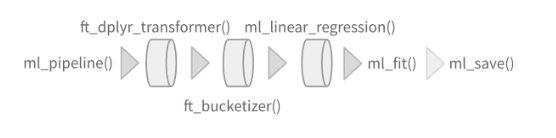
Easily create a formal Spark Pipeline models using R. Save the Pipeline in native Sacala. It will have no dependencies on R.
Supported in Databricks Connect v2
ml_pipeline() - Initializes a new Spark Pipeline.
ml_fit() - Trains the model, outputs a Spark Pipeline Model.
Supported in Databricks Connect v2
ml_save() - Saves into a format that can be read by Scala and PySpark.
ml_read() - Reads Spark object into sparklyr.
Supported in Databricks Connect v2
Run arbitrary R code at scale inside your cluster with spark_apply(). Useful when there you need functionality only available in R, and to solve ‘embarrassingly parallel problems’.
spark_apply(
  x, f,
  columns = NULL, memory = TRUE, group_by = NULL,
  name = NULL, barrier = NULL, fetch_result_as_sdf = TRUE
  )
copy_to(sc, mtcars) |>
spark_apply(
nrow, # R only function
group_by = "am",
columns = "am double, x long"
)In this section, we will demonstrate how to use sparklyr for basic data processing tasks, including loading data, performing transformations, and executing SQL queries
suppressPackageStartupMessages(library(sparklyr))
suppressPackageStartupMessages(library(tidyverse))
suppressPackageStartupMessages(library(arrow))
suppressPackageStartupMessages(library(DBI))Sys.setenv(SPARK_HOME = "/opt/spark") # Adjust to your Spark installation path
# Configure Spark with increased memory
config <- spark_config()
config$spark.driver.memory <- "120g"
config$spark.executor.memory <- "120g"
sc <- spark_connect(master = "local",
version = "3.5",
config = config)# File paths (update these to your local or cluster paths)
trip_data_path<-"/home/zia207/WebSites/R_Website/High_Performance_Computing_R/R_Markdown/Data/yellow_tripdata_2023-01.parquet"
zone_lookup_path<-"/home/zia207/WebSites/R_Website/High_Performance_Computing_R/R_Markdown/Data/taxi_zone_lookup.csv"
# Load Yellow Trip Data (Parquet)
trips <- spark_read_parquet(sc, "trips", trip_data_path)
# Load Taxi Zone Lookup (CSV)
zones <- spark_read_csv(sc, "zones", zone_lookup_path, header = TRUE, infer_schema = TRUE)# Print schemas to verify
print(sdf_schema(trips))$VendorID
$VendorID$name
[1] "VendorID"
$VendorID$type
[1] "LongType"
$tpep_pickup_datetime
$tpep_pickup_datetime$name
[1] "tpep_pickup_datetime"
$tpep_pickup_datetime$type
[1] "TimestampNTZType"
$tpep_dropoff_datetime
$tpep_dropoff_datetime$name
[1] "tpep_dropoff_datetime"
$tpep_dropoff_datetime$type
[1] "TimestampNTZType"
$passenger_count
$passenger_count$name
[1] "passenger_count"
$passenger_count$type
[1] "DoubleType"
$trip_distance
$trip_distance$name
[1] "trip_distance"
$trip_distance$type
[1] "DoubleType"
$RatecodeID
$RatecodeID$name
[1] "RatecodeID"
$RatecodeID$type
[1] "DoubleType"
$store_and_fwd_flag
$store_and_fwd_flag$name
[1] "store_and_fwd_flag"
$store_and_fwd_flag$type
[1] "StringType"
$PULocationID
$PULocationID$name
[1] "PULocationID"
$PULocationID$type
[1] "LongType"
$DOLocationID
$DOLocationID$name
[1] "DOLocationID"
$DOLocationID$type
[1] "LongType"
$payment_type
$payment_type$name
[1] "payment_type"
$payment_type$type
[1] "LongType"
$fare_amount
$fare_amount$name
[1] "fare_amount"
$fare_amount$type
[1] "DoubleType"
$extra
$extra$name
[1] "extra"
$extra$type
[1] "DoubleType"
$mta_tax
$mta_tax$name
[1] "mta_tax"
$mta_tax$type
[1] "DoubleType"
$tip_amount
$tip_amount$name
[1] "tip_amount"
$tip_amount$type
[1] "DoubleType"
$tolls_amount
$tolls_amount$name
[1] "tolls_amount"
$tolls_amount$type
[1] "DoubleType"
$improvement_surcharge
$improvement_surcharge$name
[1] "improvement_surcharge"
$improvement_surcharge$type
[1] "DoubleType"
$total_amount
$total_amount$name
[1] "total_amount"
$total_amount$type
[1] "DoubleType"
$congestion_surcharge
$congestion_surcharge$name
[1] "congestion_surcharge"
$congestion_surcharge$type
[1] "DoubleType"
$airport_fee
$airport_fee$name
[1] "airport_fee"
$airport_fee$type
[1] "DoubleType"print(sdf_schema(zones))$LocationID
$LocationID$name
[1] "LocationID"
$LocationID$type
[1] "IntegerType"
$Borough
$Borough$name
[1] "Borough"
$Borough$type
[1] "StringType"
$Zone
$Zone$name
[1] "Zone"
$Zone$type
[1] "StringType"
$service_zone
$service_zone$name
[1] "service_zone"
$service_zone$type
[1] "StringType"# Sample 5 rows from trips
trips %>% head(5) %>% collect()# A tibble: 5 × 19
VendorID tpep_pickup_datetime tpep_dropoff_datetime passenger_count
<int> <dttm> <dttm> <dbl>
1 2 2022-12-31 19:32:10 2022-12-31 19:40:36 1
2 2 2022-12-31 19:55:08 2022-12-31 20:01:27 1
3 2 2022-12-31 19:25:04 2022-12-31 19:37:49 1
4 1 2022-12-31 19:03:48 2022-12-31 19:13:25 0
5 2 2022-12-31 19:10:29 2022-12-31 19:21:19 1
# ℹ 15 more variables: trip_distance <dbl>, RatecodeID <dbl>,
# store_and_fwd_flag <chr>, PULocationID <int>, DOLocationID <int>,
# payment_type <int>, fare_amount <dbl>, extra <dbl>, mta_tax <dbl>,
# tip_amount <dbl>, tolls_amount <dbl>, improvement_surcharge <dbl>,
# total_amount <dbl>, congestion_surcharge <dbl>, airport_fee <dbl># Register temporary views
trips %>% sdf_register("trips")Warning in arrow_collect(object, ...): NAs introduced by coercion to integer
range# Source: table<`trips`> [?? x 19]
# Database: spark_connection
VendorID tpep_pickup_datetime tpep_dropoff_datetime passenger_count
<int> <dttm> <dttm> <dbl>
1 2 2022-12-31 19:32:10 2022-12-31 19:40:36 1
2 2 2022-12-31 19:55:08 2022-12-31 20:01:27 1
3 2 2022-12-31 19:25:04 2022-12-31 19:37:49 1
4 1 2022-12-31 19:03:48 2022-12-31 19:13:25 0
5 2 2022-12-31 19:10:29 2022-12-31 19:21:19 1
6 2 2022-12-31 19:50:34 2022-12-31 20:02:52 1
7 2 2022-12-31 19:09:22 2022-12-31 19:19:49 1
8 2 2022-12-31 19:27:12 2022-12-31 19:49:56 1
9 2 2022-12-31 19:21:44 2022-12-31 19:36:40 1
10 2 2022-12-31 19:39:42 2022-12-31 19:50:36 1
# ℹ more rows
# ℹ 15 more variables: trip_distance <dbl>, RatecodeID <dbl>,
# store_and_fwd_flag <chr>, PULocationID <int>, DOLocationID <int>,
# payment_type <int>, fare_amount <dbl>, extra <dbl>, mta_tax <dbl>,
# tip_amount <dbl>, tolls_amount <dbl>, improvement_surcharge <dbl>,
# total_amount <dbl>, congestion_surcharge <dbl>, airport_fee <dbl>zones %>% sdf_register("zones")Warning in arrow_collect(object, ...): NAs introduced by coercion to integer
range# Source: table<`zones`> [?? x 4]
# Database: spark_connection
LocationID Borough Zone service_zone
<int> <chr> <chr> <chr>
1 1 EWR Newark Airport EWR
2 2 Queens Jamaica Bay Boro Zone
3 3 Bronx Allerton/Pelham Gardens Boro Zone
4 4 Manhattan Alphabet City Yellow Zone
5 5 Staten Island Arden Heights Boro Zone
6 6 Staten Island Arrochar/Fort Wadsworth Boro Zone
7 7 Queens Astoria Boro Zone
8 8 Queens Astoria Park Boro Zone
9 9 Queens Auburndale Boro Zone
10 10 Queens Baisley Park Boro Zone
# ℹ more rows# Method 1: Use DBI::dbGetQuery() to execute SQL query
trip_count <- dbGetQuery(sc, "SELECT COUNT(*) AS total_trips FROM trips")
print(trip_count) # ~3 million for January 2023 total_trips
1 3066766# Method 2: Use dplyr for the same calculation (alternative, more idiomatic)
trip_count_dplyr <- trips %>%
dplyr::summarise(total_trips = n()) %>%
collect()
print(trip_count_dplyr)# A tibble: 1 × 1
total_trips
<int>
1 3066766summary_trips <- trips %>%
dplyr::summarise(
avg_distance = mean(trip_distance, na.rm = TRUE),
avg_fare = mean(total_amount, na.rm = TRUE),
max_distance = max(trip_distance, na.rm = TRUE)
)
collect(summary_trips)# A tibble: 1 × 3
avg_distance avg_fare max_distance
<dbl> <dbl> <dbl>
1 3.85 27.0 258928.Join trips with zones to add borough/zone names based on pickup location (PULocationID):
joined_trips <- trips %>%
  left_join(zones, by = c("PULocationID" = "LocationID")) %>%
  dplyr::rename(pickup_borough = Borough, pickup_zone = Zone)

# Register the joined DataFrame
joined_trips %>% sdf_register("joined_trips")
# Source: table<`joined_trips`> [?? x 22]
# Database: spark_connection
VendorID tpep_pickup_datetime tpep_dropoff_datetime passenger_count
<int> <dttm> <dttm> <dbl>
1 2 2022-12-31 19:32:10 2022-12-31 19:40:36 1
2 2 2022-12-31 19:55:08 2022-12-31 20:01:27 1
3 2 2022-12-31 19:25:04 2022-12-31 19:37:49 1
4 1 2022-12-31 19:03:48 2022-12-31 19:13:25 0
5 2 2022-12-31 19:10:29 2022-12-31 19:21:19 1
6 2 2022-12-31 19:50:34 2022-12-31 20:02:52 1
7 2 2022-12-31 19:09:22 2022-12-31 19:19:49 1
8 2 2022-12-31 19:27:12 2022-12-31 19:49:56 1
9 2 2022-12-31 19:21:44 2022-12-31 19:36:40 1
10 2 2022-12-31 19:39:42 2022-12-31 19:50:36 1
# ℹ more rows
# ℹ 18 more variables: trip_distance <dbl>, RatecodeID <dbl>,
# store_and_fwd_flag <chr>, PULocationID <int>, DOLocationID <int>,
# payment_type <int>, fare_amount <dbl>, extra <dbl>, mta_tax <dbl>,
# tip_amount <dbl>, tolls_amount <dbl>, improvement_surcharge <dbl>,
# total_amount <dbl>, congestion_surcharge <dbl>, airport_fee <dbl>,
# pickup_borough <chr>, pickup_zone <chr>, service_zone <chr>avg_distance_borough <- DBI::dbGetQuery(sc, "
SELECT pickup_borough, AVG(trip_distance) AS avg_distance
FROM joined_trips
GROUP BY pickup_borough
ORDER BY avg_distance DESC
")
collect(avg_distance_borough) pickup_borough avg_distance
1 Queens 12.320490
2 Staten Island 11.356774
3 Unknown 7.362869
4 Brooklyn 5.677405
5 Bronx 5.296593
6 Manhattan 2.883807
7 EWR 1.594780total_fare_payment <- trips %>%
dplyr::group_by(payment_type) %>%
dplyr::summarise(total_fare = sum(total_amount, na.rm = TRUE)) %>%
dplyr::arrange(desc(total_fare))
collect(total_fare_payment)# A tibble: 5 × 2
payment_type total_fare
<int> <dbl>
1 1 68240617.
2 2 12260056.
3 0 2090131.
4 3 189365.
5 4 85023.avg_fare_by_zone <- DBI::dbGetQuery(sc, "
SELECT pickup_zone, AVG(total_amount) AS avg_fare, COUNT(*) AS trip_count
FROM joined_trips
WHERE total_amount > 0 AND trip_distance > 0
GROUP BY pickup_zone
HAVING trip_count > 100
ORDER BY avg_fare DESC
")
collect(avg_fare_by_zone) pickup_zone avg_fare trip_count
1 Baisley Park 86.98441 1237
2 NA 84.26012 505
3 South Jamaica 80.59627 699
4 Flushing Meadows-Corona Park 78.65827 1560
5 JFK Airport 77.11626 154267
6 Springfield Gardens South 73.79337 285
7 Jamaica 71.05417 791
8 Briarwood/Jamaica Hills 70.69585 491
9 South Ozone Park 68.53764 487
10 Howard Beach 65.49320 172
11 LaGuardia Airport 63.99337 88035
12 Corona 63.80664 277
13 Maspeth 61.30857 217
14 East Elmhurst 59.33700 12755
15 Kew Gardens 59.24856 263
16 Rego Park 57.30500 170
17 Far Rockaway 52.61812 101
18 Elmhurst 51.64916 380
19 Richmond Hill 50.96318 261
20 Coney Island 50.01576 125
21 Bay Ridge 48.81048 165
22 Steinway 48.22820 528
23 Canarsie 47.35682 355
24 Red Hook 46.78314 102
25 University Heights/Morris Heights 46.09732 149
26 Rosedale 45.84393 112
27 Long Island City/Hunters Point 45.58400 982
28 Starrett City 44.44515 136
29 Co-Op City 43.94704 203
30 Queens Village 43.51297 148
31 Williamsbridge/Olinville 42.30618 123
32 Flushing 40.36098 112
33 NV 39.25507 38051
34 Sunset Park West 38.69563 128
35 Inwood 37.83394 137
36 Soundview/Castle Hill 37.73266 169
37 Saint Albans 37.20131 183
38 Sunnyside 36.94886 1867
39 Woodside 36.17822 533
40 East Williamsburg 36.16691 459
41 Flatlands 35.52576 165
42 Spuyten Duyvil/Kingsbridge 34.43264 106
43 Cypress Hills 34.16353 150
44 Springfield Gardens North 34.03994 158
45 Flatbush/Ditmas Park 33.99560 232
46 Bushwick North 33.88460 187
47 DUMBO/Vinegar Hill 33.78543 529
48 Bushwick South 33.47232 263
49 Financial District South 33.09857 6618
50 East New York 32.82944 408
51 Brooklyn Heights 32.81445 1194
52 Financial District North 32.33246 13573
53 Washington Heights North 32.32010 304
54 World Trade Center 31.86310 12556
55 Elmhurst/Maspeth 31.77670 106
56 Battery Park City 31.53211 15491
57 Park Slope 31.24479 703
58 Jackson Heights 31.23240 459
59 Prospect-Lefferts Gardens 31.11255 267
60 Brownsville 30.83106 160
61 Ocean Hill 30.81534 174
62 Williamsburg (North Side) 30.81440 1217
63 Downtown Brooklyn/MetroTech 30.75477 1465
64 Battery Park 30.75196 764
65 Prospect Heights 30.71070 229
66 Midwood 30.67635 104
67 Bedford 30.58069 276
68 Cobble Hill 30.50866 573
69 Greenpoint 30.32947 486
70 Seaport 30.26947 4301
71 Crown Heights North 30.04986 427
72 East Flatbush/Remsen Village 30.04507 146
73 East Flatbush/Farragut 29.99893 103
74 East Concourse/Concourse Village 29.92729 129
75 Crown Heights South 29.91533 107
76 Williamsburg (South Side) 29.86857 906
77 Van Nest/Morris Park 29.75215 135
78 South Williamsburg 29.57333 108
79 Stuyvesant Heights 29.43415 207
80 Washington Heights South 28.99650 1686
81 Carroll Gardens 28.95310 361
82 West Concourse 28.91292 195
83 Kew Gardens Hills 28.75220 118
84 Clinton Hill 28.51010 298
85 Two Bridges/Seward Park 28.39067 3032
86 Chinatown 28.34188 3768
87 Mott Haven/Port Morris 28.28374 235
88 Boerum Hill 28.17257 968
89 Forest Hills 27.93538 385
90 Fort Greene 27.77723 855
91 TriBeCa/Civic Center 26.35006 38300
92 Times Sq/Theatre District 26.23201 97114
93 Lower East Side 25.60603 30286
94 Hamilton Heights 25.34193 2095
95 Alphabet City 25.19082 3525
96 Meatpacking/West Village West 25.15541 23796
97 Queensbridge/Ravenswood 24.42341 434
98 Hudson Sq 24.32893 13709
99 Melrose South 24.23839 124
100 Little Italy/NoLiTa 24.22143 23427
101 East Chelsea 23.99559 73710
102 Garment District 23.95649 48202
103 UN/Turtle Bay South 23.89278 37160
104 SoHo 23.87051 20272
105 Midtown Center 23.58904 133391
106 Stuy Town/Peter Cooper Village 23.55642 4149
107 West Chelsea/Hudson Yards 23.54030 45445
108 Long Island City/Queens Plaza 23.47155 1249
109 Old Astoria 23.46407 479
110 Astoria 23.44656 1259
111 Midtown South 23.37005 65891
112 Penn Station/Madison Sq West 23.31231 107638
113 Midtown North 23.26812 83769
114 Clinton East 23.25655 81790
115 East Village 23.14800 76548
116 Greenwich Village South 23.08774 38919
117 Midtown East 23.06644 103825
118 Manhattanville 23.05480 1888
119 Morningside Heights 23.01812 13157
120 Murray Hill 22.90791 86852
121 West Village 22.83945 66323
122 Clinton West 22.80348 17962
123 Lenox Hill East 22.48126 65980
124 Bloomingdale 22.43837 8343
125 Greenwich Village North 22.32443 39544
126 Flatiron 22.28513 47929
127 Yorkville East 22.08635 42995
128 Gramercy 21.96709 67027
129 Union Sq 21.94952 80025
130 Central Park 21.89887 49073
131 Kips Bay 21.83426 36311
132 Manhattan Valley 21.48992 25421
133 Upper West Side North 21.47045 62255
134 Upper West Side South 21.38200 85928
135 Lincoln Square East 21.34555 98681
136 Lincoln Square West 21.07686 34183
137 Yorkville West 21.05248 65052
138 Sutton Place/Turtle Bay North 20.95878 61395
139 East Harlem South 20.88268 18530
140 Upper East Side North 20.64856 136656
141 Central Harlem North 20.52370 2427
142 East Harlem North 20.52012 5926
143 Central Harlem 20.41015 6669
144 Lenox Hill West 20.27005 79801
145 Upper East Side South 19.73756 146156# Compute trip durations using dplyr (stays in Spark)
trips_with_duration <- trips %>%
filter(tpep_dropoff_datetime > tpep_pickup_datetime) %>%
mutate(duration_minutes = (unix_timestamp(tpep_dropoff_datetime) - unix_timestamp(tpep_pickup_datetime)) / 60) %>%
select(tpep_pickup_datetime, tpep_dropoff_datetime, passenger_count, duration_minutes)
# Persist the DataFrame to optimize performance
#trips_with_duration <- trips_with_duration %>% sdf_persist(storage_level = "MEMORY_AND_DISK")
# Register for SQL (if needed)
trips_with_duration %>% sdf_register("trips_with_duration")# Source: table<`trips_with_duration`> [?? x 4]
# Database: spark_connection
tpep_pickup_datetime tpep_dropoff_datetime passenger_count duration_minutes
<dttm> <dttm> <dbl> <dbl>
1 2022-12-31 19:32:10 2022-12-31 19:40:36 1 8.43
2 2022-12-31 19:55:08 2022-12-31 20:01:27 1 6.32
3 2022-12-31 19:25:04 2022-12-31 19:37:49 1 12.8
4 2022-12-31 19:03:48 2022-12-31 19:13:25 0 9.62
5 2022-12-31 19:10:29 2022-12-31 19:21:19 1 10.8
6 2022-12-31 19:50:34 2022-12-31 20:02:52 1 12.3
7 2022-12-31 19:09:22 2022-12-31 19:19:49 1 10.4
8 2022-12-31 19:27:12 2022-12-31 19:49:56 1 22.7
9 2022-12-31 19:21:44 2022-12-31 19:36:40 1 14.9
10 2022-12-31 19:39:42 2022-12-31 19:50:36 1 10.9
# ℹ more rows# Average duration by passenger count
avg_duration <- trips_with_duration %>%
dplyr::group_by(passenger_count) %>%
dplyr::summarise(avg_duration = mean(duration_minutes, na.rm = TRUE)) %>%
dplyr::arrange(passenger_count) %>%
collect()
print(avg_duration)# A tibble: 11 × 2
passenger_count avg_duration
<dbl> <dbl>
1 NA 16.8
2 0 13.2
3 1 15.2
4 2 17.2
5 3 16.8
6 4 16.7
7 5 18.7
8 6 18.8
9 7 10.6
10 8 13.1
11 9 0.117peak_hours <- trips %>%
mutate(pickup_hour = hour(tpep_pickup_datetime)) %>%
dplyr::group_by(pickup_hour) %>%
dplyr::summarise(trip_count = n()) %>%
arrange(desc(trip_count))
collect(peak_hours)# A tibble: 24 × 2
pickup_hour trip_count
<int> <int>
1 18 215889
2 17 209493
3 15 196424
4 16 195977
5 19 192801
6 14 191604
7 13 178739
8 12 169858
9 20 165862
10 21 161548
# ℹ 14 more rowspopular_boroughs <- joined_trips %>%
dplyr::group_by(pickup_borough) %>%
dplyr::summarise(trip_count = n()) %>%
dplyr::arrange(desc(trip_count))
# Collect to local R data frame
popular_boroughs_local <- collect(popular_boroughs)
# Install ggplot2 if needed: install.packages("ggplot2")
library(ggplot2)
# Bar plot
ggplot(popular_boroughs_local, aes(x = reorder(pickup_borough, -trip_count), y = trip_count)) +
geom_bar(stat = "identity", fill = "steelblue") +
labs(title = "Most Popular Pickup Boroughs (Jan 2023)", x = "Borough", y = "Trip Count") +
theme_minimal()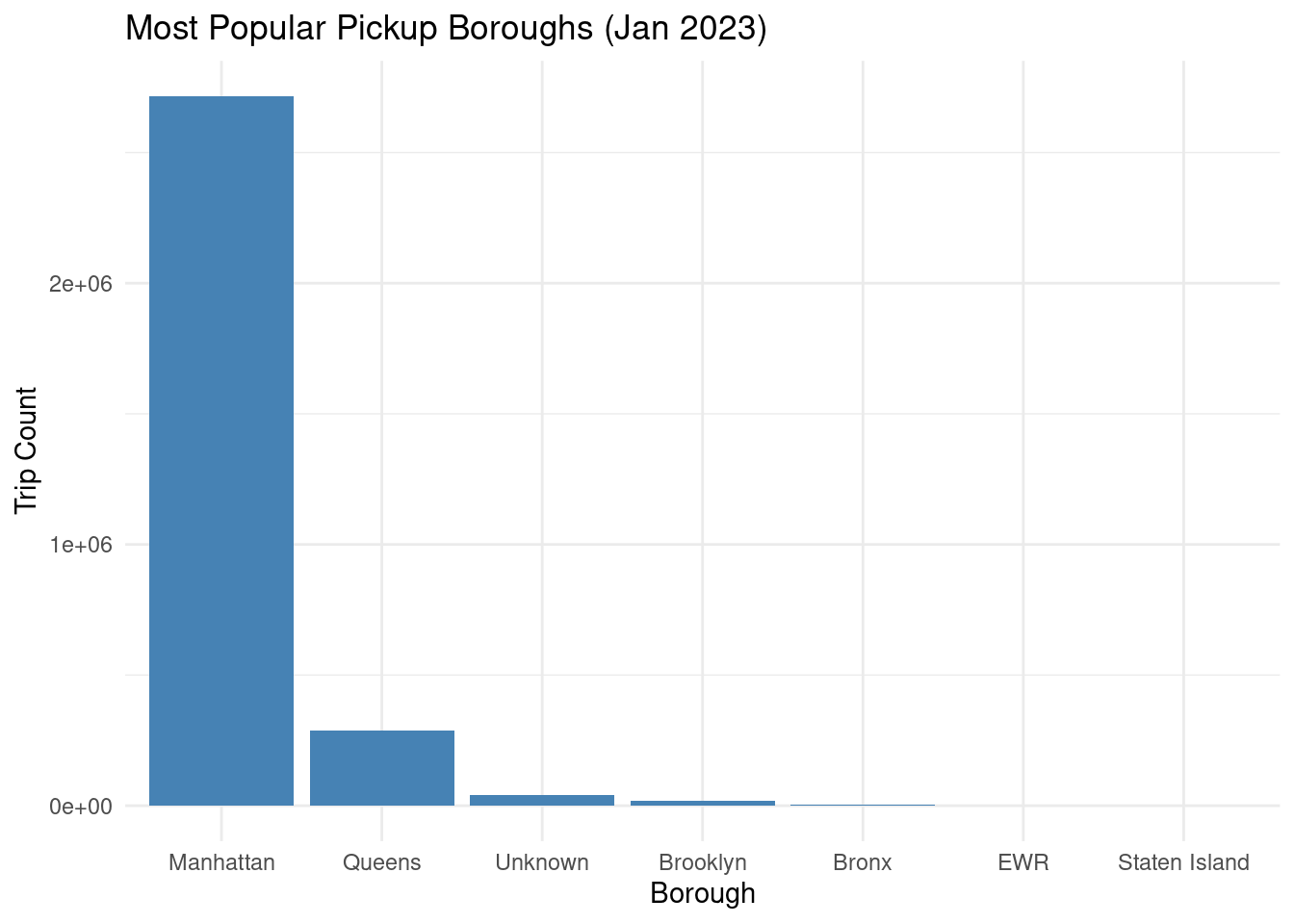
# Select relevant numerical columns and remove NA values
trip_data <- trips %>%
  select(trip_distance, fare_amount, tip_amount) %>%
  na.omit()

# Show first few rows
trip_data %>% head(5) %>% collect()
# A tibble: 5 × 3
trip_distance fare_amount tip_amount
<dbl> <dbl> <dbl>
1 0.97 9.3 0
2 1.1 7.9 4
3 2.51 14.9 15
4 1.9 12.1 0
5 1.43 11.4 3.28# Compute correlations
cor_trip_fare <- ml_corr(trip_data, columns = c("trip_distance", "fare_amount"))[1, 2]
cor_trip_tip <- ml_corr(trip_data, columns = c("trip_distance", "tip_amount"))[1, 2]
cor_fare_tip <- ml_corr(trip_data, columns = c("fare_amount", "tip_amount"))[1, 2]
# Print correlation matrix
cat("Distributed Pearson Correlation Matrix:\n")Distributed Pearson Correlation Matrix:cor_matrix <- matrix(c(1, cor_trip_fare, cor_trip_tip,
cor_trip_fare, 1, cor_fare_tip,
cor_trip_tip, cor_fare_tip, 1),
nrow = 3, byrow = TRUE,
dimnames = list(c("trip_distance", "fare_amount", "tip_amount"),
c("trip_distance", "fare_amount", "tip_amount")))
print(cor_matrix) trip_distance fare_amount tip_amount
trip_distance 1 0.01634001 0.01115849
fare_amount 0.01634001 1 0.5901523
tip_amount 0.01115849 0.5901523 1 Fit a linear regression model to predict fare_amount based on trip_distance:
multi_model <- trip_data %>%
  ml_linear_regression(fare_amount ~ trip_distance + tip_amount, reg_param = 0.01, max_iter = 100)

# Print model summary
summary(multi_model)
Deviance Residuals (approximate):
Min 1Q Median 3Q Max
-796.333 -7.122 -3.665 2.277 1150.854
Coefficients:
(Intercept) trip_distance tip_amount
9.1220008915 0.0006959653 2.7442259253
R-Squared: 0.3484
Root Mean Squared Error: 14.38Fit a linear regression model to predict fare_amount using trip_distance and tip_amount:
multi_model <- trip_data %>%
  ml_linear_regression(fare_amount ~ trip_distance + tip_amount, reg_param = 0.01, max_iter = 100)

# Print model summary
summary(multi_model)
Deviance Residuals (approximate):
Min 1Q Median 3Q Max
-434.970 -7.122 -3.733 2.277 376.736
Coefficients:
(Intercept) trip_distance tip_amount
9.1220008915 0.0006959653 2.7442259253
R-Squared: 0.3484
Root Mean Squared Error: 14.38The tutorial on distributed computing with sparklyr demonstrates how to leverage Apache Spark’s capabilities within R to process and analyze large-scale datasets, using the NYC Yellow Taxi dataset (January 2023, ~3 million rows) as an example. It begins with setting up a Spark connection using spark_connect() and loading data from Parquet and CSV files with spark_read_parquet() and spark_read_csv(). The tutorial emphasizes sparklyr’s integration with dplyr for intuitive data manipulation, such as filtering, grouping, and summarizing, and its support for Spark SQL via DBI::dbGetQuery() for complex queries. Key analyses include calculating trip counts, summary statistics (e.g., average trip distance, fare), joining datasets (trips with zone lookups), and computing trip durations. Advanced tasks cover correlation analysis with ml_corr() and linear regression using ml_linear_regression(). The tutorial also addresses performance optimization (e.g., caching with sdf_persist(), increasing memory allocation) and troubleshooting common issues like connection errors, memory limits, and incorrect function usage.
The sparklyr package provides a powerful and user-friendly interface for distributed computing in R, enabling seamless integration with Apache Spark for big data tasks. By combining dplyr’s familiar syntax with Spark’s scalability, it simplifies large-scale data processing, as demonstrated with the NYC Taxi dataset. The tutorial highlights the importance of proper Spark configuration (e.g., memory settings, Java setup) and efficient workflows (e.g., persisting DataFrames, avoiding large data collection) to handle memory-intensive operations. Despite challenges like connection issues or memory errors, sparklyr’s flexibility and extensive documentation make it an excellent tool for data scientists working with big data in R, offering a robust bridge to Spark’s distributed computing capabilities.
sparklyr Official Documentation
Comprehensive guide for setup, dplyr integration, and MLlib.
sparklyr.ai
“Mastering Spark with R” Book
Tutorials on data processing, memory optimization, and ML with sparklyr.
therinspark.com
Posit Community sparklyr Posts
Practical tutorials and Q&A for data analysis and troubleshooting.
community.rstudio.com/c/sparklyr
DataCamp: Big Data with R and Spark
Interactive course on sparklyr for data manipulation and ML.
datacamp.com/courses/big-data-with-r-and-spark
YouTube: Introduction to sparklyr by Edgar Ruiz
Video demo of sparklyr for data processing and optimization.
Search “sparklyr Edgar Ruiz” on YouTube.