The {snow} package in R, which stands for “Simple Network of Workstations,” is designed for parallel computing, allowing users to distribute computational tasks across multiple processors or computers to speed up processing. It provides a high-level interface for parallelizing R code, particularly for tasks that can be split into independent subtasks, such as simulations, bootstrapping, or large-scale data processing. Below is an introduction to {snow}, how it works, and its key components.
The {snow} package, developed by Luke Tierney and others, enables parallel computing in R by leveraging multiple processors or machines in a cluster. It abstracts much of the complexity of parallel programming, making it accessible for users who need to perform computationally intensive tasks. {snow} supports various parallel backends, including MPI (Message Passing Interface), PVM (Parallel Virtual Machine), and socket-based communication, allowing flexibility depending on the system setup.
The package is particularly useful for:
Embarrassingly parallel problems: Tasks that can be divided into independent subtasks with no need for communication between them (e.g., Monte Carlo simulations, cross-validation).
Cluster computing: Distributing tasks across multiple machines in a network.
Multi-core processing: Utilizing multiple cores on a single machine.
{snow} is lightweight, flexible, and integrates well with R’s functional programming paradigm. It is often used alongside other parallel computing packages like {parallel} or {foreach} for specific use cases.
How {snow} Works
{snow} operates by creating a cluster of worker processes (or nodes) that execute tasks in parallel. The main steps in using {snow} are:
Cluster Setup:
Initialize a cluster using a chosen communication backend (e.g., MPI, sockets, or PVM).
Specify the number of nodes (workers) and their configuration (e.g., local cores or remote machines).
Common functions: makeCluster() to create the cluster, specifying the type (e.g., “MPI”, “SOCK”, “PVM”) and number of nodes.
Task Distribution:
Divide the computational task into smaller, independent subtasks.
Use {snow} functions like clusterApply(), clusterApplyLB(), or parLapply() to distribute these tasks across the cluster’s nodes.
Each node processes its assigned task independently, and results are collected back to the master process.
Communication:
{snow} handles communication between the master (the main R session) and worker nodes using the chosen backend.
Workers execute R functions or scripts sent by the master, and results are returned via the communication protocol (e.g., sockets or MPI).
Cluster Termination:
Once tasks are complete, the cluster is shut down using stopCluster() to free resources.
Key Functions in {snow}
Here are the core functions in {snow} and their purposes:
makeCluster(spec, type, ...): Creates a cluster of workers. spec specifies the number of nodes or machine names, and type defines the backend (e.g., “SOCK” for sockets, “MPI” for MPI).
clusterApply(cl, x, fun, ...): Applies a function fun to each element of x across the cluster cl. Each worker processes a subset of x.
clusterApplyLB(cl, x, fun, ...): Similar to clusterApply, but with load balancing, dynamically assigning tasks to workers as they become available.
parLapply(cl, x, fun, ...): A parallel version of lapply, distributing tasks across the cluster.
clusterExport(cl, list): Exports variables or functions from the master’s environment to the workers’ environments.
clusterEvalQ(cl, expr): Evaluates an expression on each worker, useful for initializing worker environments (e.g., loading packages).
stopCluster(cl): Shuts down the cluster, freeing resources.
Example Workflow
Here’s a simple example of using {snow} for parallel computation with a socket-based cluster:
Code
# Load the snow packagelibrary(snow)# Create a cluster with 4 workers (using sockets)cl <-makeCluster(4, type ="SOCK")# Export a variable to all workersmy_data <-1:10clusterExport(cl, "my_data")# Define a function to compute squaressquare <-function(x) x^2# Apply the function in parallelresult <-parLapply(cl, my_data, square)# Stop the clusterstopCluster(cl)# View resultsprint(unlist(result))
[1] 1 4 9 16 25 36 49 64 81 100
Output (assuming no errors):
[1] 1 4 9 16 25 36 49 64 81 100
In this example:
A cluster of 4 workers is created using sockets.
The my_data vector is exported to all workers.
The square function is applied to each element of my_data in parallel using parLapply.
Results are collected and returned as a list, which is unlisted for display.
How It Works Internally
Master-Worker Model: The master R session coordinates tasks, while workers (separate R processes) execute them. The master sends tasks and collects results.
Communication Backend:
SOCK: Uses TCP/IP sockets for communication, suitable for local or networked machines.
MPI: Uses the MPI standard (via {Rmpi} package) for high-performance clusters.
PVM: Uses the Parallel Virtual Machine system (less common today).
Load Balancing: Functions like clusterApplyLB ensure efficient task distribution by assigning new tasks to workers as they complete their current ones.
Serialization: R objects (data, functions) are serialized and sent to workers, which deserialize and process them. Results are serialized and sent back to the master.
Advantages of {snow}
Simplicity: Provides a high-level interface, hiding much of the complexity of parallel programming.
Flexibility: Supports multiple backends, making it adaptable to different hardware setups (local multi-core machines or distributed clusters).
Scalability: Works for both small-scale (e.g., multi-core laptops) and large-scale (e.g., HPC clusters) computations.
Integration: Works seamlessly with R’s functional programming style and other packages like {foreach}.
Limitations
Overhead: Setting up a cluster and communicating data introduces overhead, which may outweigh benefits for small tasks.
Dependencies: Some backends (e.g., MPI) require additional software installation and configuration (e.g., {Rmpi}).
Memory: Each worker loads a copy of the data and R environment, which can be memory-intensive.
Not for Interdependent Tasks: {snow} is best for embarrassingly parallel tasks; tasks requiring frequent communication between workers are better suited for other frameworks (e.g., MPI directly).
Practical Considerations
Choosing a Backend: Use “SOCK” for simplicity on local machines or small networks. Use “MPI” for high-performance clusters if {Rmpi} is installed.
Environment Setup: Ensure all necessary packages and objects are exported to workers using clusterExport or clusterEvalQ.
Task Granularity: Break tasks into appropriately sized chunks to balance computation time and communication overhead.
Error Handling: Use try-catch mechanisms in functions to handle errors on workers, as they run independently.
Parallel Data Processing and Basic Statistics with {snow}
This tutorial demonstrates how to use the {snow} package in R for parallel computing, applied to data processing and basic statistical analyses on a large dataset: the NYC Yellow Taxi trip records for January 2023 (yellow_tripdata_2023-01.parquet). The dataset contains approximately 3 million rows of taxi trip data, including variables like pickup/dropoff times, distances, fares, and more. We’ll cover parallel data loading/processing, descriptive statistics, correlation, and simple/multiple linear regression.
{snow} enables distributing tasks across multiple cores or machines, which is ideal for large datasets to reduce computation time. We’ll focus on “embarrassingly parallel” tasks, such as processing data chunks independently and combining results.
Load the data using {arrow} for memory efficiency. Convert to a data.frame for easier manipulation (note: this collects the data into memory).
Code
# Read the Parquet filedataFolder<-"/home/zia207/WebSites/R_Website/High_Performance_Computing_R/R_Markdown/Data/"# Load January 2023 datadf <-read_parquet(paste0(dataFolder, "yellow_tripdata_2023-01.parquet"))# Basic explorationdim(df) # Dimensions: ~3,066,766 rows, 19 columns
[1] 3066766 19
The dataset is large, so sequential processing can be slow for intensive tasks. We’ll use {snow} to parallelize.
Setting Up the {snow} Cluster
Create a cluster using available cores (e.g., 4 workers). Use the “SOCK” type for local multi-core processing.
Always stop the cluster when done to free resources:
Code
# At the end of your script/sessionstopCluster(cl)
Parallel Data Processing: Cleaning and Feature Engineering
For large data, split into chunks, process each in parallel (e.g., add features, filter invalid rows), and recombine.
First, split the data into a list of chunks (e.g., 4 chunks for 4 workers).
Code
# Split data into chunksn_chunks <- n_coreschunk_indices <-rep(1:n_chunks, each =ceiling(nrow(df) / n_chunks), length.out =nrow(df))df_chunks <-split(df, chunk_indices)
Define a processing function (e.g., compute trip duration in minutes, filter invalid trips: positive distance, fare, duration > 0, reasonable passenger count).
Code
# Processing function for each chunkprocess_chunk <-function(chunk) {# Compute trip duration (in minutes) chunk$trip_duration <-as.numeric(difftime(chunk$tpep_dropoff_datetime, chunk$tpep_pickup_datetime, units ="mins"))# Filter invalid rows chunk <- chunk[chunk$trip_distance >0& chunk$fare_amount >0& chunk$trip_duration >0& chunk$passenger_count >=1& chunk$passenger_count <=6, ] # Reasonable passenger rangereturn(chunk)}
Apply in parallel and recombine:
This parallelizes the cleaning, speeding up for large datasets.
Code
# At the end of your script/session# Safely stop the clusterif (!is.null(cl)) {tryCatch({stopCluster(cl) }, error =function(e) {cat("Error stopping cluster:", conditionMessage(e), "\n") }) cl <-NULL}
Parallel Descriptive Statistics
For descriptive stats (mean, median, sd, min, max), compute on chunks and aggregate.
Focus on numeric variables: trip_distance, fare_amount, tip_amount, trip_duration.
Define functions to compute local stats per chunk, then combine.
Code
# Create cluster with error handlingn_cores <- parallel::detectCores() -1cl <-NULLtryCatch({ cl <-makeCluster(n_cores, type ="SOCK")}, error =function(e) {cat("Error creating cluster:", conditionMessage(e), "\n")stop("Cluster creation failed.")})# Load required libraries on workersclusterEvalQ(cl, {library(arrow)library(matrixStats)})
# Create cluster with error handlingn_cores <- parallel::detectCores() -1cl <-NULLtryCatch({ cl <-makeCluster(n_cores, type ="SOCK")}, error =function(e) {cat("Error creating cluster:", conditionMessage(e), "\n")stop("Cluster creation failed.")})# Ensure data is cleanvars <-c("trip_distance", "fare_amount", "passenger_count", "trip_duration")reg_df <- df_processed[, vars, drop =FALSE]reg_df <- reg_df[complete.cases(reg_df) &apply(reg_df, 1, function(x) all(is.finite(x))), ]# Function to fit model on a chunk and return coefficients and sample sizefit_model <-function(data, formula) {if (nrow(data) <2) {return(list(coefficients =NULL, n =0)) } model <-lm(formula, data = data)list(coefficients =coef(model), n =nrow(data))}# Split data into chunksn_chunks <- n_coreschunks <-split(reg_df, rep(1:n_chunks, each =ceiling(nrow(reg_df) / n_chunks), length.out =nrow(reg_df)))
Simple Linear Regression (SLR)
Code
# --- OLS: fare_amount ~ trip_distance ---# Define formula explicitlyols_formula <- fare_amount ~ trip_distance# Export and fit OLS in parallelclusterExport(cl, c("fit_model", "reg_df", "ols_formula"))ols_results <-parLapply(cl, chunks, function(chunk) fit_model(chunk, ols_formula))# Combine OLS results (weighted by sample size)ols_n <-sapply(ols_results, function(x) x$n)total_n <-sum(ols_n)if (total_n <2) stop("Not enough valid observations to fit model.")ols_coefs <-Reduce("+", lapply(ols_results, function(x) if (is.null(x$coefficients)) rep(0, 2) else x$coefficients * x$n)) / total_n# Display OLS resultscat("OLS Coefficients (Parallel):\n")
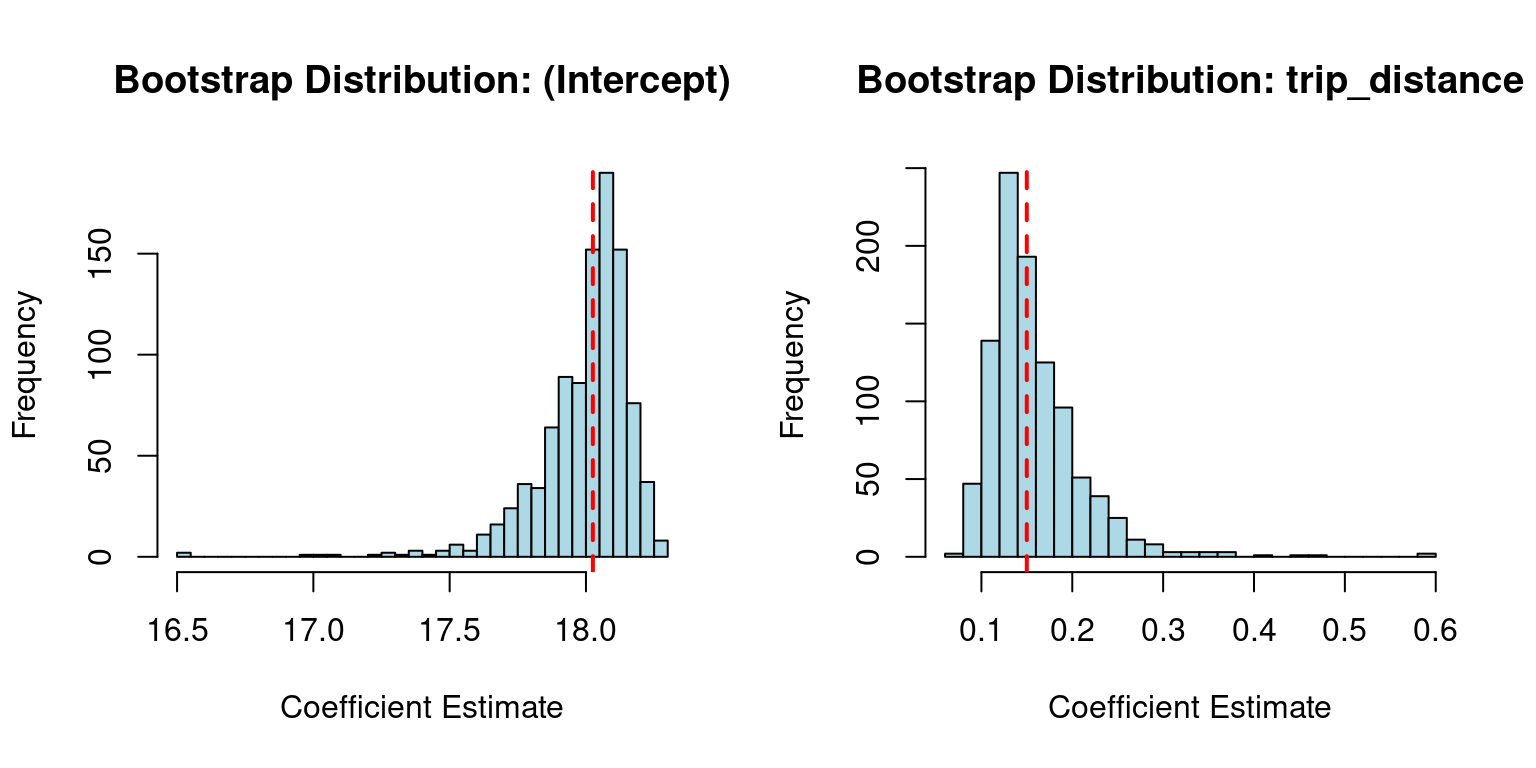
# Convert boot_coefs_ols to a data frame for easier plottingols_boot_df <-as.data.frame(boot_coefs_ols)colnames(ols_boot_df) <-c("(Intercept)", "trip_distance")# Sequential OLS fit for referenceols_seq_coefs <-coef(ols_model)# Base R: Histograms for OLS coefficientspar(mfrow =c(1, 2)) # Set up a 1x2 plot gridfor (coef_name incolnames(ols_boot_df)) {hist(ols_boot_df[[coef_name]], main =paste("Bootstrap Distribution:", coef_name),xlab ="Coefficient Estimate", col ="lightblue", breaks =30)abline(v = ols_seq_coefs[coef_name], col ="red", lwd =2, lty =2) # Sequential estimate}
Code
par(mfrow =c(1, 1)) # Reset plot grid
Multiple Linear Regression (MLR)
Code
# --- MLR: fare_amount ~ trip_distance + passenger_count + trip_duration ---# Sequential fit for referencemlr_model <-lm(fare_amount ~ trip_distance + passenger_count + trip_duration, data = reg_df)cat("\nMLR Coefficients:\n")
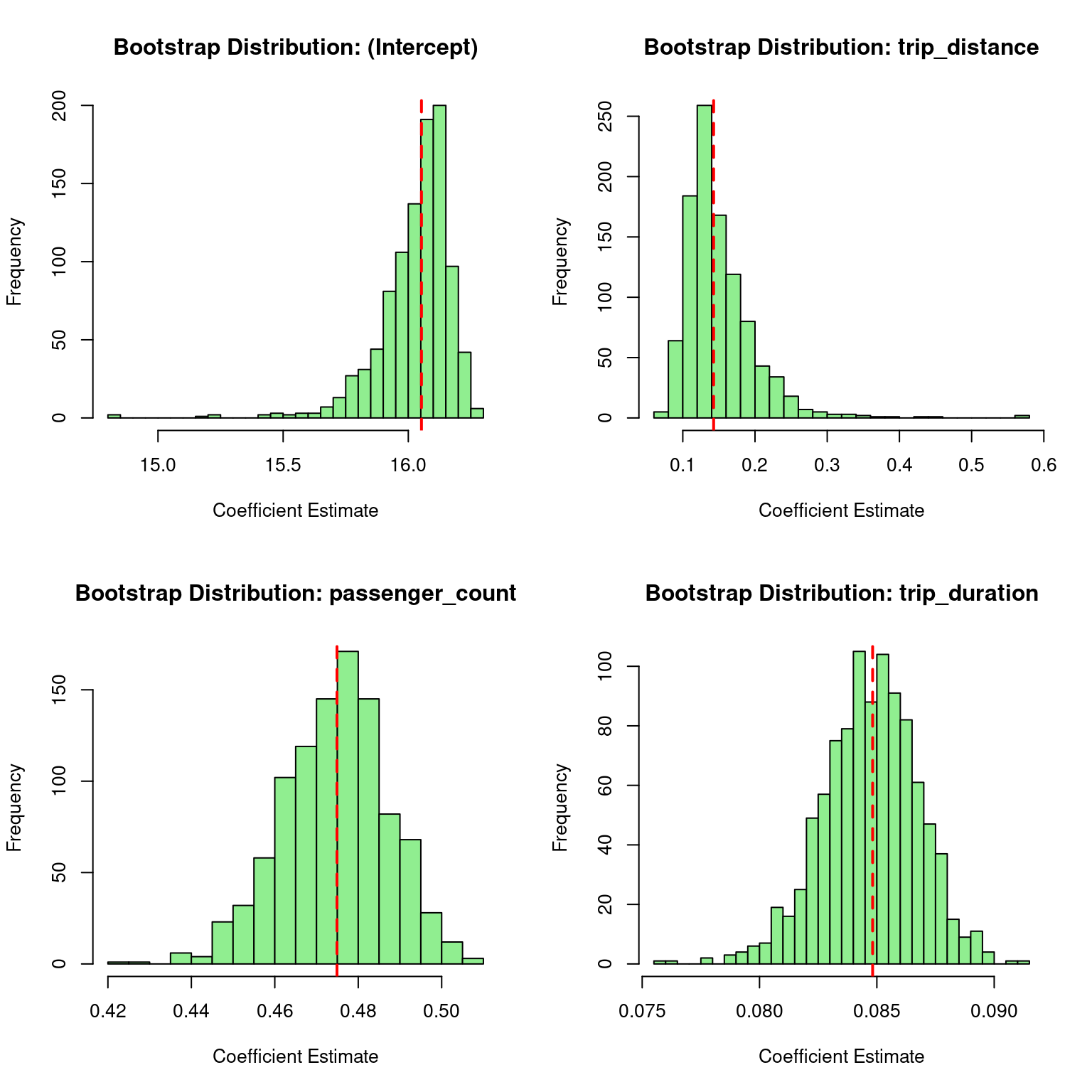
# Convert boot_coefs_mlr to a data framemlr_boot_df <-as.data.frame(boot_coefs_mlr)colnames(mlr_boot_df) <-c("(Intercept)", "trip_distance", "passenger_count", "trip_duration")# Sequential MLR fit for referencemlr_seq_coefs <-coef(mlr_model)# Base R: Histograms for MLR coefficientspar(mfrow =c(2, 2)) # Set up a 2x2 plot gridfor (coef_name incolnames(mlr_boot_df)) {hist(mlr_boot_df[[coef_name]], main =paste("Bootstrap Distribution:", coef_name),xlab ="Coefficient Estimate", col ="lightgreen", breaks =30)abline(v = mlr_seq_coefs[coef_name], col ="red", lwd =2, lty =2) # Sequential estimate}
Code
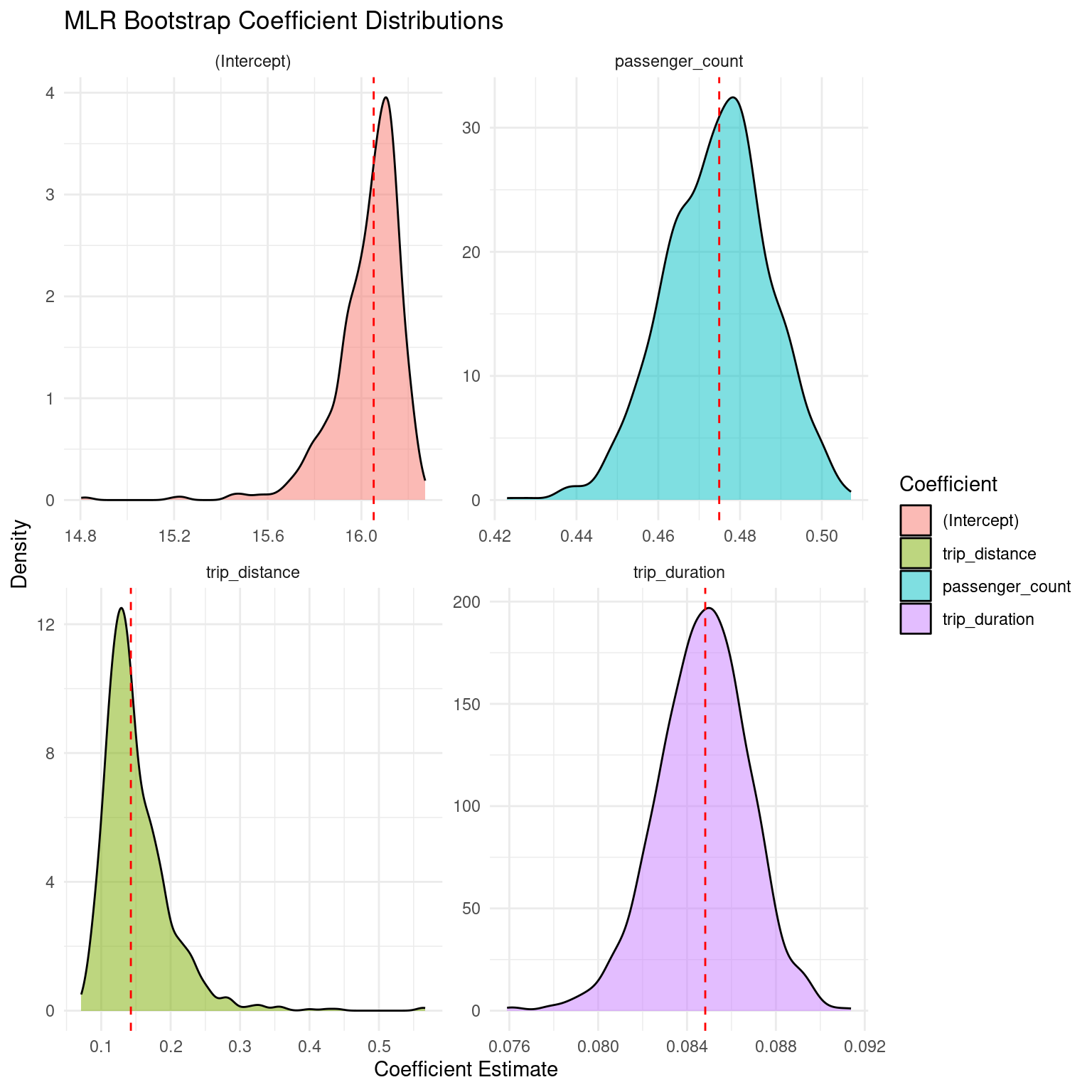
par(mfrow =c(1, 1)) # Reset plot grid# ggplot2: Density plots for MLR coefficients (optional)mlr_boot_long <- reshape2::melt(mlr_boot_df, variable.name ="Coefficient", value.name ="Estimate")ggplot(mlr_boot_long, aes(x = Estimate, fill = Coefficient)) +geom_density(alpha =0.5) +geom_vline(data =data.frame(Coefficient =names(mlr_seq_coefs), Estimate = mlr_seq_coefs),aes(xintercept = Estimate), color ="red", linetype ="dashed") +facet_wrap(~ Coefficient, scales ="free") +theme_minimal() +labs(title ="MLR Bootstrap Coefficient Distributions", x ="Coefficient Estimate", y ="Density")
Monitor memory: For very large data, use smaller chunks or sample first.
Compare timings: Use system.time() for sequential vs. parallel to see speedups.
Error handling: Wrap functions in tryCatch for robustness.
Summary and Conclusion
The {snow} package is a powerful tool for parallel computing in R, making it easier to speed up computations by distributing tasks across multiple cores or machines. Its simplicity and flexibility make it ideal for embarrassingly parallel problems, though users must consider overhead and setup requirements for optimal use. By leveraging functions like parLapply and clusterApply, users can significantly reduce computation time for large-scale analyses. This tutorial demonstrated how to set up a {snow} cluster, process large datasets in parallel, and perform statistical analyses efficiently. Always remember to stop the cluster after use to free up resources.