Big Data Processing with DuckDB in R

DuckDB is an open-source, high-performance, in-process analytical database management system designed for data analytics. It’s optimized for columnar data storage and query execution, making it ideal for analytical workloads like those in data science, machine learning, and business intelligence. Unlike traditional databases that run as separate server processes, DuckDB operates within the same process as the application, eliminating the need for a dedicated server and enabling fast, lightweight data processing. It supports SQL queries and integrates seamlessly with various programming languages, including R, Python, and Julia.

Key features of DuckDB:

  • In-process: Runs embedded within the host application, reducing overhead.
  • Columnar storage: Optimized for analytical queries with efficient columnar data processing.
  • SQL support: Uses standard SQL for querying, with extensions for advanced analytics.
  • High performance: Leverages modern hardware (e.g., multi-core CPUs, vectorized query execution).
  • Lightweight: No external dependencies, easy to install and use.
  • Cross-platform: Works on Windows, macOS, Linux, and more.
  • Integration: Supports reading/writing from various formats like CSV, Parquet, and JSON.

DuckDB is particularly useful for scenarios where you need to analyze large datasets quickly without setting up a full-fledged database server, such as exploratory data analysis or prototyping.

## How DuckDB Works in R

DuckDB integrates with R through the duckdb R package, which provides an interface to connect to a DuckDB database, execute SQL queries, and work with data in R. This tutorial introduces the DuckBD package in R for handling large datasets that exceed RAM, using the NYC taxi dataset (yellow_tripdata_2023.csv) as an example. disk.frame stores data on disk in chunks, allowing efficient processing with familiar dplyr or data.table syntax.

Installtion

To use DuckDB in R, you need to install the {duckdb} package. You can install it from CRAN or GitHub (for the latest development version).

# Install from CRAN
install.packages("duckdb")

# Or install the development version from GitHub
# devtools::install_github("duckdb/duckdb-r")

Ensure you have a compatible R version (typically R 4.0 or later). The package includes the DuckDB engine, so no separate installation of DuckDB is required.

Connecting to DuckDB

DuckDB can operate in two modes in R:

  • In-memory: Data is stored in memory (default).
  • Persistent: Data is stored on disk for persistence across sessions.

To connect to a DuckDB database, use the duckdb() function to create a connection. You can specify a file path for a persistent database or leave it blank for an in-memory database

library(duckdb)

# Create an in-memory database
con <- dbConnect(duckdb::duckdb())

# Create a persistent database (stored in a file)
con <- dbConnect(duckdb::duckdb(), dbdir = "my_duckdb.db")
```r

### Working with Data

DuckDB in R allows you to:

- Execute SQL queries directly.
- Register R data frames as virtual tables.
- Read/write data from various sources (e.g., `CSV`, `Parquet`)

### Executing SQL Queries

You can run SQL queries using `dbGetQuery()` or `dbExecute()` from the `DBI` package, which `duckdb` supports.

```r
# Example: Create a table and insert data
dbExecute(con, "CREATE TABLE example (id INTEGER, name VARCHAR);")
dbExecute(con, "INSERT INTO example VALUES (1, 'Alice'), (2, 'Bob');")

# Query the table
result <- dbGetQuery(con, "SELECT * FROM example")
print(result)
#   id  name
# 1  1 Alice
# 2  2   Bob

Registering R Data Frames

You can register an R data frame as a virtual table in DuckDB using duckdb_register(). This allows you to query the data frame using SQL without copying it into the database.

# Create an R data frame
df <- data.frame(id = 1:3, name = c("Alice", "Bob", "Charlie"))

# Register the data frame as a table
duckdb_register(con, "mytable", df)

# Query the registered table
result <- dbGetQuery(con, "SELECT * FROM mytable WHERE id > 1")
print(result)
#   id  name
# 1  2   Bob
# 2  3 Charlie

Reading/Writing External Files

DuckDB supports direct reading and writing of files like CSV and Parquet. You can query these files as if they were tables.

# Write a data frame to a CSV file
write.csv(df, "data.csv", row.names = FALSE)

# Query the CSV file directly
result <- dbGetQuery(con, "SELECT * FROM 'data.csv' WHERE id > 1")
print(result)

# Export query results to a Parquet file
dbExecute(con, "COPY (SELECT * FROM mytable) TO 'output.parquet' (FORMAT PARQUET);")

Key Features in R

Integration with dplyr: DuckDB works with the dplyr package, allowing you to use familiar dplyr syntax for data manipulation. The dbplyr package translates dplyr operations into SQL queries for DuckDB.

Integration with duckplyr: The duckplyr package is a drop-in replacement for dplyr that uses DuckDB as its backend to execute data manipulation operations

Performance: DuckDB’s vectorized query engine ensures fast execution, even for large datasets. It leverages R’s memory efficiently and supports parallel query execution.

Memory Management: For in-memory databases, data is stored in RAM. For large datasets, use a persistent database or query external files directly to manage memory usage.

Closing the Connection

dbDisconnect(con, shutdown = TRUE)

Example Workflow

Code
library(duckdb)
Loading required package: DBI
Code
library(dplyr)

Attaching package: 'dplyr'
The following objects are masked from 'package:stats':

    filter, lag
The following objects are masked from 'package:base':

    intersect, setdiff, setequal, union
Code
# Connect to an in-memory database
con <- dbConnect(duckdb::duckdb())

# Create and register a data frame
df <- data.frame(
  id = 1:5,
  value = c(10, 20, 30, 40, 50),
  category = c("A", "B", "A", "B", "A")
)
duckdb_register(con, "data", df)

# Run a SQL query
result <- dbGetQuery(con, "
  SELECT category, AVG(value) as avg_value
  FROM data
  GROUP BY category
")

# Use dplyr for the same query
tbl(con, "data") %>%
  group_by(category) %>%
  summarise(avg_value = mean(value)) %>%
  collect()
Warning: Missing values are always removed in SQL aggregation functions.
Use `na.rm = TRUE` to silence this warning
This warning is displayed once every 8 hours.
# A tibble: 2 × 2
  category avg_value
  <chr>        <dbl>
1 A               30
2 B               30
Code
# Export to Parquet
dbExecute(con, "COPY (SELECT * FROM data) TO 'data.parquet' (FORMAT PARQUET);")
[1] 5
Code
# Disconnect
dbDisconnect(con, shutdown = TRUE)

Advantages in R

  • Speed: DuckDB is faster than many R-native data processing methods for large datasets due to its columnar storage and query optimization.

  • Flexibility: Combines SQL’s power with R’s data manipulation ecosystem (dplyr, tidyr, etc.).

  • Scalability: Handles large datasets by querying files directly or using persistent storage.

  • Ease of Use: No need to set up a database server, making it ideal for quick analyses.

Limitations

In-memory Size: For in-memory databases, data size is limited by available RAM. Use persistent databases or file-based queries for larger datasets.

Learning Curve: Requires familiarity with SQL for advanced queries, though dplyr integration mitigates this.

Analytics Focus: DuckDB is optimized for analytical (OLAP) workloads, not transactional (OLTP) tasks like frequent inserts/updates.

Large Data Processing with DuckDB in R

This tutorial introduces the DuckBD package in R for handling large datasets that exceed RAM, using the NYC taxi dataset (yellow_tripdata_2023.csv) as an example. disk.frame stores data on disk in chunks, allowing efficient processing with familiar dplyr or data.table syntax. We’ll start from the basics (simple queries) and progress to advanced topics (complex SQL, joins, aggregations, and performance optimization).

Check and Install Required R Packages

Code
packages <- c(
          'tidyverse',
          'data.table',
          'arrow',
          'duckdb',
          'duckplyr',
          'future',
          'arrow'
          
) 
#| warning: false
#| error: false

# Install missing packages
new_packages <- packages[!(packages %in% installed.packages()[,"Package"])]
if(length(new_packages)) install.packages(new_packages)

Verify Installation

Code
# Verify installation
cat("Installed packages:\n")
Installed packages:
Code
print(sapply(packages, requireNamespace, quietly = TRUE))
The duckplyr package is configured to fall back to dplyr when it encounters an
incompatibility. Fallback events can be collected and uploaded for analysis to
guide future development. By default, data will be collected but no data will
be uploaded.
ℹ Automatic fallback uploading is not controlled and therefore disabled, see
  `?duckplyr::fallback()`.
✔ Number of reports ready for upload: 5.
→ Review with `duckplyr::fallback_review()`, upload with
  `duckplyr::fallback_upload()`.
ℹ Configure automatic uploading with `duckplyr::fallback_config()`.
 tidyverse data.table      arrow     duckdb   duckplyr     future      arrow 
      TRUE       TRUE       TRUE       TRUE       TRUE       TRUE       TRUE 

Load Packages

Code
# Load packages with suppressed messages
invisible(lapply(packages, function(pkg) {
  suppressPackageStartupMessages(library(pkg, character.only = TRUE))
}))

Check Loaded Packages

Code
# Check loaded packages
cat("Successfully loaded packages:\n")
Successfully loaded packages:
Code
print(search()[grepl("package:", search())])
 [1] "package:future"     "package:duckplyr"   "package:arrow"     
 [4] "package:data.table" "package:lubridate"  "package:forcats"   
 [7] "package:stringr"    "package:purrr"      "package:readr"     
[10] "package:tidyr"      "package:tibble"     "package:ggplot2"   
[13] "package:tidyverse"  "package:dplyr"      "package:duckdb"    
[16] "package:DBI"        "package:stats"      "package:graphics"  
[19] "package:grDevices"  "package:utils"      "package:datasets"  
[22] "package:methods"    "package:base"      

Data

This tutorial introduces DuckDB in R, using the NYC Yellow Taxi Trip Data for 2023 as an example dataset. DuckDB is an efficient, in-process analytical database that’s perfect for handling large datasets like this one (which contains millions of rows for taxi trips). We’ll start from the basics (installation and simple queries) and progress to advanced topics (complex SQL, joins, aggregations, and performance optimization).

The dataset is in Parquet format, which DuckDB can query directly without loading into memory. For reproducibility: - Download the January 2023 data from: https://d37ci07v2hxiua.cloudfront.net/trip-data/yellow_tripdata_2023-01.parquet (about 47 MB, ~3 million rows). - We saved it to a local folder, e.g., /home/zia207/Dropbox/WebSites/R_Website/Quarto_Projects/R_Beginner/Data/yellow_tripdata_2023-01.parquet. - We’ll also use the Taxi Zone Lookup CSV for joins: Download from https://s3.amazonaws.com/nyc-tlc/misc/taxi+_zone_lookup.csv.

The dataset includes columns like VendorID, tpep_pickup_datetime, tpep_dropoff_datetime, passenger_count, trip_distance, PULocationID, DOLocationID, fare_amount, total_amount, etc.

Code
dataFolder <- "/home/zia207/WebSites/R_Website/High_Performance_Computing_R/R_Markdown/Data/"
parquet_file <- paste0(dataFolder, "yellow_tripdata_2023-01.parquet")
# Create an Arrow Dataset
ds <- open_dataset(parquet_file)

Level 1: Basics

Connect to DuckDB

Create an in-memory connection (fast for analysis; use dbdir for persistent storage if needed).

Code
con <- dbConnect(duckdb::duckdb())

Register the Arrow Dataset in DuckDB

To query the arrow dataset (ds) with DuckDB, register it as a table/view using duckdb_register_arrow().

Code
# Register the arrow dataset as a DuckDB table
duckdb_register_arrow(con, "taxi_data", ds)

Query the Parquet File Directly

DuckDB can treat the Parquet file as a table without loading it fully. Use SQL to preview data.

Code
preview <- dbGetQuery(con, "SELECT * FROM taxi_data LIMIT 10")
print(preview)
   VendorID tpep_pickup_datetime tpep_dropoff_datetime passenger_count
1         2  2023-01-01 00:32:10   2023-01-01 00:40:36               1
2         2  2023-01-01 00:55:08   2023-01-01 01:01:27               1
3         2  2023-01-01 00:25:04   2023-01-01 00:37:49               1
4         1  2023-01-01 00:03:48   2023-01-01 00:13:25               0
5         2  2023-01-01 00:10:29   2023-01-01 00:21:19               1
6         2  2023-01-01 00:50:34   2023-01-01 01:02:52               1
7         2  2023-01-01 00:09:22   2023-01-01 00:19:49               1
8         2  2023-01-01 00:27:12   2023-01-01 00:49:56               1
9         2  2023-01-01 00:21:44   2023-01-01 00:36:40               1
10        2  2023-01-01 00:39:42   2023-01-01 00:50:36               1
   trip_distance RatecodeID store_and_fwd_flag PULocationID DOLocationID
1           0.97          1                  N          161          141
2           1.10          1                  N           43          237
3           2.51          1                  N           48          238
4           1.90          1                  N          138            7
5           1.43          1                  N          107           79
6           1.84          1                  N          161          137
7           1.66          1                  N          239          143
8          11.70          1                  N          142          200
9           2.95          1                  N          164          236
10          3.01          1                  N          141          107
   payment_type fare_amount extra mta_tax tip_amount tolls_amount
1             2         9.3  1.00     0.5       0.00            0
2             1         7.9  1.00     0.5       4.00            0
3             1        14.9  1.00     0.5      15.00            0
4             1        12.1  7.25     0.5       0.00            0
5             1        11.4  1.00     0.5       3.28            0
6             1        12.8  1.00     0.5      10.00            0
7             1        12.1  1.00     0.5       3.42            0
8             1        45.7  1.00     0.5      10.74            3
9             1        17.7  1.00     0.5       5.68            0
10            2        14.9  1.00     0.5       0.00            0
   improvement_surcharge total_amount congestion_surcharge airport_fee
1                      1        14.30                  2.5        0.00
2                      1        16.90                  2.5        0.00
3                      1        34.90                  2.5        0.00
4                      1        20.85                  0.0        1.25
5                      1        19.68                  2.5        0.00
6                      1        27.80                  2.5        0.00
7                      1        20.52                  2.5        0.00
8                      1        64.44                  2.5        0.00
9                      1        28.38                  2.5        0.00
10                     1        19.90                  2.5        0.00
Code
# Get column names and types (schema)
schema <- dbGetQuery(con, "DESCRIBE taxi_data")
print(schema)
             column_name column_type null  key default extra
1               VendorID      BIGINT  YES <NA>    <NA>  <NA>
2   tpep_pickup_datetime   TIMESTAMP  YES <NA>    <NA>  <NA>
3  tpep_dropoff_datetime   TIMESTAMP  YES <NA>    <NA>  <NA>
4        passenger_count      DOUBLE  YES <NA>    <NA>  <NA>
5          trip_distance      DOUBLE  YES <NA>    <NA>  <NA>
6             RatecodeID      DOUBLE  YES <NA>    <NA>  <NA>
7     store_and_fwd_flag     VARCHAR  YES <NA>    <NA>  <NA>
8           PULocationID      BIGINT  YES <NA>    <NA>  <NA>
9           DOLocationID      BIGINT  YES <NA>    <NA>  <NA>
10          payment_type      BIGINT  YES <NA>    <NA>  <NA>
11           fare_amount      DOUBLE  YES <NA>    <NA>  <NA>
12                 extra      DOUBLE  YES <NA>    <NA>  <NA>
13               mta_tax      DOUBLE  YES <NA>    <NA>  <NA>
14            tip_amount      DOUBLE  YES <NA>    <NA>  <NA>
15          tolls_amount      DOUBLE  YES <NA>    <NA>  <NA>
16 improvement_surcharge      DOUBLE  YES <NA>    <NA>  <NA>
17          total_amount      DOUBLE  YES <NA>    <NA>  <NA>
18  congestion_surcharge      DOUBLE  YES <NA>    <NA>  <NA>
19           airport_fee      DOUBLE  YES <NA>    <NA>  <NA>

Basic Filtering

Filter trips with more than 1 passenger.

Code
filtered <- dbGetQuery(con, "SELECT * FROM taxi_data WHERE passenger_count > 1 LIMIT 10")
print(filtered)
   VendorID tpep_pickup_datetime tpep_dropoff_datetime passenger_count
1         1  2023-01-01 00:43:37   2023-01-01 01:17:18               4
2         2  2023-01-01 00:09:29   2023-01-01 00:29:23               2
3         1  2023-01-01 00:03:36   2023-01-01 00:09:36               3
4         1  2023-01-01 00:15:23   2023-01-01 00:29:41               2
5         1  2023-01-01 00:21:49   2023-01-01 00:29:15               4
6         1  2023-01-01 00:52:06   2023-01-01 01:02:18               2
7         1  2023-01-01 00:22:24   2023-01-01 00:35:11               2
8         1  2023-01-01 00:31:30   2023-01-01 00:46:51               2
9         2  2023-01-01 00:27:16   2023-01-01 00:59:51               4
10        2  2023-01-01 00:39:14   2023-01-01 00:47:26               2
   trip_distance RatecodeID store_and_fwd_flag PULocationID DOLocationID
1           7.30          1                  N           79          264
2          11.43          1                  N          138           33
3           1.20          1                  N          237          239
4           2.50          1                  N          143          229
5           0.80          1                  N          163          161
6           1.70          1                  N          161          164
7           2.30          1                  N           43          262
8           4.10          1                  N          170           75
9           2.02          1                  N          163          186
10          2.41          1                  N          233          263
   payment_type fare_amount extra mta_tax tip_amount tolls_amount
1             1        33.8   3.5     0.5       7.75            0
2             1        44.3   6.0     0.5      13.26            0
3             2         8.6   3.5     0.5       0.00            0
4             2        15.6   3.5     0.5       0.00            0
5             4         8.6   3.5     0.5       0.00            0
6             4        11.4   3.5     0.5       0.00            0
7             1        13.5   3.5     0.5       3.70            0
8             2        19.1   3.5     0.5       0.00            0
9             2        26.1   1.0     0.5       0.00            0
10            1        12.1   1.0     0.5       3.42            0
   improvement_surcharge total_amount congestion_surcharge airport_fee
1                      1        46.55                  2.5        0.00
2                      1        66.31                  0.0        1.25
3                      1        13.60                  2.5        0.00
4                      1        20.60                  2.5        0.00
5                      1        13.60                  2.5        0.00
6                      1        16.40                  2.5        0.00
7                      1        22.20                  2.5        0.00
8                      1        24.10                  2.5        0.00
9                      1        31.10                  2.5        0.00
10                     1        20.52                  2.5        0.00

Disconnect

Always clean up.

Code
dbDisconnect(con, shutdown = TRUE)

Level 2: Intermediate - Registering Data, dplyr Integration, and Aggregations

Reconnect and Register the Dataset

Register the Parquet file as a virtual table for easier querying.

Code
con <- dbConnect(duckdb::duckdb())
duckdb_register_arrow(con, "taxi_data", ds)
# Register as a table
preview <- dbGetQuery(con, "SELECT * FROM taxi_data LIMIT 10")
print(preview)
   VendorID tpep_pickup_datetime tpep_dropoff_datetime passenger_count
1         2  2023-01-01 00:32:10   2023-01-01 00:40:36               1
2         2  2023-01-01 00:55:08   2023-01-01 01:01:27               1
3         2  2023-01-01 00:25:04   2023-01-01 00:37:49               1
4         1  2023-01-01 00:03:48   2023-01-01 00:13:25               0
5         2  2023-01-01 00:10:29   2023-01-01 00:21:19               1
6         2  2023-01-01 00:50:34   2023-01-01 01:02:52               1
7         2  2023-01-01 00:09:22   2023-01-01 00:19:49               1
8         2  2023-01-01 00:27:12   2023-01-01 00:49:56               1
9         2  2023-01-01 00:21:44   2023-01-01 00:36:40               1
10        2  2023-01-01 00:39:42   2023-01-01 00:50:36               1
   trip_distance RatecodeID store_and_fwd_flag PULocationID DOLocationID
1           0.97          1                  N          161          141
2           1.10          1                  N           43          237
3           2.51          1                  N           48          238
4           1.90          1                  N          138            7
5           1.43          1                  N          107           79
6           1.84          1                  N          161          137
7           1.66          1                  N          239          143
8          11.70          1                  N          142          200
9           2.95          1                  N          164          236
10          3.01          1                  N          141          107
   payment_type fare_amount extra mta_tax tip_amount tolls_amount
1             2         9.3  1.00     0.5       0.00            0
2             1         7.9  1.00     0.5       4.00            0
3             1        14.9  1.00     0.5      15.00            0
4             1        12.1  7.25     0.5       0.00            0
5             1        11.4  1.00     0.5       3.28            0
6             1        12.8  1.00     0.5      10.00            0
7             1        12.1  1.00     0.5       3.42            0
8             1        45.7  1.00     0.5      10.74            3
9             1        17.7  1.00     0.5       5.68            0
10            2        14.9  1.00     0.5       0.00            0
   improvement_surcharge total_amount congestion_surcharge airport_fee
1                      1        14.30                  2.5        0.00
2                      1        16.90                  2.5        0.00
3                      1        34.90                  2.5        0.00
4                      1        20.85                  0.0        1.25
5                      1        19.68                  2.5        0.00
6                      1        27.80                  2.5        0.00
7                      1        20.52                  2.5        0.00
8                      1        64.44                  2.5        0.00
9                      1        28.38                  2.5        0.00
10                     1        19.90                  2.5        0.00

Simple Aggregations with SQL

Calculate average trip distance and total trips.

Code
agg_sql <- dbGetQuery(con, "
  SELECT 
    AVG(trip_distance) AS avg_distance,
    COUNT(*) AS total_trips
  FROM taxi_data
")
print(agg_sql)
  avg_distance total_trips
1     3.847342     3066766

Group By with SQL

Group by payment type and compute sums.

Code
group_sql <- dbGetQuery(con, "
  SELECT 
    payment_type,
    SUM(total_amount) AS total_revenue,
    AVG(tip_amount) AS avg_tip
  FROM taxi_data
  GROUP BY payment_type
  ORDER BY total_revenue DESC
")
print(group_sql)
  payment_type total_revenue     avg_tip
1            1   68240616.86 4.170799453
2            2   12260056.18 0.001675012
3            0    2090131.14 3.733109154
4            3     189364.69 0.029469012
5            4      85023.35 0.051490224

Handling Dates

Extract pickup hour and aggregate.

Code
# Install and load the ICU extension
dbExecute(con, "INSTALL icu;")
[1] 0
Code
dbExecute(con, "LOAD icu;")
[1] 0
Code
# Now run your query
result <- dbGetQuery(con, "
  SELECT 
    DATE_PART('hour', tpep_pickup_datetime) AS pickup_hour,
    COUNT(*) AS trip_count
  FROM taxi_data
  GROUP BY pickup_hour
  ORDER BY pickup_hour
")

# Print result
print(result)
   pickup_hour trip_count
1            0      84969
2            1      59799
3            2      42040
4            3      27438
5            4      17835
6            5      18011
7            6      43860
8            7      86877
9            8     116865
10           9     131111
11          10     143666
12          11     154157
13          12     169858
14          13     178739
15          14     191604
16          15     196424
17          16     195977
18          17     209493
19          18     215889
20          19     192801
21          20     165862
22          21     161548
23          22     147415
24          23     114528
Code
date_agg <- dbGetQuery(con, "
  SELECT 
    DATE_PART('hour', tpep_pickup_datetime) AS pickup_hour,
    COUNT(*) AS trip_count
  FROM taxi_data
  GROUP BY pickup_hour
  ORDER BY pickup_hour
")
print(date_agg)
   pickup_hour trip_count
1            0      84969
2            1      59799
3            2      42040
4            3      27438
5            4      17835
6            5      18011
7            6      43860
8            7      86877
9            8     116865
10           9     131111
11          10     143666
12          11     154157
13          12     169858
14          13     178739
15          14     191604
16          15     196424
17          16     195977
18          17     209493
19          18     215889
20          19     192801
21          20     165862
22          21     161548
23          22     147415
24          23     114528
Code
# Peak hours: Evenings show higher counts
Code
dbDisconnect(con, shutdown = TRUE)

Level 3: Advanced - Joins, Window Functions, Multiple Files, and Performance

For advanced topics, we’ll join with the taxi zone lookup, handle multiple months (assume you download February 2023 Parquet too: yellow_tripdata_2023-02.parquet), use window functions, and optimize.

Download and Register Additional Data (taxi_zone_lookup.csv)

Download taxi zone CSV and save as taxi_zone_lookup.csv in dataFolder.

Code
zone_file <- paste0(dataFolder, "taxi_zone_lookup.csv")
con <- dbConnect(duckdb::duckdb())

# Register Parquet and CSV as views
dbExecute(con, paste0("CREATE VIEW taxi_data AS SELECT * FROM '", parquet_file, "'"))
[1] 0
Code
dbExecute(con, paste0("CREATE VIEW zones AS SELECT * FROM '", zone_file, "'"))
[1] 0

Joins - Enrich Data with Locations

Join to get borough names for pickup locations.

Code
join_query <- dbGetQuery(con, "
  SELECT 
    t.VendorID,
    t.trip_distance,
    t.total_amount,
    z.Borough AS pickup_borough
  FROM taxi_data t
  LEFT JOIN zones z ON t.PULocationID = z.LocationID
  WHERE t.trip_distance > 10
  LIMIT 10
")
print(join_query)
   VendorID trip_distance total_amount pickup_borough
1         2         11.70        64.44      Manhattan
2         2         11.43        66.31         Queens
3         1         17.80        95.15         Queens
4         2         11.11        61.86         Queens
5         2         16.02        64.85         Queens
6         1         11.30        64.20      Manhattan
7         2         11.19        72.90      Manhattan
8         2         11.03        68.50         Queens
9         2         13.54        78.41         Queens
10        1         19.20        91.25         Queens

Group by borough for aggregations.

Code
borough_agg <- dbGetQuery(con, "
  SELECT 
    z.Borough AS pickup_borough,
    AVG(t.trip_distance) AS avg_distance,
    SUM(t.total_amount) AS total_revenue
  FROM taxi_data t
  LEFT JOIN zones z ON t.PULocationID = z.LocationID
  GROUP BY pickup_borough
  ORDER BY total_revenue DESC
")
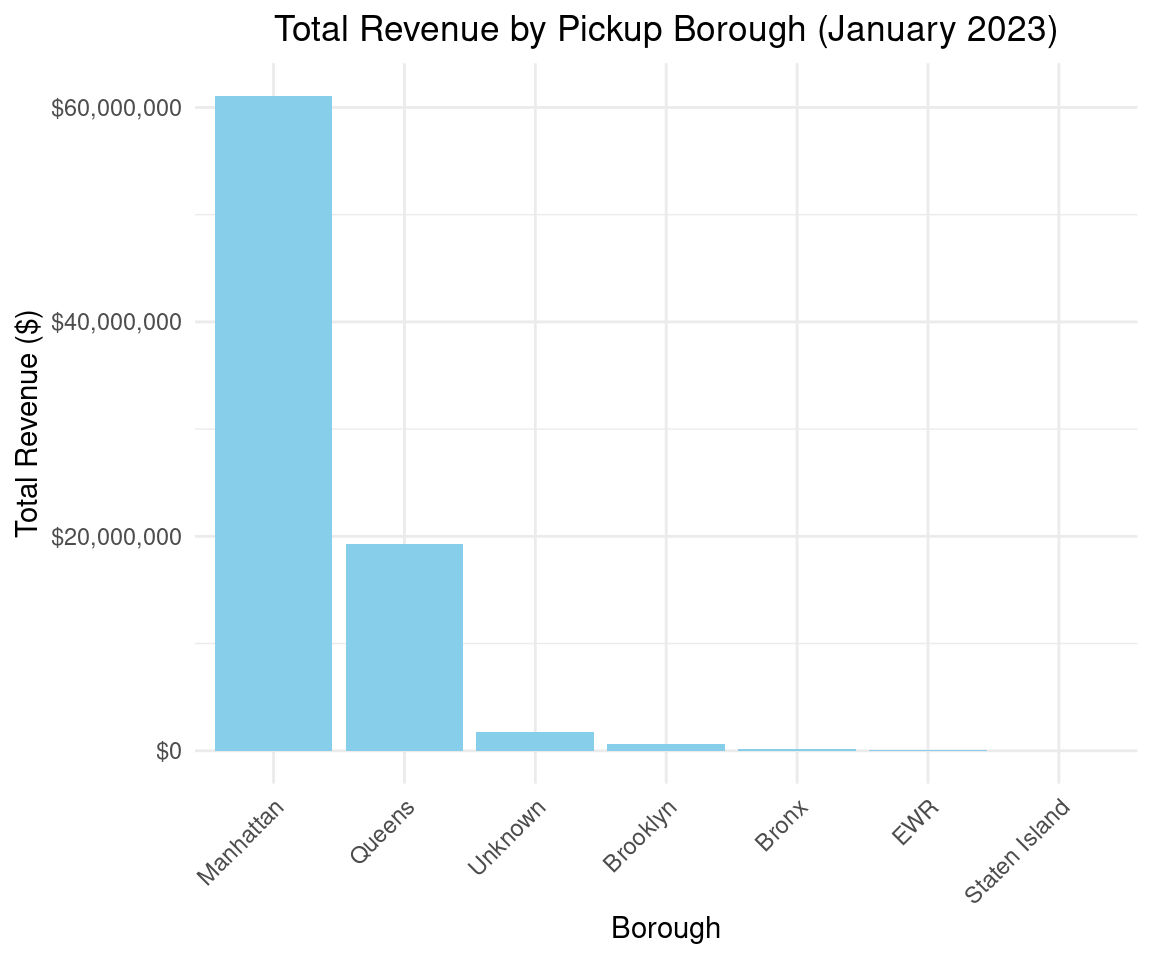
print(borough_agg)
  pickup_borough avg_distance total_revenue
1      Manhattan     2.883807   61071964.50
2         Queens    12.320490   19283937.36
3        Unknown     7.362869    1704629.49
4       Brooklyn     5.677405     596810.31
5          Bronx     5.296593     143734.99
6            EWR     1.594780      42794.04
7  Staten Island    11.356774      21321.53
Code
# Manhattan likely tops revenue
Code
# Create bar chart
ggplot(borough_agg, aes(x = reorder(pickup_borough, -total_revenue), y = total_revenue)) +
  geom_bar(stat = "identity", fill = "skyblue") +
  labs(
    title = "Total Revenue by Pickup Borough (January 2023)",
    x = "Borough",
    y = "Total Revenue ($)"
  ) +
  theme_minimal() +
  theme(
    axis.text.x = element_text(angle = 45, hjust = 1),
    plot.title = element_text(hjust = 0.5)
  ) +
  scale_y_continuous(labels = scales::dollar_format())

Window Functions

Rank trips by distance within each payment type.

Code
window_query <- dbGetQuery(con, "
  SELECT 
    payment_type,
    trip_distance,
    RANK() OVER (PARTITION BY payment_type ORDER BY trip_distance DESC) AS distance_rank
  FROM taxi_data
  LIMIT 20
")
print(window_query)
   payment_type trip_distance distance_rank
1             3         74.40             1
2             3         70.20             2
3             3         63.60             3
4             3         61.50             4
5             3         61.50             4
6             3         53.60             6
7             3         53.20             7
8             3         46.00             8
9             3         39.40             9
10            3         38.30            10
11            3         37.70            11
12            3         37.60            12
13            3         35.20            13
14            3         34.70            14
15            3         34.10            15
16            3         33.70            16
17            3         32.50            17
18            3         32.20            18
19            3         32.10            19
20            3         30.82            20

SQuerying Multiple Files (e.g., Jan + Feb 2023)

Code
dbExecute(con, "INSTALL httpfs; LOAD httpfs;")
[1] 0
Code
multi_data <- dbGetQuery(con, "
  SELECT * FROM read_parquet([
    'https://d37ci6vzurychx.cloudfront.net/trip-data/yellow_tripdata_2023-01.parquet',
    'https://d37ci6vzurychx.cloudfront.net/trip-data/yellow_tripdata_2023-02.parquet'
  ])
") %>% as_tibble()
total_trips <- multi_data %>%
  summarise(total_trips = n())
print(total_trips)
# A tibble: 1 × 1
  total_trips
*       <int>
1     5980721

Export Results

Write query results to CSV or Parquet.

Code
duckdb_register_arrow(con, "taxi_data", ds)
dbExecute(con, paste0("COPY (SELECT * FROM taxi_data WHERE trip_distance > 5 LIMIT 1000) TO '", dataFolder, "output.csv' (FORMAT CSV, HEADER)"))
[1] 1000
Code
dbDisconnect(con, shutdown = TRUE)

Integrate with dplyr

DuckDB works with the dplyr package, allowing you to use familiar dplyr syntax for data manipulation. The dbplyr package translates dplyr operations into SQL queries for DuckDB.

This tutorial uses dplyr functions with the NYC Yellow Taxi Trip Data (yellow_tripdata_2023.parquet, ~3 million rows), integrating arrow for efficient data loading and duckdb for SQL operations.

Load and Register Arrow Dataset

Code
ds <- open_dataset(parquet_file)
con <- dbConnect(duckdb::duckdb())
duckdb_register_arrow(con, "taxi_data", ds)
taxi_df <- tbl(con, "taxi_data")  # dplyr table reference
Code
preview <- taxi_df %>%
  head(10) %>%
  collect()
print(preview)
# A tibble: 10 × 19
   VendorID tpep_pickup_datetime tpep_dropoff_datetime passenger_count
      <dbl> <dttm>               <dttm>                          <dbl>
 1        2 2023-01-01 00:32:10  2023-01-01 00:40:36                 1
 2        2 2023-01-01 00:55:08  2023-01-01 01:01:27                 1
 3        2 2023-01-01 00:25:04  2023-01-01 00:37:49                 1
 4        1 2023-01-01 00:03:48  2023-01-01 00:13:25                 0
 5        2 2023-01-01 00:10:29  2023-01-01 00:21:19                 1
 6        2 2023-01-01 00:50:34  2023-01-01 01:02:52                 1
 7        2 2023-01-01 00:09:22  2023-01-01 00:19:49                 1
 8        2 2023-01-01 00:27:12  2023-01-01 00:49:56                 1
 9        2 2023-01-01 00:21:44  2023-01-01 00:36:40                 1
10        2 2023-01-01 00:39:42  2023-01-01 00:50:36                 1
# ℹ 15 more variables: trip_distance <dbl>, RatecodeID <dbl>,
#   store_and_fwd_flag <chr>, PULocationID <dbl>, DOLocationID <dbl>,
#   payment_type <dbl>, fare_amount <dbl>, extra <dbl>, mta_tax <dbl>,
#   tip_amount <dbl>, tolls_amount <dbl>, improvement_surcharge <dbl>,
#   total_amount <dbl>, congestion_surcharge <dbl>, airport_fee <dbl>

Basic Filtering

Code
filtered <- taxi_df %>%
  filter(passenger_count > 1) %>%
  head(10) %>%
  collect()
print(filtered)
# A tibble: 10 × 19
   VendorID tpep_pickup_datetime tpep_dropoff_datetime passenger_count
      <dbl> <dttm>               <dttm>                          <dbl>
 1        1 2023-01-01 00:43:37  2023-01-01 01:17:18                 4
 2        2 2023-01-01 00:09:29  2023-01-01 00:29:23                 2
 3        1 2023-01-01 00:03:36  2023-01-01 00:09:36                 3
 4        1 2023-01-01 00:15:23  2023-01-01 00:29:41                 2
 5        1 2023-01-01 00:21:49  2023-01-01 00:29:15                 4
 6        1 2023-01-01 00:52:06  2023-01-01 01:02:18                 2
 7        1 2023-01-01 00:22:24  2023-01-01 00:35:11                 2
 8        1 2023-01-01 00:31:30  2023-01-01 00:46:51                 2
 9        2 2023-01-01 00:27:16  2023-01-01 00:59:51                 4
10        2 2023-01-01 00:39:14  2023-01-01 00:47:26                 2
# ℹ 15 more variables: trip_distance <dbl>, RatecodeID <dbl>,
#   store_and_fwd_flag <chr>, PULocationID <dbl>, DOLocationID <dbl>,
#   payment_type <dbl>, fare_amount <dbl>, extra <dbl>, mta_tax <dbl>,
#   tip_amount <dbl>, tolls_amount <dbl>, improvement_surcharge <dbl>,
#   total_amount <dbl>, congestion_surcharge <dbl>, airport_fee <dbl>

Aggregations and Grouping

Code
# Simple aggregation
agg_result <- taxi_df %>%
  summarise(
    avg_distance = mean(trip_distance, na.rm = TRUE),
    total_trips = n()
  ) %>%
  collect()
print(agg_result)
# A tibble: 1 × 2
  avg_distance total_trips
         <dbl>       <dbl>
1         3.85     3066766
Code
# Grouping by Payment Type
group_result <- taxi_df %>%
  group_by(payment_type) %>%
  summarise(
    total_revenue = sum(total_amount, na.rm = TRUE),
    avg_tip = mean(tip_amount, na.rm = TRUE)
  ) %>%
  arrange(desc(total_revenue)) %>%
  collect()
print(group_result)
# A tibble: 5 × 3
  payment_type total_revenue avg_tip
         <dbl>         <dbl>   <dbl>
1            1     68240617. 4.17   
2            2     12260056. 0.00168
3            0      2090131. 3.73   
4            3       189365. 0.0295 
5            4        85023. 0.0515 
Code
# Create a tbl reference
taxi_tbl <- tbl(con, "taxi_data")

# dplyr pipeline: Filter, group, summarize
result_dplyr <- taxi_tbl %>%
  filter(trip_distance > 5) %>%
  group_by(payment_type) %>%
  summarise(
    avg_fare = mean(fare_amount, na.rm = TRUE),
    total_trips = n()
  ) %>%
  arrange(desc(total_trips)) %>%
  collect()  # Pull results into R memory

print(result_dplyr)
# A tibble: 5 × 3
  payment_type avg_fare total_trips
         <dbl>    <dbl>       <dbl>
1            1    48.7       391530
2            2    47.2        92624
3            0    40.3        13822
4            4     5.62        5377
5            3    28.4         2063
Code
# handling date
hourly_trips <- taxi_df %>%
  mutate(pickup_hour = hour(tpep_pickup_datetime)) %>%
  group_by(pickup_hour) %>%
  summarise(trip_count = n()) %>%
  arrange(pickup_hour) %>%
  collect()
print(head(hourly_trips))
# A tibble: 6 × 2
  pickup_hour trip_count
        <dbl>      <dbl>
1           0      84969
2           1      59799
3           2      42040
4           3      27438
5           4      17835
6           5      18011

Joins

Code
# Load Tazixi Zone Lookup
zone_file <- paste0(dataFolder, "taxi_zone_lookup.csv")
zones_df <- read.csv(zone_file) %>% as_tibble()
dbExecute(con, paste0("CREATE VIEW zones AS SELECT * FROM '", zone_file, "'"))
[1] 0
Code
# Join
joined_result <- taxi_df %>%
  left_join(tbl(con, "zones"), by = c("PULocationID" = "LocationID")) %>%
  filter(trip_distance > 10) %>%
  select(VendorID, trip_distance, total_amount, Borough) %>%
  head(10) %>%
  collect()
print(joined_result)
# A tibble: 10 × 4
   VendorID trip_distance total_amount Borough      
      <dbl>         <dbl>        <dbl> <chr>        
 1        2          15          110.  EWR          
 2        1          12.7         50.6 Bronx        
 3        1          10.4         51.5 Manhattan    
 4        1          28           96.3 Staten Island
 5        2          15.5        127.  Staten Island
 6        2          10.7         45.4 Queens       
 7        2          14.6         62   Queens       
 8        2          15.4         60.8 Queens       
 9        2          15.7         90.0 Queens       
10        1          21.3         52   Brooklyn     
Code
# Group by borough
borough_agg <- taxi_df %>%
  left_join(tbl(con, "zones"), by = c("PULocationID" = "LocationID")) %>%
  group_by(Borough) %>%
  summarise(
    avg_distance = mean(trip_distance, na.rm = TRUE),
    total_revenue = sum(total_amount, na.rm = TRUE)
  ) %>%
  arrange(desc(total_revenue)) %>%
  collect()
print(borough_agg)
# A tibble: 7 × 3
  Borough       avg_distance total_revenue
  <chr>                <dbl>         <dbl>
1 Manhattan             2.88     61071964.
2 Queens               12.3      19283937.
3 Unknown               7.36      1704629.
4 Brooklyn              5.68       596810.
5 Bronx                 5.30       143735.
6 EWR                   1.59        42794.
7 Staten Island        11.4         21322.

Windows Functions

Code
running_total <- taxi_df %>%
  mutate(pickup_date = as_date(tpep_pickup_datetime)) %>%
  group_by(pickup_date) %>%
  summarise(daily_revenue = sum(total_amount, na.rm = TRUE)) %>%
  arrange(pickup_date) %>%
  mutate(running_revenue = cumsum(daily_revenue)) %>%
  collect()
Warning: ORDER BY is ignored in subqueries without LIMIT
ℹ Do you need to move arrange() later in the pipeline or use window_order() instead?
Code
print(running_total)
# A tibble: 36 × 3
   pickup_date daily_revenue running_revenue
   <date>              <dbl>           <dbl>
 1 2008-12-31           80.6            80.6
 2 2022-10-24          337.            418. 
 3 2022-10-25          423.            841. 
 4 2022-12-31          658.           1499. 
 5 2023-01-01      2347475.        2348974. 
 6 2023-01-02      2033445.        4382419. 
 7 2023-01-03      2488095.        6870514. 
 8 2023-01-04      2645252.        9515766. 
 9 2023-01-05      2734583.       12250349. 
10 2023-01-06      2713406.       14963755. 
# ℹ 26 more rows
Code
running_total <- taxi_df %>%
  mutate(pickup_date = as_date(tpep_pickup_datetime)) %>%
  group_by(pickup_date) %>%
  summarise(daily_revenue = sum(total_amount, na.rm = TRUE)) %>%
  arrange(pickup_date) %>%
  mutate(running_revenue = cumsum(daily_revenue)) %>%
  collect()
Warning: ORDER BY is ignored in subqueries without LIMIT
ℹ Do you need to move arrange() later in the pipeline or use window_order() instead?
Code
print(running_total)
# A tibble: 36 × 3
   pickup_date daily_revenue running_revenue
   <date>              <dbl>           <dbl>
 1 2008-12-31           80.6            80.6
 2 2022-10-24          337.            418. 
 3 2022-10-25          423.            841. 
 4 2022-12-31          658.           1499. 
 5 2023-01-01      2347475.        2348974. 
 6 2023-01-02      2033445.        4382419. 
 7 2023-01-03      2488095.        6870514. 
 8 2023-01-04      2645252.        9515766. 
 9 2023-01-05      2734583.       12250349. 
10 2023-01-06      2713406.       14963755. 
# ℹ 26 more rows

Export Results

Code
filtered_df <- taxi_df %>%
  filter(trip_distance > 5) %>%
  head(1000) %>%
  collect()
write.csv(filtered_df, paste0(dataFolder, "output.csv"), row.names = FALSE)
Code
### Disconnect
dbDisconnect(con, shutdown = TRUE)

Integrate with duckplyr

The duckplyr package is a drop-in replacement for dplyr that uses DuckDB as its backend to execute data manipulation operations, offering significant performance improvements for large datasets by leveraging DuckDB’s efficient columnar storage and query engine. Unlike dplyr, which processes data in R’s memory, duckplyr translates dplyr-style code into SQL queries executed by DuckDB, often resulting in faster operations, especially for large datasets like the NYC Yellow Taxi Trip Data

Calling library(duckplyr) overwrites dplyr methods, enabling duckplyr for the entire session:

Code
library(conflicted)
library(duckplyr)

conflict_prefer("filter", "dplyr")
[conflicted] Will prefer dplyr::filter over any other package.

Load Data as a duckplyr Data Frame

With duckplyr, you can load the Parquet file directly into a duckplyr data frame, which is a wrapper around a DuckDB table or view. Use duckplyr::as_duckdb_tibble() to create a duckplyr data frame from a Parquet file.

Code
# Set data path
dataFolder <- "/home/zia207/WebSites/R_Website/High_Performance_Computing_R/R_Markdown/Data/"
parquet_file <- paste0(dataFolder, "yellow_tripdata_2023.parquet")
zone_file <- paste0(dataFolder, "taxi_zone_lookup.csv")
Code
# Load and register Arrow dataset
ds <- open_dataset(parquet_file)
con <- dbConnect(duckdb::duckdb())
duckdb_register_arrow(con, "taxi_data", ds)
taxi_df <- tbl(con, "taxi_data")  # Use dbplyr table
Code
# Register zones as DuckDB table
zones_df <- read.csv(zone_file)
duckdb_register(con, "zones", zones_df)
zones_tbl <- tbl(con, "zones")
Code
# Register zones
zones_df <- as_duckplyr_df(read.csv(zone_file))
Warning: `as_duckplyr_df()` was deprecated in duckplyr 1.0.0.
ℹ Please use `as_duckdb_tibble()` instead.
Code
dbExecute(con, paste0("CREATE VIEW zones AS SELECT * FROM '", zone_file, "'"))
[1] 0
Code
# Verify table registration
dbGetQuery(con, "SHOW TABLES")
   name
1 zones
2 zones
Code
# Preview data
preview <- taxi_df %>%
  head(10) %>%
  collect()
print(preview)
# A tibble: 10 × 19
   VendorID tpep_pickup_datetime tpep_dropoff_datetime passenger_count
      <dbl> <dttm>               <dttm>                          <dbl>
 1        2 2023-01-01 00:32:10  2023-01-01 00:40:36                 1
 2        2 2023-01-01 00:55:08  2023-01-01 01:01:27                 1
 3        2 2023-01-01 00:25:04  2023-01-01 00:37:49                 1
 4        1 2023-01-01 00:03:48  2023-01-01 00:13:25                 0
 5        2 2023-01-01 00:10:29  2023-01-01 00:21:19                 1
 6        2 2023-01-01 00:50:34  2023-01-01 01:02:52                 1
 7        2 2023-01-01 00:09:22  2023-01-01 00:19:49                 1
 8        2 2023-01-01 00:27:12  2023-01-01 00:49:56                 1
 9        2 2023-01-01 00:21:44  2023-01-01 00:36:40                 1
10        2 2023-01-01 00:39:42  2023-01-01 00:50:36                 1
# ℹ 15 more variables: trip_distance <dbl>, RatecodeID <dbl>,
#   store_and_fwd_flag <chr>, PULocationID <dbl>, DOLocationID <dbl>,
#   payment_type <dbl>, fare_amount <dbl>, extra <dbl>, mta_tax <dbl>,
#   tip_amount <dbl>, tolls_amount <dbl>, improvement_surcharge <dbl>,
#   total_amount <dbl>, congestion_surcharge <dbl>, airport_fee <dbl>
Code
# Inspect schema
glimpse(taxi_df)
Rows: ??
Columns: 19
Database: DuckDB 1.5.2 [zia207@Linux 6.8.0-111-generic:R 4.6.0/:memory:]
$ VendorID              <dbl> 2, 2, 2, 1, 2, 2, 2, 2, 2, 2, 2, 1, 2, 2, 2, 2, …
$ tpep_pickup_datetime  <dttm> 2023-01-01 00:32:10, 2023-01-01 00:55:08, 2023-…
$ tpep_dropoff_datetime <dttm> 2023-01-01 00:40:36, 2023-01-01 01:01:27, 2023-…
$ passenger_count       <dbl> 1, 1, 1, 0, 1, 1, 1, 1, 1, 1, 1, 4, 1, 2, 1, 1, …
$ trip_distance         <dbl> 0.97, 1.10, 2.51, 1.90, 1.43, 1.84, 1.66, 11.70,…
$ RatecodeID            <dbl> 1, 1, 1, 1, 1, 1, 1, 1, 1, 1, 1, 1, 1, 1, 1, 1, …
$ store_and_fwd_flag    <chr> "N", "N", "N", "N", "N", "N", "N", "N", "N", "N"…
$ PULocationID          <dbl> 161, 43, 48, 138, 107, 161, 239, 142, 164, 141, …
$ DOLocationID          <dbl> 141, 237, 238, 7, 79, 137, 143, 200, 236, 107, 6…
$ payment_type          <dbl> 2, 1, 1, 1, 1, 1, 1, 1, 1, 2, 1, 1, 1, 1, 1, 1, …
$ fare_amount           <dbl> 9.3, 7.9, 14.9, 12.1, 11.4, 12.8, 12.1, 45.7, 17…
$ extra                 <dbl> 1.00, 1.00, 1.00, 7.25, 1.00, 1.00, 1.00, 1.00, …
$ mta_tax               <dbl> 0.5, 0.5, 0.5, 0.5, 0.5, 0.5, 0.5, 0.5, 0.5, 0.5…
$ tip_amount            <dbl> 0.00, 4.00, 15.00, 0.00, 3.28, 10.00, 3.42, 10.7…
$ tolls_amount          <dbl> 0.00, 0.00, 0.00, 0.00, 0.00, 0.00, 0.00, 3.00, …
$ improvement_surcharge <dbl> 1, 1, 1, 1, 1, 1, 1, 1, 1, 1, 1, 1, 1, 1, 1, 1, …
$ total_amount          <dbl> 14.30, 16.90, 34.90, 20.85, 19.68, 27.80, 20.52,…
$ congestion_surcharge  <dbl> 2.5, 2.5, 2.5, 0.0, 2.5, 2.5, 2.5, 2.5, 2.5, 2.5…
$ airport_fee           <dbl> 0.00, 0.00, 0.00, 1.25, 0.00, 0.00, 0.00, 0.00, …


Basic Filtering

Code
# Basic filtering: Trips with more than 1 passenger
filtered <- taxi_df %>%
  filter(passenger_count > 1) %>%
  head(10) %>%
  collect()
print(filtered)
# A tibble: 10 × 19
   VendorID tpep_pickup_datetime tpep_dropoff_datetime passenger_count
      <dbl> <dttm>               <dttm>                          <dbl>
 1        1 2023-01-01 00:43:37  2023-01-01 01:17:18                 4
 2        2 2023-01-01 00:09:29  2023-01-01 00:29:23                 2
 3        1 2023-01-01 00:03:36  2023-01-01 00:09:36                 3
 4        1 2023-01-01 00:15:23  2023-01-01 00:29:41                 2
 5        1 2023-01-01 00:21:49  2023-01-01 00:29:15                 4
 6        1 2023-01-01 00:52:06  2023-01-01 01:02:18                 2
 7        1 2023-01-01 00:22:24  2023-01-01 00:35:11                 2
 8        1 2023-01-01 00:31:30  2023-01-01 00:46:51                 2
 9        2 2023-01-01 00:27:16  2023-01-01 00:59:51                 4
10        2 2023-01-01 00:39:14  2023-01-01 00:47:26                 2
# ℹ 15 more variables: trip_distance <dbl>, RatecodeID <dbl>,
#   store_and_fwd_flag <chr>, PULocationID <dbl>, DOLocationID <dbl>,
#   payment_type <dbl>, fare_amount <dbl>, extra <dbl>, mta_tax <dbl>,
#   tip_amount <dbl>, tolls_amount <dbl>, improvement_surcharge <dbl>,
#   total_amount <dbl>, congestion_surcharge <dbl>, airport_fee <dbl>

Aggregations and Grouping

Code
# Simple aggregations
agg_result <- taxi_df %>%
  summarise(
    avg_distance = mean(trip_distance, na.rm = TRUE),
    total_trips = n()
  ) %>%
  collect()
print(agg_result)
# A tibble: 1 × 2
  avg_distance total_trips
         <dbl>       <dbl>
1         4.09    38310226
Code
# Grouping by payment type
group_result <- taxi_df %>%
  group_by(payment_type) %>%
  summarise(
    total_revenue = sum(total_amount, na.rm = TRUE),
    avg_tip = mean(tip_amount, na.rm = TRUE)
  ) %>%
  arrange(desc(total_revenue)) %>%
  collect()
print(group_result)
# A tibble: 6 × 3
  payment_type total_revenue avg_tip
         <dbl>         <dbl>   <dbl>
1            1    890779114. 4.40   
2            2    157050238. 0.00194
3            0     38882575. 2.77   
4            3      2540632. 0.0353 
5            4      1130853. 0.0516 
6            5            0  0      
Code
# Handling dates: Count trips by pickup hour
hourly_trips <- taxi_df %>%
  mutate(pickup_hour = lubridate::hour(tpep_pickup_datetime)) %>%
  group_by(pickup_hour) %>%
  summarise(trip_count = n()) %>%
  arrange(pickup_hour) %>%
  collect()
print(hourly_trips)
# A tibble: 24 × 2
   pickup_hour trip_count
         <dbl>      <dbl>
 1           0    1088628
 2           1     731321
 3           2     483366
 4           3     319641
 5           4     217492
 6           5     226411
 7           6     532181
 8           7    1044241
 9           8    1446062
10           9    1632601
# ℹ 14 more rows

Joins, Window Functions, Exporting, and Larger-than-Memory Data

Code
# Join: Long trips with borough information
joined_result <- taxi_df %>%
  left_join(zones_tbl, by = c("PULocationID" = "LocationID")) %>%
  filter(trip_distance > 10) %>%
  select(VendorID, trip_distance, total_amount, Borough) %>%
  head(10) %>%
  collect()
print(joined_result)
# A tibble: 10 × 4
   VendorID trip_distance total_amount Borough      
      <dbl>         <dbl>        <dbl> <chr>        
 1        2          12.0         51.9 EWR          
 2        2          15.3         57.4 Queens       
 3        1          16.7         49   Bronx        
 4        2          10.6         57.5 Manhattan    
 5        1          16.3         92.2 Staten Island
 6        2          26.4        122.  Staten Island
 7        1          14.8         50   Queens       
 8        2          18.9         66.7 Queens       
 9        1          10.1         39   Queens       
10        2          13.8         97.1 Queens       
Code
# Group by borough (for bar chart)
borough_agg <- taxi_df %>%
  left_join(zones_tbl, by = c("PULocationID" = "LocationID")) %>%
  group_by(pickup_borough = Borough) %>%
  summarise(
    avg_distance = mean(trip_distance, na.rm = TRUE),
    total_revenue = sum(total_amount, na.rm = TRUE)
  ) %>%
  arrange(desc(total_revenue)) %>%
  collect()
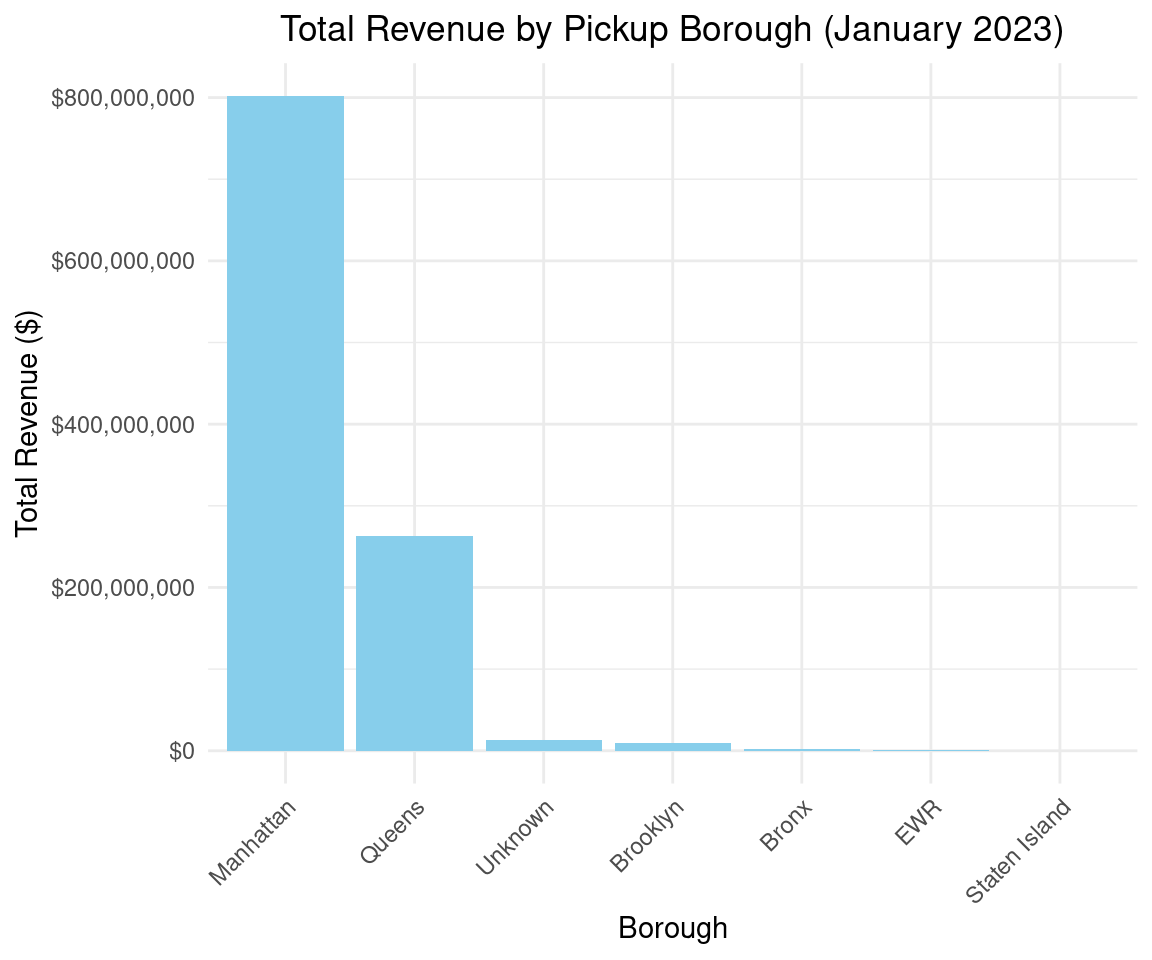
print(borough_agg)
# A tibble: 7 × 3
  pickup_borough avg_distance total_revenue
  <chr>                 <dbl>         <dbl>
1 Manhattan              2.99    801952154.
2 Queens                12.9     262536479.
3 Unknown                4.56     13484252.
4 Brooklyn              17.0       9441382.
5 Bronx                  9.86      2282759.
6 EWR                    1.49       522707.
7 Staten Island         12.9        163679.
Code
# Bar chart of total revenue by borough
library(ggplot2)
ggplot(borough_agg, aes(x = reorder(pickup_borough, -total_revenue), y = total_revenue)) +
  geom_bar(stat = "identity", fill = "skyblue") +
  labs(
    title = "Total Revenue by Pickup Borough (January 2023)",
    x = "Borough",
    y = "Total Revenue ($)"
  ) +
  theme_minimal() +
  theme(
    axis.text.x = element_text(angle = 45, hjust = 1),
    plot.title = element_text(hjust = 0.5)
  ) +
  scale_y_continuous(labels = scales::dollar_format())

Code
# Window function: Running total revenue by date
running_total <- taxi_df %>%
  mutate(pickup_date = as_date(tpep_pickup_datetime)) %>%
  group_by(pickup_date) %>%
  summarise(daily_revenue = sum(total_amount, na.rm = TRUE)) %>%
  arrange(pickup_date) %>%
  mutate(running_revenue = cumsum(daily_revenue)) %>%
  collect()
Warning: ORDER BY is ignored in subqueries without LIMIT
ℹ Do you need to move arrange() later in the pipeline or use window_order() instead?
Code
print(running_total)
# A tibble: 376 × 3
   pickup_date daily_revenue running_revenue
   <date>              <dbl>           <dbl>
 1 2001-01-01          338.             338.
 2 2002-12-31          593.             931.
 3 2003-01-01          454.            1385.
 4 2008-12-31         1102.            2487.
 5 2009-01-01          302.            2789.
 6 2014-11-19           52.4           2841.
 7 2022-10-24          337.            3178.
 8 2022-10-25          423.            3601.
 9 2022-12-31          658.            4260.
10 2023-01-01      2347475.         2351734.
# ℹ 366 more rows

Export Results

Code
# Export results: Trips with trip_distance > 5
taxi_df %>%
  filter(trip_distance > 5) %>%
  head(1000) %>%
  dbplyr::sql_render() %>%
  {dbExecute(con, paste0("COPY (", ., ") TO '", dataFolder, "output.csv' (FORMAT CSV, HEADER)"))}
[1] 1000

Analyzing larger-than-memory data (remote Parquet files)

Code
# Analyzing larger-than-memory data (remote Parquet files)
dbExecute(con, "INSTALL httpfs; LOAD httpfs;")
[1] 0
Code
remote_urls <- c(
  "https://d37ci6vzurychx.cloudfront.net/trip-data/yellow_tripdata_2023-01.parquet",
  "https://d37ci6vzurychx.cloudfront.net/trip-data/yellow_tripdata_2023-02.parquet"
)
remote_df <- as_duckplyr_df(dbGetQuery(con, paste0("SELECT * FROM read_parquet(['", paste(remote_urls, collapse = "', '"), "'])")))
total_trips <- remote_df %>%
  summarise(total_trips = n()) %>%
  collect()
print(total_trips)
  total_trips
1     5980721
Code
# Disconnect
dbDisconnect(con, shutdown = TRUE)
Code
# Disconnect
if (dbIsValid(con)) dbDisconnect(con, shutdown = TRUE)

Basic Data Pre-processing with DuckDB

DuckDB is not a machine learning library, but it plays a powerful supporting role in ML workflows—especially in the data preprocessing, feature engineering, and scalable inference stages. By performing these steps inside the database, you avoid costly data movement, reduce memory pressure, and often achieve significant performance gains over traditional R-based pipelines.

### Why Use DuckDB for ML?

Benefit Explanation
Speed Vectorized, parallel SQL execution often outperforms Pandas/scikit-learn on large data
Memory Efficiency Processes data in chunks; no need to load full dataset into RAM
Reproducibility Preprocessing logic lives in SQL—easy to version, audit, and reuse
Data Locality Transform data where it lives (Parquet, CSV, S3, etc.)
Consistency Same SQL logic can be used at training and inference time

Below is a complete R translation of the Basic Feature Engineering with DuckDB blog post, using duckdb and dplyr-like syntax via dbplyr (which integrates with dplyr for SQL generation).

We’ll replicate the key steps:

  • Load data
  • Summarize
  • One-hot, Ordinal, and Label Encoding
  • Train/test split
  • Feature scaling (Standard, Min-Max, Robust)
  • Missing value imputation

Load Data into DuckDB

We will be working with a synthetic financial transactions dataset from Kaggle, which contains generic information used for fraud detection in financial transactions.

Code
# Connect to an in-memory DuckDB database
con <- dbConnect(duckdb())

# Install and load ICU extension (needed for date/time functions)
dbExecute(con, "INSTALL icu;")
[1] 0
Code
dbExecute(con, "LOAD icu;")
[1] 0
Code
# Read CSV directly from URL into a DuckDB table
dbExecute(con, "
  CREATE TABLE financial_trx AS
  FROM read_csv('https://blobs.duckdb.org/data/financial_fraud_detection_dataset.csv')
")
[1] 5e+06

Summarize the Data (Equivalent to SUMMARIZE)

DuckDB’s SUMMARIZE isn’t available in R directly, but we can replicate it.

Code
summary_stats <- tbl(con, sql("
  SELECT
    column_name,
    column_type,
    count,
    null_percentage,
    min
  FROM (SUMMARIZE financial_trx)
"))

# Collect and print
summary_stats %>% collect()
# A tibble: 18 × 5
   column_name                 column_type   count null_percentage min          
   <chr>                       <chr>         <dbl>           <dbl> <chr>        
 1 transaction_id              VARCHAR     5000000             0   T100000      
 2 timestamp                   TIMESTAMP   5000000             0   2023-01-01 0…
 3 sender_account              VARCHAR     5000000             0   ACC100000    
 4 receiver_account            VARCHAR     5000000             0   ACC100000    
 5 amount                      DOUBLE      5000000             0   0.01         
 6 transaction_type            VARCHAR     5000000             0   deposit      
 7 merchant_category           VARCHAR     5000000             0   entertainment
 8 location                    VARCHAR     5000000             0   Berlin       
 9 device_used                 VARCHAR     5000000             0   atm          
10 is_fraud                    BOOLEAN     5000000             0   false        
11 fraud_type                  VARCHAR     5000000            96.4 card_not_pre…
12 time_since_last_transaction DOUBLE      5000000            17.9 -8777.814181…
13 spending_deviation_score    DOUBLE      5000000             0   -5.26        
14 velocity_score              BIGINT      5000000             0   1            
15 geo_anomaly_score           DOUBLE      5000000             0   0.0          
16 payment_channel             VARCHAR     5000000             0   ACH          
17 ip_address                  VARCHAR     5000000             0   0.0.102.150  
18 device_hash                 VARCHAR     5000000             0   D1000002     

This uses raw SQL inside sql() because SUMMARIZE is a DuckDB-specific meta-command.

Feature Encoding

The summary statistics reveal several categorical columns in the dataset, including transaction_type, merchant_category, and payment_channel. Since most machine learning algorithms require numerical input, these categorical variables need to be transformed into numerical form. This transformation process is known as encoding, and there are various methods to achieve it. Below, we demonstrate some widely used encoding techniques using SQL.

One-Hot Encoding

One-hot encoding creates binary columns for each category in a categorical variable. For example, the transaction_type column has four unique values: deposit, payment, transfer, and withdrawal. One-hot encoding will create four new binary columns, each indicating the presence (1) or absence (0) of a specific transaction type.

Option 1: Manual CASE-style one-hot encoding

Code
one_hot_manual <- tbl(con, "financial_trx") %>%
  select(transaction_type) %>%
  distinct() %>%
  mutate(
    deposit_onehot = sql("CAST(transaction_type = 'deposit' AS INT)"),
    payment_onehot = sql("CAST(transaction_type = 'payment' AS INT)"),
    transfer_onehot = sql("CAST(transaction_type = 'transfer' AS INT)"),
    withdrawal_onehot = sql("CAST(transaction_type = 'withdrawal' AS INT)")
  )

one_hot_manual %>% show_query()
<SQL>
SELECT
  q01.*,
  CAST(transaction_type = 'deposit' AS INT) AS deposit_onehot,
  CAST(transaction_type = 'payment' AS INT) AS payment_onehot,
  CAST(transaction_type = 'transfer' AS INT) AS transfer_onehot,
  CAST(transaction_type = 'withdrawal' AS INT) AS withdrawal_onehot
FROM (
  SELECT DISTINCT transaction_type
  FROM financial_trx
) q01
Code
one_hot_manual %>% collect()
# A tibble: 4 × 5
  transaction_type deposit_onehot payment_onehot transfer_onehot
  <chr>                     <int>          <int>           <int>
1 withdrawal                    0              0               0
2 deposit                       1              0               0
3 transfer                      0              0               1
4 payment                       0              1               0
# ℹ 1 more variable: withdrawal_onehot <int>

Option 2: Use PIVOT via SQL (not directly supported in dplyr, so use raw SQL)

Code
one_hot_pivot <- tbl(con, sql("
  PIVOT financial_trx ON transaction_type 
  USING COALESCE(MAX(transaction_type = transaction_type)::INT, 0) AS onehot
  GROUP BY transaction_type
"))

one_hot_pivot %>% collect()
# A tibble: 4 × 5
  transaction_type deposit_onehot payment_onehot transfer_onehot
  <chr>                     <int>          <int>           <int>
1 withdrawal                    0              0               0
2 deposit                       1              0               0
3 transfer                      0              0               1
4 payment                       0              1               0
# ℹ 1 more variable: withdrawal_onehot <int>

Ordinal Encoding

Ordinal encoding assigns a unique integer to each category based on a specified order. For transaction_type, we can assign integers as follows: deposit = 0, payment = 1, transfer = 2, withdrawal = 3. This encoding is useful when there is an inherent order in the categories.

Code
trx_type_ordinal_encoded <- tbl(con, sql("
  SELECT
    transaction_type,
    ROW_NUMBER() OVER (ORDER BY transaction_type) - 1 AS trx_type_oe
  FROM (SELECT DISTINCT transaction_type FROM financial_trx)
"))

# Join back to full data
financial_trx_with_oe <- tbl(con, "financial_trx") %>%
  inner_join(trx_type_ordinal_encoded, by = "transaction_type")

financial_trx_with_oe %>%
  group_by(transaction_type, trx_type_oe) %>%
  summarise(number_trx = n(), .groups = "drop") %>%
  arrange(trx_type_oe) %>%
  collect()
# A tibble: 4 × 3
  transaction_type trx_type_oe number_trx
  <chr>                  <dbl>      <dbl>
1 deposit                    0    1250593
2 payment                    1    1250438
3 transfer                   2    1250334
4 withdrawal                 3    1248635

Label Encoding (Non-deterministic order)

Similarly to ordinal encoding, label encoding assigns a unique identifier, but it does not take order into account and it is, usually, applied to output data:

Code
trx_type_label_encoded <- tbl(con, sql("
  SELECT
    transaction_type,
    ROW_NUMBER() OVER () - 1 AS trx_type_le
  FROM (SELECT DISTINCT transaction_type FROM financial_trx)
"))

financial_trx_with_le <- tbl(con, "financial_trx") %>%
  inner_join(trx_type_label_encoded, by = "transaction_type")

financial_trx_with_le %>%
  group_by(transaction_type, trx_type_le) %>%
  summarise(number_trx = n(), .groups = "drop") %>%
  arrange(trx_type_le) %>%
  collect()
# A tibble: 4 × 3
  transaction_type trx_type_le number_trx
  <chr>                  <dbl>      <dbl>
1 deposit                    0    1250593
2 withdrawal                 1    1248635
3 payment                    2    1250438
4 transfer                   3    1250334

Train/Test Split (Reservoir Sampling)

Code
# Set single-threaded for reproducibility
dbExecute(con, "SET threads = 1;")
[1] 0
Code
# Create training sample (80%)
dbExecute(con, "
  CREATE OR REPLACE TABLE financial_trx_training AS
  FROM financial_trx USING SAMPLE 80 PERCENT (reservoir, 256)
")
[1] 4e+06
Code
# Restore thread count
dbExecute(con, "SET threads = 8;")
[1] 0
Code
# Create testing set (anti-join)
dbExecute(con, "
  CREATE OR REPLACE TABLE financial_trx_testing AS
  FROM financial_trx ANTI JOIN financial_trx_training USING (transaction_id)
")
[1] 1e+06

Feature Scaling

Another essential step in machine learning preprocessing is scaling numerical features to ensure they fall within a comparable range or distribution. Known as feature normalization or standardization, this process adjusts feature magnitudes so they are on a similar scale—either by rescaling values to a specific interval (such as 0 to 1) or by transforming them to have a mean of zero and a standard deviation of one. Scaling is crucial because many machine learning algorithms use distance-based calculations or gradient-driven optimization, both of which can be distorted when features have vastly different scales.

Code
# Create standard scaler macro
dbExecute(con, "
  CREATE OR REPLACE MACRO standard_scaler(val, avg_val, std_val) AS
    (val - avg_val) / std_val
")
[1] 0
Code
# Create min-max scaler
dbExecute(con, "
  CREATE OR REPLACE MACRO min_max_scaler(val, min_val, max_val) AS
    (val - min_val) / NULLIF(max_val - min_val, 0)
")
[1] 0
Code
# Create robust scaler
dbExecute(con, "
  CREATE OR REPLACE MACRO robust_scaler(val, q25_val, q50_val, q75_val) AS
    (val - q50_val) / NULLIF(q75_val - q25_val, 0)
")
[1] 0

⚠️ Note: The above macro uses dynamic SQL and array unnesting. For simplicity, we’ll compute scaling parameters per column below.

ompute Scaling Parameters (Practical Approach)

Instead of complex macros, here’s a practical R + DuckDB way:

Code
# Compute scaling parameters from training set
scaling_params <- tbl(con, "financial_trx_training") %>%
  summarise(
    avg_velocity_score = mean(velocity_score),
    std_velocity_score = sd(velocity_score),
    min_velocity_score = min(velocity_score),
    max_velocity_score = max(velocity_score),
    q25_velocity_score = quantile(velocity_score, 0.25),
    q50_velocity_score = quantile(velocity_score, 0.50),
    q75_velocity_score = quantile(velocity_score, 0.75),
    median_velocity_score = median(velocity_score),

    avg_spending_deviation_score = mean(spending_deviation_score),
    std_spending_deviation_score = sd(spending_deviation_score),
    min_spending_deviation_score = min(spending_deviation_score),
    max_spending_deviation_score = max(spending_deviation_score),
    q25_spending_deviation_score = quantile(spending_deviation_score, 0.25),
    q50_spending_deviation_score = quantile(spending_deviation_score, 0.50),
    q75_spending_deviation_score = quantile(spending_deviation_score, 0.75),
    median_spending_deviation_score = median(spending_deviation_score),

    avg_time_since_last_transaction = mean(time_since_last_transaction, na.rm = TRUE),
    median_time_since_last_transaction = median(time_since_last_transaction, na.rm = TRUE)
  ) %>%
  collect()

# Convert to a list for easy access
params <- as.list(scaling_params)

Apply Scaling & Imputation on Test Set

Now apply transformations using mutate() and coalesce().

Code
test_scaled <- tbl(con, "financial_trx_testing") %>%
  # Standard Scaling
  mutate(
    ss_velocity_score = (velocity_score - !!params$avg_velocity_score) / !!params$std_velocity_score,
    ss_spending_deviation_score = (spending_deviation_score - !!params$avg_spending_deviation_score) / !!params$std_spending_deviation_score
  ) %>%
  # Min-Max Scaling
  mutate(
    min_max_velocity_score = (velocity_score - !!params$min_velocity_score) / 
                             nullif(!!params$max_velocity_score - !!params$min_velocity_score, 0),
    min_max_spending_deviation_score = (spending_deviation_score - !!params$min_spending_deviation_score) / 
                                       nullif(!!params$max_spending_deviation_score - !!params$min_spending_deviation_score, 0)
  ) %>%
  # Robust Scaling
  mutate(
    rs_velocity_score = (velocity_score - !!params$q50_velocity_score) / 
                        nullif(!!params$q75_velocity_score - !!params$q25_velocity_score, 0),
    rs_spending_deviation_score = (spending_deviation_score - !!params$q50_spending_deviation_score) / 
                                  nullif(!!params$q75_spending_deviation_score - !!params$q25_spending_deviation_score, 0)
  ) %>%
  # Handle Missing Values
  mutate(
    time_since_last_transaction_with_0 = coalesce(time_since_last_transaction, 0),
    time_since_last_transaction_with_mean = coalesce(time_since_last_transaction, !!params$avg_time_since_last_transaction),
    time_since_last_transaction_with_median = coalesce(time_since_last_transaction, !!params$median_time_since_last_transaction)
  )

# Show SQL
test_scaled %>% show_query()
<SQL>
SELECT
  q01.*,
  COALESCE(time_since_last_transaction, 0.0) AS time_since_last_transaction_with_0,
  COALESCE(time_since_last_transaction, 0.762706265000331) AS time_since_last_transaction_with_mean,
  COALESCE(time_since_last_transaction, -0.710903199166667) AS time_since_last_transaction_with_median
FROM (
  SELECT
    q01.*,
    (velocity_score - 11.0) / nullif(16.0 - 6.0, 0.0) AS rs_velocity_score,
    (spending_deviation_score - -0.0) / nullif(0.67 - -0.68, 0.0) AS rs_spending_deviation_score
  FROM (
    SELECT
      q01.*,
      (velocity_score - 1.0) / nullif(20.0 - 1.0, 0.0) AS min_max_velocity_score,
      (spending_deviation_score - -5.26) / nullif(5.02 - -5.26, 0.0) AS min_max_spending_deviation_score
    FROM (
      SELECT
        financial_trx_testing.*,
        (velocity_score - 10.5018185) / 5.76734028895566 AS ss_velocity_score,
        (spending_deviation_score - -0.000398622499999997) / 1.00085861511734 AS ss_spending_deviation_score
      FROM financial_trx_testing
    ) q01
  ) q01
) q01
Code
# Collect results (or write to file)
test_scaled %>% collect(n = 10)  # Preview first 10 rows
# A tibble: 10 × 27
   transaction_id timestamp           sender_account receiver_account  amount
   <chr>          <dttm>              <chr>          <chr>              <dbl>
 1 T210758        2023-03-26 11:52:29 ACC711137      ACC358447          26.6 
 2 T210762        2023-09-21 19:57:39 ACC502758      ACC415330          93.2 
 3 T210776        2023-10-03 16:42:39 ACC952600      ACC766064          59.2 
 4 T210779        2023-10-14 09:48:47 ACC131036      ACC891799           3.46
 5 T210780        2023-05-10 01:50:16 ACC818345      ACC660794        1580.  
 6 T210782        2023-12-04 14:22:31 ACC130853      ACC432415        1671.  
 7 T210785        2023-06-28 03:05:04 ACC874845      ACC955856         960.  
 8 T210787        2023-02-17 09:23:25 ACC237183      ACC137696        1571.  
 9 T210790        2023-03-19 06:07:39 ACC440395      ACC831283          62.7 
10 T210792        2023-10-04 21:03:00 ACC109098      ACC710547          39.9 
# ℹ 22 more variables: transaction_type <chr>, merchant_category <chr>,
#   location <chr>, device_used <chr>, is_fraud <lgl>, fraud_type <chr>,
#   time_since_last_transaction <dbl>, spending_deviation_score <dbl>,
#   velocity_score <dbl>, geo_anomaly_score <dbl>, payment_channel <chr>,
#   ip_address <chr>, device_hash <chr>, ss_velocity_score <dbl>,
#   ss_spending_deviation_score <dbl>, min_max_velocity_score <dbl>,
#   min_max_spending_deviation_score <dbl>, rs_velocity_score <dbl>, …

Use !! (from rlang) to splice precomputed values from R into SQL.

Cleanup (Optional)

Code
dbDisconnect(con, shutdown = TRUE)

Summary and Conclusion

By leveraging DuckDB’s SQL capabilities, we were able to efficiently preprocess data directly within the database, minimizing data movement and enhancing performance. This approach not only simplifies the workflow but also ensures that transformations are reproducible and auditable. DuckDB’s integration with R through packages like duckdb and duckplyr allows data scientists to harness the power of SQL while maintaining the flexibility of R for further analysis and modeling.

This tutorial uses duckplyr to analyze NYC Yellow Taxi Trip Data (yellow_tripdata_2023-01.parquet) with arrow, duckdb, and dbplyr. It covers:

  • Loading: Registers Parquet file in DuckDB using arrow::open_dataset() and duckdb_register_arrow().
  • Filtering: Filters trips with passenger_count > 1.
  • Aggregation: Computes average distance, total trips, and groups by payment type and pickup hour.
  • Joins: Joins with taxi_zone_lookup.csv for borough data.
  • Window Functions: Calculates running revenue for January 2023.
  • Exporting: Saves filtered trips to CSV using dbplyr::sql_render().
  • Large Data: Queries remote 2023 Parquet files via httpfs.
  • Visualization: Plots revenue by borough with ggplot2.
  • *Feature Engineering**:

References

  1. DuckDB

  2. duckbd-r

  3. duckplyr

  4. Basic Feature Engineering with DuckDB