Distributed Computing with {SparkR}

The SparkR package provides a light-weight frontend to use Apache Spark from R. It supports distributed data frames and machine learning. In this section, we will explore how to use SparkR for big data processing and analysis.

Overview of SparkR

SparkR is an R package that provides a lightweight interface for using Apache Spark from within the R programming environment. It enables R users to leverage Spark’s distributed computing capabilities for large-scale data processing, machine learning, and structured streaming, while working with familiar R syntax and data structures such as data frames.

Note

Note: SparkR is deprecated as of Apache Spark 4.0.0 and will be removed in a future version. Users are encouraged to consider alternative tools or migration paths.

Key Features of SparkR

  1. Distributed DataFrames (SparkDataFrame)

SparkR provides a distributed implementation of data frames called SparkDataFrame, which is conceptually similar to R’s native data.frame or dplyr objects but operates on large, distributed datasets across a cluster. These data frames support common operations like:

-   Selection (`select`)
-   Filtering (`filter`)
-   Aggregation (`groupBy`, `summarize`)
-   Sorting (`arrange`)
-   Column manipulation

Example:

``` r
df <- as.DataFrame(faithful)
head(filter(df, df$waiting < 50))
```
  1. SparkSession – Entry Point

The sparkR.session() function initializes a SparkSession, which serves as the entry point to interact with Spark. This session connects the R environment to a Spark cluster and allows configuration of settings such as memory, master URL, and integration with external packages.

Example:

``` r
sparkR.session(master = "local[*]", sparkConfig = list(spark.driver.memory = "2g"))
```
  1. Data Source Integration

SparkR supports reading and writing data from various formats including:

-   JSON (newline-delimited)
-   CSV
-   Parquet
-   Hive tables
-   External databases

Data can be loaded using read.df() and saved via write.df().

Example:

``` r
people <- read.df("people.json", "json")
write.df(people, "output.parquet", "parquet", mode = "overwrite")
```
  1. SQL Support

SparkR allows running SQL queries over SparkDataFrames by registering them as temporary views:

``` r
createOrReplaceTempView(people, "people")
teenagers <- sql("SELECT name FROM people WHERE age >= 13 AND age <= 19")
```
  1. Machine Learning (MLlib)

SparkR provides a formula-based interface to several MLlib algorithms, enabling distributed model training and prediction. Supported algorithms include:

-   **Classification**: Logistic Regression, Naive Bayes, SVM, Decision Trees
-   **Regression**: Linear, Generalized Linear Models (GLM), Isotonic Regression
-   **Clustering**: K-means, Gaussian Mixture Models
-   **Collaborative Filtering & Frequent Pattern Mining**

Models can be saved and loaded using `write.ml()` and `read.ml()`.
  1. User-Defined Functions (UDFs)

SparkR supports applying custom R functions to distributed data using:

-   `dapply()` / `dapplyCollect()`: Apply a function to each partition
-   `gapply()` / `gapplyCollect()`: Apply a function to each group
-   `spark.lapply()`: Distribute `lapply`-style computations across the cluster
  1. Apache Arrow Integration

For improved performance in data transfer between JVM and R processes, SparkR supports Apache Arrow, an in-memory columnar format. When enabled (spark.sql.execution.arrow.sparkr.enabled = true), it accelerates operations like collect(), createDataFrame(), dapply(), and gapply().

  1. Structured Streaming

SparkR supports Spark’s Structured Streaming API for scalable and fault-tolerant stream processing, allowing real-time data ingestion and transformation.

  1. Data Type Mapping

SparkR automatically maps R data types to corresponding Spark SQL types (e.g., numeric → double, character → string, POSIXct → timestamp).

  1. Eager Execution (REPL Mode)

When enabled (spark.sql.repl.eagerEval.enabled = true), SparkDataFrames display their content immediately (like regular R data frames), improving interactivity in shells and notebooks.


Limitations and Considerations

  • Deprecation Warning: SparkR is deprecated starting in Spark 4.0.0, indicating it will be phased out in future releases.
  • Function Name Conflicts: Some SparkR functions (e.g., filter, sample, cov) mask base R or stats package functions. Use explicit namespace prefixes (e.g., base::sample) when needed.
  • Arrow Limitations: Arrow optimization does not support all Spark data types (e.g., FloatType, BinaryType, complex types like ArrayType, StructType, MapType).
  • Memory Constraints: Operations like collect() and dapplyCollect() bring data to the driver and should be used cautiously on large datasets.

Getting Started WithSparkR

# Set up SparkR session
if (nchar(Sys.getenv("SPARK_HOME")) < 1) {
  Sys.setenv(SPARK_HOME = "/path/to/spark")
}
library(SparkR)

sparkR.session(master = "local[*]", 
               sparkConfig = list(spark.sql.execution.arrow.sparkr.enabled = "true"))

# Create SparkDataFrame
df <- as.DataFrame(faithful)

# Perform operations
result <- summarize(groupBy(df, df$waiting), count = n(df$waiting))
head(arrange(result, desc(count)))

Basic Data Processing with SparkR

In this section, I will demonstrate how to use SparkR for data processing and analysis using a sample dataset. We will cover basic operations such as loading data, filtering, aggregating, and performing simple analyses.

Starting SparkR in R

Before using SparkR, ensure that you have Apache Spark installed and configured on your system. You can download it from the Apache Spark website. In previous sections, we hat discussed how to install and configure Apache Spark and SparkR package in R. After installation, set the SPARK_HOME environment variable to point to your Spark installation directory.

Code
library(tidyverse)

# Set up SparkR
Sys.setenv(SPARK_HOME = "/opt/spark")  # Adjust to your Spark installation path
library(SparkR, lib.loc = c(file.path(Sys.getenv("SPARK_HOME"), "R", "lib")))

# Detach conflicting packages to avoid interference
#if ("package:dplyr" %in% search()) detach("package:dplyr", unload=TRUE)
#if ("package:data.table" %in% search()) detach("package:data.table", unload=TRUE)

# Initialize Spark session
sparkR.session(
  master = "local[*]",
  appName = "Iris Analysis",
  sparkConfig = list(spark.driver.memory = "4g")
)
Launching java with spark-submit command /opt/spark/bin/spark-submit   --driver-memory "4g" sparkr-shell /tmp/RtmpK7KVQ5/backend_port71265777fc146 
Java ref type org.apache.spark.sql.SparkSession id 1 

Converts R data.frame or list into SparkDataFrame.

as.DataFrame() function is used to convert R data.frame or list into SparkDataFrame.

Code
# Create a Spark DataFrame from the built-in iris dataset
df<-as.DataFrame(iris)
# Prints out the schema in tree format
printSchema(df)
root
 |-- Sepal_Length: double (nullable = true)
 |-- Sepal_Width: double (nullable = true)
 |-- Petal_Length: double (nullable = true)
 |-- Petal_Width: double (nullable = true)
 |-- Species: string (nullable = true)

SparkDataFrame Operations

Code
# Show the first 5 rows of the DataFrame
head(df, 5)
  Sepal_Length Sepal_Width Petal_Length Petal_Width Species
1          5.1         3.5          1.4         0.2  setosa
2          4.9         3.0          1.4         0.2  setosa
3          4.7         3.2          1.3         0.2  setosa
4          4.6         3.1          1.5         0.2  setosa
5          5.0         3.6          1.4         0.2  setosa
Code
# Filter rows where Sepal_Length > 5.0
filtered_df <- filter(df, df$Sepal_Length > 5.0)
head(filtered_df, 5)
  Sepal_Length Sepal_Width Petal_Length Petal_Width Species
1          5.1         3.5          1.4         0.2  setosa
2          5.4         3.9          1.7         0.4  setosa
3          5.4         3.7          1.5         0.2  setosa
4          5.8         4.0          1.2         0.2  setosa
5          5.7         4.4          1.5         0.4  setosa
Code
# Group by Species and calculate average Sepal_Length
grouped_df <- summarize(groupBy(df, df$Species), avg_sepal_length = avg(df$Sepal_Length))
collect(grouped_df)
     Species avg_sepal_length
1  virginica            6.588
2 versicolor            5.936
3     setosa            5.006

In addition to standard aggregations, SparkR supports OLAP cube operators:

OLAP cube operator is used to compute aggregations across multiple dimensions. It generates a multi-dimensional cube of the data, allowing for analysis at various levels of granularity. The cube operator is particularly useful for performing complex aggregations and summarizations in a single operation.

Code
# Create a cube on Species and calculate average Sepal_Length
cube_df <- cube(df, df$Species) 
cube_df <- summarize(cube_df, avg_sepal_length = avg(df$Sepal_Length))
collect(cube_df)
     Species avg_sepal_length
1 versicolor         5.936000
2       <NA>         5.843333
3     setosa         5.006000
4  virginica         6.588000

The rollup operator is used to create hierarchical aggregations. It generates subtotals and grand totals for the specified dimensions, allowing for analysis at different levels of detail. Rollup is useful for summarizing data in a way that reflects a hierarchy, such as time (year, month, day) or geography (country, state, city).

Code
head(agg(rollup(df, df$Species), avg_sepal_length = avg(df$Sepal_Length)), 5)
     Species avg_sepal_length
1 versicolor         5.936000
2       <NA>         5.843333
3     setosa         5.006000
4  virginica         6.588000

Operating on Columns

SparkR also provides a number of functions that can be directly applied to columns for data processing and during aggregation. The example below shows the use of basic arithmetic functions.

Code
df$Sepal_Area <- df$Sepal_Length * df$Sepal_Width
head(select(df, df$Sepal_Length, df$Sepal_Width, df$Sepal_Area), 5)
  Sepal_Length Sepal_Width Sepal_Area
1          5.1         3.5      17.85
2          4.9         3.0      14.70
3          4.7         3.2      15.04
4          4.6         3.1      14.26
5          5.0         3.6      18.00

Applying User-Defined Function

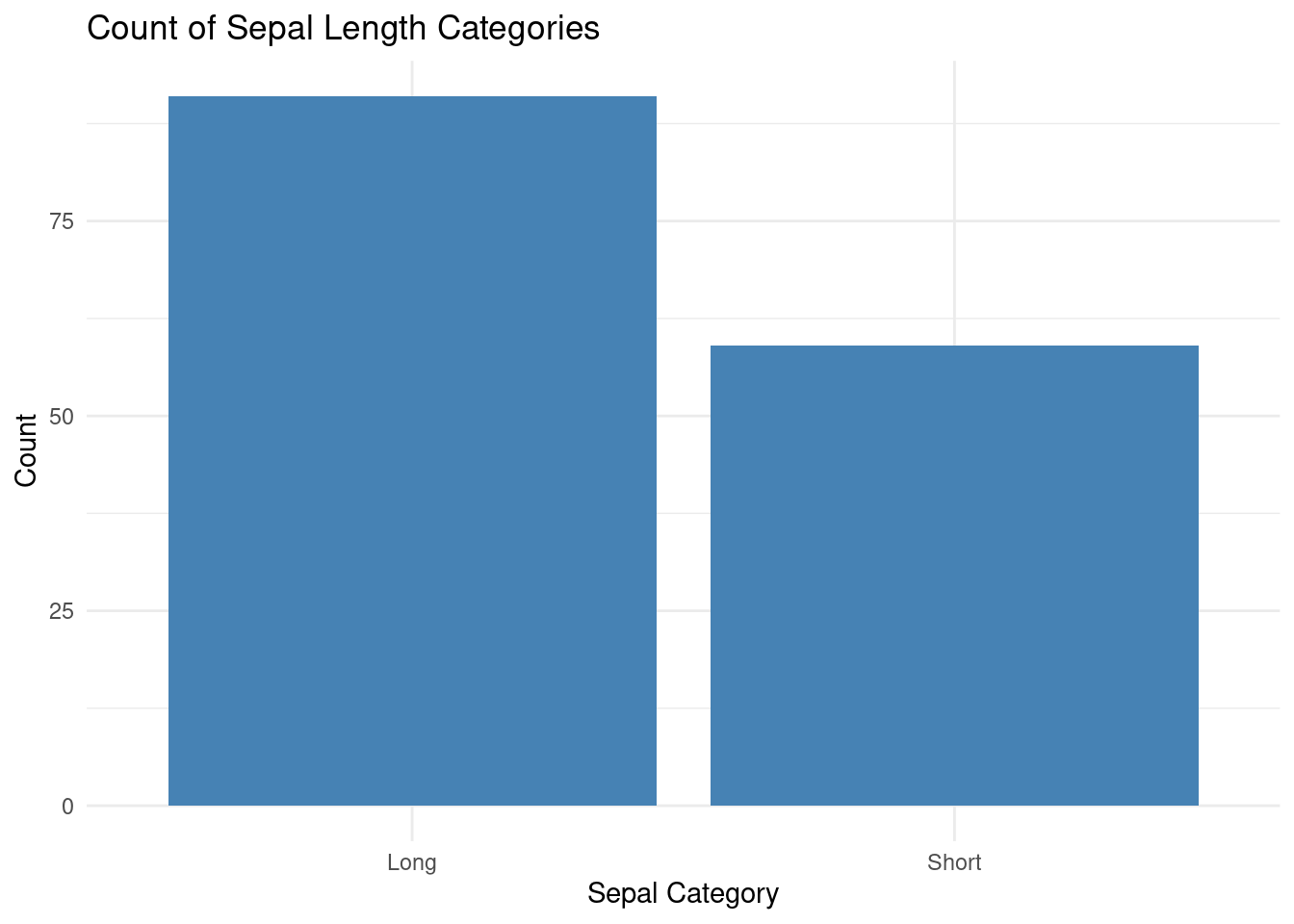
You can define custom functions in R and apply them to Spark DataFrame columns using dapply() or gapply(). Here’s an example of applying a user-defined function to categorize Sepal_Length.

dappy: Apply a function to each partition of a SparkDataFrame.

Code
# Define a custom function to categorize Sepal_Length
# Step 1: Set up SparkR
Sys.setenv(SPARK_HOME = "/opt/spark")  # Adjust to your Spark installation path
library(SparkR, lib.loc = c(file.path(Sys.getenv("SPARK_HOME"), "R", "lib")))

# Detach conflicting packages to avoid interference
if ("package:dplyr" %in% search()) detach("package:dplyr", unload=TRUE)
if ("package:data.table" %in% search()) detach("package:data.table", unload=TRUE)

# Initialize Spark session
sparkR.session(
  master = "local[*]",
  appName = "Iris Analysis",
  sparkConfig = list(spark.driver.memory = "4g")
)
Java ref type org.apache.spark.sql.SparkSession id 1 
Code
# Load Iris dataset and convert to Spark DataFrame
data(iris)
iris_df <- as.DataFrame(iris)
# Verify schema
printSchema(iris_df)
root
 |-- Sepal_Length: double (nullable = true)
 |-- Sepal_Width: double (nullable = true)
 |-- Petal_Length: double (nullable = true)
 |-- Petal_Width: double (nullable = true)
 |-- Species: string (nullable = true)
Code
# Define a custom function to categorize Sepal_Length
categorize_sepal_length <- function(df) {
  df$Sepal_Category <- ifelse(df$Sepal_Length > 5.5, "Long", "Short")
  return(df)
}

# Define the output schema for dapply
output_schema <- structType(
  structField("Sepal_Length", "double"),
  structField("Sepal_Width", "double"),
  structField("Petal_Length", "double"),
  structField("Petal_Width", "double"),
  structField("Species", "string"),
  structField("Sepal_Category", "string")
)

# Apply the custom function using dapply
df1 <- dapply(iris_df, categorize_sepal_length, output_schema)

#  Select and display Sepal_Length and Sepal_Category
result <- select(df1, "Sepal_Length", "Sepal_Category")
head(result, 5)
  Sepal_Length Sepal_Category
1          5.1          Short
2          4.9          Short
3          4.7          Short
4          4.6          Short
5          5.0          Short
Code
# Collect results to local R for further use (optional)
result_local <- collect(result)
print(result_local)
    Sepal_Length Sepal_Category
1            5.1          Short
2            4.9          Short
3            4.7          Short
4            4.6          Short
5            5.0          Short
6            5.4          Short
7            4.6          Short
8            5.0          Short
9            4.4          Short
10           4.9          Short
11           5.4          Short
12           4.8          Short
13           4.8          Short
14           4.3          Short
15           5.8           Long
16           5.7           Long
17           5.4          Short
18           5.1          Short
19           5.7           Long
20           5.1          Short
21           5.4          Short
22           5.1          Short
23           4.6          Short
24           5.1          Short
25           4.8          Short
26           5.0          Short
27           5.0          Short
28           5.2          Short
29           5.2          Short
30           4.7          Short
31           4.8          Short
32           5.4          Short
33           5.2          Short
34           5.5          Short
35           4.9          Short
36           5.0          Short
37           5.5          Short
38           4.9          Short
39           4.4          Short
40           5.1          Short
41           5.0          Short
42           4.5          Short
43           4.4          Short
44           5.0          Short
45           5.1          Short
46           4.8          Short
47           5.1          Short
48           4.6          Short
49           5.3          Short
50           5.0          Short
51           7.0           Long
52           6.4           Long
53           6.9           Long
54           5.5          Short
55           6.5           Long
56           5.7           Long
57           6.3           Long
58           4.9          Short
59           6.6           Long
60           5.2          Short
61           5.0          Short
62           5.9           Long
63           6.0           Long
64           6.1           Long
65           5.6           Long
66           6.7           Long
67           5.6           Long
68           5.8           Long
69           6.2           Long
70           5.6           Long
71           5.9           Long
72           6.1           Long
73           6.3           Long
74           6.1           Long
75           6.4           Long
76           6.6           Long
77           6.8           Long
78           6.7           Long
79           6.0           Long
80           5.7           Long
81           5.5          Short
82           5.5          Short
83           5.8           Long
84           6.0           Long
85           5.4          Short
86           6.0           Long
87           6.7           Long
88           6.3           Long
89           5.6           Long
90           5.5          Short
91           5.5          Short
92           6.1           Long
93           5.8           Long
94           5.0          Short
95           5.6           Long
96           5.7           Long
97           5.7           Long
98           6.2           Long
99           5.1          Short
100          5.7           Long
101          6.3           Long
102          5.8           Long
103          7.1           Long
104          6.3           Long
105          6.5           Long
106          7.6           Long
107          4.9          Short
108          7.3           Long
109          6.7           Long
110          7.2           Long
111          6.5           Long
112          6.4           Long
113          6.8           Long
114          5.7           Long
115          5.8           Long
116          6.4           Long
117          6.5           Long
118          7.7           Long
119          7.7           Long
120          6.0           Long
121          6.9           Long
122          5.6           Long
123          7.7           Long
124          6.3           Long
125          6.7           Long
126          7.2           Long
127          6.2           Long
128          6.1           Long
129          6.4           Long
130          7.2           Long
131          7.4           Long
132          7.9           Long
133          6.4           Long
134          6.3           Long
135          6.1           Long
136          7.7           Long
137          6.3           Long
138          6.4           Long
139          6.0           Long
140          6.9           Long
141          6.7           Long
142          6.9           Long
143          5.8           Long
144          6.8           Long
145          6.7           Long
146          6.7           Long
147          6.3           Long
148          6.5           Long
149          6.2           Long
150          5.9           Long
Code
# Plot result
library(ggplot2)
ggplot(result_local, aes(x = Sepal_Category)) +
  geom_bar(fill = "steelblue") +
  labs(title = "Count of Sepal Length Categories", x = "Sepal Category", y = "Count") +
  theme_minimal()

gapply: Groups the SparkDataFrame using the specified columns and applies the R function to each group

Groups the data by waiting and applies a function to compute the maximum eruptions for each group. The key is the waiting value, and x is a data frame of rows with that waiting value.

Code
# Initialize Spark session
sparkR.session(
  master = "local[*]",
  appName = "Old Faithful Analysis",
  sparkConfig = list(spark.driver.memory = "4g")
)
Java ref type org.apache.spark.sql.SparkSession id 1 
Code
# Load Old Faithful dataset and convert to Spark DataFrame
data(faithful)  # Available in base R
faithful_df <- as.DataFrame(faithful)

# Verify schema
printSchema(faithful_df)
root
 |-- eruptions: double (nullable = true)
 |-- waiting: double (nullable = true)
Code
# Expected: waiting (double), eruptions (double)

# SDefine schema for gapply output
schema <- structType(
  structField("waiting", "double"),
  structField("max_eruption", "double")
)

# Apply gapply to group by waiting and compute max eruption
result <- gapply(
  faithful_df,
  "waiting",
  function(key, x) {
    y <- data.frame(key, max(x$eruptions))
    return(y)
  },
  schema
)

# Sort by max_eruption (descending) and collect top 6
sorted_result <- arrange(result, desc(result$max_eruption))
top_six <- head(collect(sorted_result), 6)
print(top_six)
  waiting max_eruption
1      96        5.100
2      76        5.067
3      77        5.033
4      88        5.000
5      86        4.933
6      82        4.900

Large Data Processing with SparkR

In this section, we will demonstrate how to use SparkR for processing a large dataset, specifically the NYC Taxi dataset. This dataset contains trip records from New York City taxis and is commonly used for big data analysis.

Importing Data (parquet file)

We will use open_dataset() function of arrow package to import yellow_tripdata_2023.parquet as a lazy data. The open_dataset() function is used to read in a dataset from a specified file path or URL. It is particularly useful for working with large datasets that may not fit into memory all at once. The function returns a lazy dataset object that can be manipulated using dplyr-style syntax, allowing for efficient filtering, grouping, and summarization of the data without loading the entire dataset into memory. This makes it an ideal choice for working with big data in R.

Code
trip_data_path<-"/home/zia207/WebSites/R_Website/High_Performance_Computing_R/R_Markdown/Data/yellow_tripdata_2023-01.parquet"
zone_lookup_path<-"/home/zia207/WebSites/R_Website/High_Performance_Computing_R/R_Markdown/Data/taxi_zone_lookup.csv"
# Load January 2023 data
# Load Yellow Trip Data (Parquet)
trips <- read.df(trip_data_path, source = "parquet")
# Load Taxi Zone Lookup (CSV)
zones <- read.df(zone_lookup_path, source = "csv", header = "true", inferSchema = "true")
Code
# Print schemas to verify
printSchema(trips)
root
 |-- VendorID: long (nullable = true)
 |-- tpep_pickup_datetime: timestamp_ntz (nullable = true)
 |-- tpep_dropoff_datetime: timestamp_ntz (nullable = true)
 |-- passenger_count: double (nullable = true)
 |-- trip_distance: double (nullable = true)
 |-- RatecodeID: double (nullable = true)
 |-- store_and_fwd_flag: string (nullable = true)
 |-- PULocationID: long (nullable = true)
 |-- DOLocationID: long (nullable = true)
 |-- payment_type: long (nullable = true)
 |-- fare_amount: double (nullable = true)
 |-- extra: double (nullable = true)
 |-- mta_tax: double (nullable = true)
 |-- tip_amount: double (nullable = true)
 |-- tolls_amount: double (nullable = true)
 |-- improvement_surcharge: double (nullable = true)
 |-- total_amount: double (nullable = true)
 |-- congestion_surcharge: double (nullable = true)
 |-- airport_fee: double (nullable = true)
Code
printSchema(zones)
root
 |-- LocationID: integer (nullable = true)
 |-- Borough: string (nullable = true)
 |-- Zone: string (nullable = true)
 |-- service_zone: string (nullable = true)

Exploring the Data

Register DataFrames as temporary views for SQL queries.

Code
# Register temporary views
createOrReplaceTempView(trips, "trips")
createOrReplaceTempView(zones, "zones")

# Basic stats: Number of trips
trip_count <- sql("SELECT COUNT(*) AS total_trips FROM trips")
collect(trip_count)  # ~3 million for January 2023
  total_trips
1     3066766
Code
# Sample 5 rows from trips
head(trips, 5)
  VendorID          tpep_pickup_datetime         tpep_dropoff_datetime
1        2 <environment: 0x5b8dea451390> <environment: 0x5b8dea4118f8>
2        2 <environment: 0x5b8dea447470> <environment: 0x5b8dea406f20>
3        2 <environment: 0x5b8dea435518> <environment: 0x5b8dea4001b8>
4        1 <environment: 0x5b8dea4239b0> <environment: 0x5b8dea3f5738>
5        2 <environment: 0x5b8dea41c708> <environment: 0x5b8dea3eb658>
  passenger_count trip_distance RatecodeID store_and_fwd_flag PULocationID
1               1          0.97          1                  N          161
2               1          1.10          1                  N           43
3               1          2.51          1                  N           48
4               0          1.90          1                  N          138
5               1          1.43          1                  N          107
  DOLocationID payment_type fare_amount extra mta_tax tip_amount tolls_amount
1          141            2         9.3  1.00     0.5       0.00            0
2          237            1         7.9  1.00     0.5       4.00            0
3          238            1        14.9  1.00     0.5      15.00            0
4            7            1        12.1  7.25     0.5       0.00            0
5           79            1        11.4  1.00     0.5       3.28            0
  improvement_surcharge total_amount congestion_surcharge airport_fee
1                     1        14.30                  2.5        0.00
2                     1        16.90                  2.5        0.00
3                     1        34.90                  2.5        0.00
4                     1        20.85                  0.0        1.25
5                     1        19.68                  2.5        0.00

Summary Statistics

Code
# Summary statistics for trip_distance and total_amount
summary_trips <- summarize(trips, 
  avg_distance = mean(trips$trip_distance),
  avg_fare = mean(trips$total_amount),
  max_distance = max(trips$trip_distance)
)
collect(summary_trips)
  avg_distance avg_fare max_distance
1     3.847342 27.02038     258928.1

Joining Datasets

Join trips with zones to add borough/zone names. We’ll join on pickup location (PULocationID).

Code
# Join trips with zones on PULocationID
joined_trips <- sql("
  SELECT t.*, z.Borough AS pickup_borough, z.Zone AS pickup_zone
  FROM trips t
  JOIN zones z ON t.PULocationID = z.LocationID
")

# Register the joined DataFrame
createOrReplaceTempView(joined_trips, "joined_trips")

Data Analysis Examples

Average Trip Distance by Pickup Borough

Code
avg_distance_borough <- sql("
  SELECT pickup_borough, AVG(trip_distance) AS avg_distance
  FROM joined_trips
  GROUP BY pickup_borough
  ORDER BY avg_distance DESC
")
collect(avg_distance_borough)
  pickup_borough avg_distance
1         Queens    12.320490
2  Staten Island    11.356774
3        Unknown     7.362869
4       Brooklyn     5.677405
5          Bronx     5.296593
6      Manhattan     2.883807
7            EWR     1.594780

Total Fare Amount by Payment Type

Code
total_fare_payment <- sql("
  SELECT payment_type, SUM(total_amount) AS total_fare
  FROM trips
  GROUP BY payment_type
  ORDER BY total_fare DESC
")
collect(total_fare_payment)
  payment_type  total_fare
1            1 68240616.86
2            2 12260056.18
3            0  2090131.14
4            3   189364.69
5            4    85023.35

Average Fare by Pickup Zone

Code
avg_fare_by_zone <- sql("
  SELECT pickup_zone, AVG(total_amount) AS avg_fare, COUNT(*) AS trip_count
  FROM joined_trips
  WHERE total_amount > 0 AND trip_distance > 0
  GROUP BY pickup_zone
  HAVING trip_count > 100  -- Filter for zones with sufficient trips
  ORDER BY avg_fare DESC
")
collect(avg_fare_by_zone)
                          pickup_zone avg_fare trip_count
1                        Baisley Park 86.98441       1237
2                                <NA> 84.26012        505
3                       South Jamaica 80.59627        699
4        Flushing Meadows-Corona Park 78.65827       1560
5                         JFK Airport 77.11626     154267
6           Springfield Gardens South 73.79337        285
7                             Jamaica 71.05417        791
8             Briarwood/Jamaica Hills 70.69585        491
9                    South Ozone Park 68.53764        487
10                       Howard Beach 65.49320        172
11                  LaGuardia Airport 63.99337      88035
12                             Corona 63.80664        277
13                            Maspeth 61.30857        217
14                      East Elmhurst 59.33700      12755
15                        Kew Gardens 59.24856        263
16                          Rego Park 57.30500        170
17                       Far Rockaway 52.61812        101
18                           Elmhurst 51.64916        380
19                      Richmond Hill 50.96318        261
20                       Coney Island 50.01576        125
21                          Bay Ridge 48.81048        165
22                           Steinway 48.22820        528
23                           Canarsie 47.35682        355
24                           Red Hook 46.78314        102
25  University Heights/Morris Heights 46.09732        149
26                           Rosedale 45.84393        112
27     Long Island City/Hunters Point 45.58400        982
28                      Starrett City 44.44515        136
29                         Co-Op City 43.94704        203
30                     Queens Village 43.51297        148
31           Williamsbridge/Olinville 42.30618        123
32                           Flushing 40.36098        112
33                                 NV 39.25507      38051
34                   Sunset Park West 38.69563        128
35                             Inwood 37.83394        137
36              Soundview/Castle Hill 37.73266        169
37                       Saint Albans 37.20131        183
38                          Sunnyside 36.94886       1867
39                           Woodside 36.17822        533
40                  East Williamsburg 36.16691        459
41                          Flatlands 35.52576        165
42         Spuyten Duyvil/Kingsbridge 34.43264        106
43                      Cypress Hills 34.16353        150
44          Springfield Gardens North 34.03994        158
45               Flatbush/Ditmas Park 33.99560        232
46                     Bushwick North 33.88460        187
47                 DUMBO/Vinegar Hill 33.78543        529
48                     Bushwick South 33.47232        263
49           Financial District South 33.09857       6618
50                      East New York 32.82944        408
51                   Brooklyn Heights 32.81445       1194
52           Financial District North 32.33246      13573
53           Washington Heights North 32.32010        304
54                 World Trade Center 31.86310      12556
55                   Elmhurst/Maspeth 31.77670        106
56                  Battery Park City 31.53211      15491
57                         Park Slope 31.24479        703
58                    Jackson Heights 31.23240        459
59          Prospect-Lefferts Gardens 31.11255        267
60                        Brownsville 30.83106        160
61                         Ocean Hill 30.81534        174
62          Williamsburg (North Side) 30.81440       1217
63        Downtown Brooklyn/MetroTech 30.75477       1465
64                       Battery Park 30.75196        764
65                   Prospect Heights 30.71070        229
66                            Midwood 30.67635        104
67                            Bedford 30.58069        276
68                        Cobble Hill 30.50866        573
69                         Greenpoint 30.32947        486
70                            Seaport 30.26947       4301
71                Crown Heights North 30.04986        427
72       East Flatbush/Remsen Village 30.04507        146
73             East Flatbush/Farragut 29.99893        103
74   East Concourse/Concourse Village 29.92729        129
75                Crown Heights South 29.91533        107
76          Williamsburg (South Side) 29.86857        906
77               Van Nest/Morris Park 29.75215        135
78                 South Williamsburg 29.57333        108
79                 Stuyvesant Heights 29.43415        207
80           Washington Heights South 28.99650       1686
81                    Carroll Gardens 28.95310        361
82                     West Concourse 28.91292        195
83                  Kew Gardens Hills 28.75220        118
84                       Clinton Hill 28.51010        298
85            Two Bridges/Seward Park 28.39067       3032
86                          Chinatown 28.34188       3768
87             Mott Haven/Port Morris 28.28374        235
88                        Boerum Hill 28.17257        968
89                       Forest Hills 27.93538        385
90                        Fort Greene 27.77723        855
91               TriBeCa/Civic Center 26.35006      38300
92          Times Sq/Theatre District 26.23201      97114
93                    Lower East Side 25.60603      30286
94                   Hamilton Heights 25.34193       2095
95                      Alphabet City 25.19082       3525
96      Meatpacking/West Village West 25.15541      23796
97            Queensbridge/Ravenswood 24.42341        434
98                          Hudson Sq 24.32893      13709
99                      Melrose South 24.23839        124
100               Little Italy/NoLiTa 24.22143      23427
101                      East Chelsea 23.99559      73710
102                  Garment District 23.95649      48202
103               UN/Turtle Bay South 23.89278      37160
104                              SoHo 23.87051      20272
105                    Midtown Center 23.58904     133391
106    Stuy Town/Peter Cooper Village 23.55642       4149
107         West Chelsea/Hudson Yards 23.54030      45445
108     Long Island City/Queens Plaza 23.47155       1249
109                       Old Astoria 23.46407        479
110                           Astoria 23.44656       1259
111                     Midtown South 23.37005      65891
112      Penn Station/Madison Sq West 23.31231     107638
113                     Midtown North 23.26812      83769
114                      Clinton East 23.25655      81790
115                      East Village 23.14800      76548
116           Greenwich Village South 23.08774      38919
117                      Midtown East 23.06644     103825
118                    Manhattanville 23.05480       1888
119               Morningside Heights 23.01812      13157
120                       Murray Hill 22.90791      86852
121                      West Village 22.83945      66323
122                      Clinton West 22.80348      17962
123                   Lenox Hill East 22.48126      65980
124                      Bloomingdale 22.43837       8343
125           Greenwich Village North 22.32443      39544
126                          Flatiron 22.28513      47929
127                    Yorkville East 22.08635      42995
128                          Gramercy 21.96709      67027
129                          Union Sq 21.94952      80025
130                      Central Park 21.89887      49073
131                          Kips Bay 21.83426      36311
132                  Manhattan Valley 21.48992      25421
133             Upper West Side North 21.47045      62255
134             Upper West Side South 21.38200      85928
135               Lincoln Square East 21.34555      98681
136               Lincoln Square West 21.07686      34183
137                    Yorkville West 21.05248      65052
138     Sutton Place/Turtle Bay North 20.95878      61395
139                 East Harlem South 20.88268      18530
140             Upper East Side North 20.64856     136656
141              Central Harlem North 20.52370       2427
142                 East Harlem North 20.52012       5926
143                    Central Harlem 20.41015       6669
144                   Lenox Hill West 20.27005      79801
145             Upper East Side South 19.73756     146156

Trip Duration Analysis

Code
# Add duration column (requires casting timestamps)
trips_with_duration <- sql("
  SELECT *, 
    (UNIX_TIMESTAMP(tpep_dropoff_datetime) - UNIX_TIMESTAMP(tpep_pickup_datetime)) / 60 AS duration_minutes
  FROM trips
  WHERE tpep_dropoff_datetime > tpep_pickup_datetime  -- Valid durations
")

createOrReplaceTempView(trips_with_duration, "trips_with_duration")

# Average duration by passenger count
avg_duration <- sql("
  SELECT passenger_count, AVG(duration_minutes) AS avg_duration
  FROM trips_with_duration
  GROUP BY passenger_count
  ORDER BY passenger_count
")
collect(avg_duration)
   passenger_count avg_duration
1               NA   16.7780047
2                0   13.1911597
3                1   15.2169570
4                2   17.2038656
5                3   16.8067216
6                4   16.7172034
7                5   18.6607172
8                6   18.8262903
9                7   10.5972222
10               8   13.1115385
11               9    0.1166667

Peak Hours for Pickups

Code
peak_hours <- sql("
  SELECT HOUR(tpep_pickup_datetime) AS pickup_hour, COUNT(*) AS trip_count
  FROM trips
  GROUP BY pickup_hour
  ORDER BY trip_count DESC
")
collect(peak_hours)
   pickup_hour trip_count
1           18     215889
2           17     209493
3           15     196424
4           16     195977
5           19     192801
6           14     191604
7           13     178739
8           12     169858
9           20     165862
10          21     161548
11          11     154157
12          22     147415
13          10     143666
14           9     131111
15           8     116865
16          23     114528
17           7      86877
18           0      84969
19           1      59799
20           6      43860
21           2      42040
22           3      27438
23           5      18011
24           4      17835
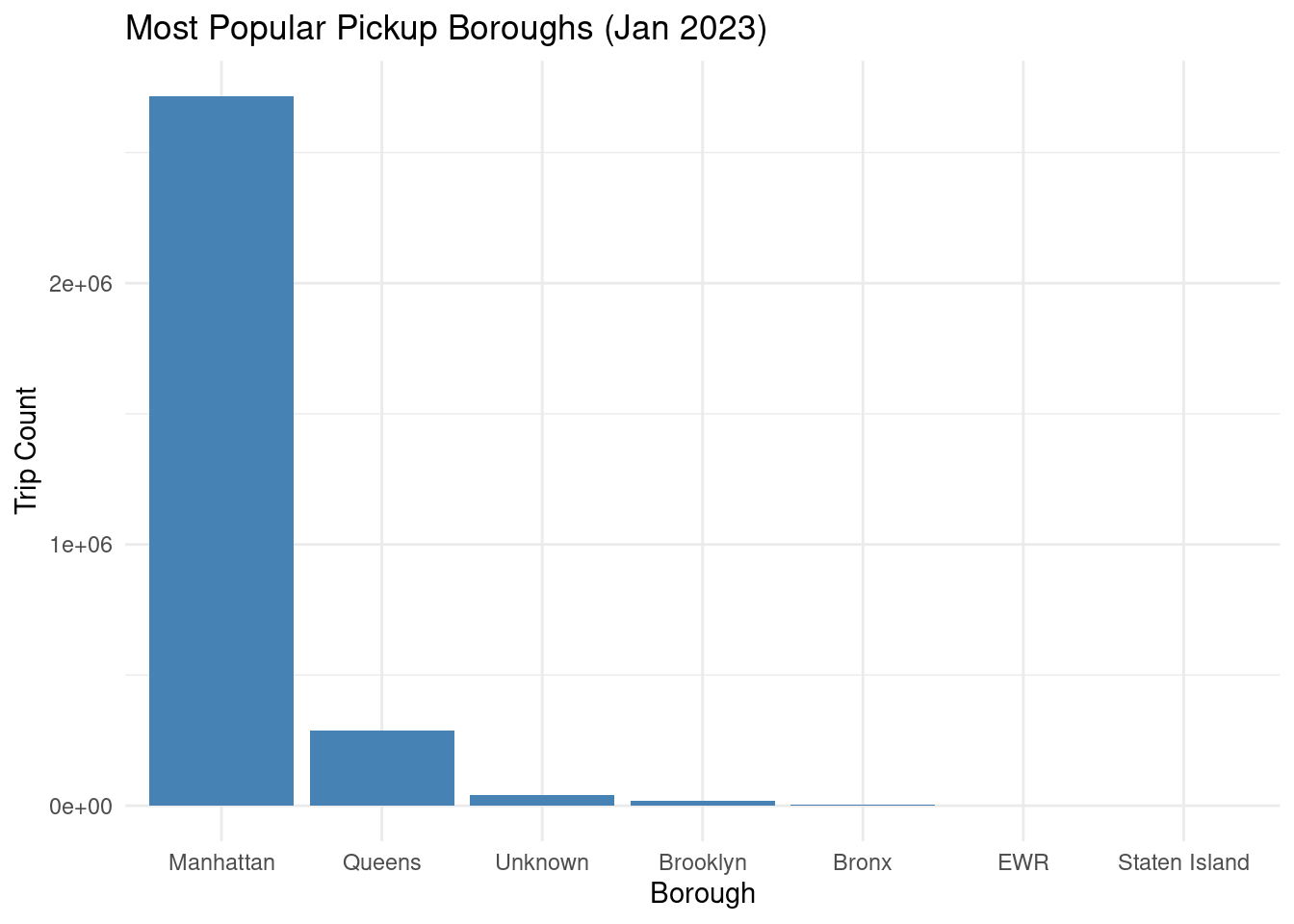
Code
popular_boroughs <- sql("
  SELECT pickup_borough, COUNT(*) AS trip_count
  FROM joined_trips
  GROUP BY pickup_borough
  ORDER BY trip_count DESC
")
# Collect popular boroughs to local R data frame
popular_boroughs_local <- collect(popular_boroughs)

# Install ggplot2 if needed: install.packages("ggplot2")
library(ggplot2)

# Bar plot
ggplot(popular_boroughs_local, aes(x = reorder(pickup_borough, -trip_count), y = trip_count)) +
  geom_bar(stat = "identity", fill = "steelblue") +
  labs(title = "Most Popular Pickup Boroughs (Jan 2023)", x = "Borough", y = "Trip Count") +
  theme_minimal()

Correlation Analysis

SparkR provides the corr function to compute correlations in a distributed manner, leveraging Apache Spark’s distributed computing capabilities. This function calculates the Pearson correlation coefficient between pairs of numerical columns in a Spark DataFrame, making it suitable for large-scale datasets processed in a distributed system.

Code
# Select relevant numerical columns for correlation
trip_data <- select(trips, "trip_distance", "fare_amount", "tip_amount")

# Remove rows with NA values using na.omit (fix for dropNA error)
trip_data <- na.omit(trip_data)

# Show first few rows of the cleaned data
showDF(trip_data, numRows = 5)
+-------------+-----------+----------+
|trip_distance|fare_amount|tip_amount|
+-------------+-----------+----------+
|         0.97|        9.3|       0.0|
|          1.1|        7.9|       4.0|
|         2.51|       14.9|      15.0|
|          1.9|       12.1|       0.0|
|         1.43|       11.4|      3.28|
+-------------+-----------+----------+
only showing top 5 rows
Code
# Compute Pearson correlations for each pair of columns
print("Distributed Pearson Correlations:")
[1] "Distributed Pearson Correlations:"
Code
cor_trip_fare <- corr(trip_data, "trip_distance", "fare_amount", method = "pearson")
cor_trip_tip <- corr(trip_data, "trip_distance", "tip_amount", method = "pearson")
cor_fare_tip <- corr(trip_data, "fare_amount", "tip_amount", method = "pearson")

# Print correlation matrix
print("Distributed Pearson Correlation Matrix:")
[1] "Distributed Pearson Correlation Matrix:"
Code
cor_matrix <- matrix(c(1, cor_trip_fare, cor_trip_tip,
                        cor_trip_fare, 1, cor_fare_tip,
                        cor_trip_tip, cor_fare_tip, 1),
                      nrow = 3, byrow = TRUE)

print(cor_matrix)
           [,1]       [,2]       [,3]
[1,] 1.00000000 0.01634001 0.01115849
[2,] 0.01634001 1.00000000 0.59015235
[3,] 0.01115849 0.59015235 1.00000000

Simple Linear Regression Example

spark.lm fits a linear regression model against a SparkDataFrame. Users can call summary to print a summary of the fitted model, predict to make predictions on new data, and write.ml/read.ml to save/load fitted models.

Below is an example of fitting a simple linear regression model to predict fare_amount based on trip_distance. reParam and ’maxIter` are regularization parameter and maximum number of iterations, respectively.

Code
# Predict fare_amount based on trip_distance
simple_model <- spark.lm(trip_data, fare_amount ~ trip_distance, 
                         regParam = 0.01, 
                         maxIter = 100L)
summary_simple <- summary(simple_model)
# Print simple regression summary
print("Simple Linear Regression Summary (fare_amount ~ trip_distance):")
[1] "Simple Linear Regression Summary (fare_amount ~ trip_distance):"
Code
print(summary_simple)
$coefficients
                  Estimate
(Intercept)   18.362585663
trip_distance  0.001165207

$numFeatures
[1] 1

Multi-Variable Linear Regression Example

Code
# Multi-variable regression to predict fare_amount
multi_model <- spark.lm(trip_data, fare_amount ~ trip_distance + tip_amount, 
                        regParam = 0.01, 
                        maxIter = 100L)
summary_multi <- summary(multi_model)
# Print multiple regression summary
print("Multiple Linear Regression Summary (fare_amount ~ trip_distance + tip_amount):")
[1] "Multiple Linear Regression Summary (fare_amount ~ trip_distance + tip_amount):"
Code
print(summary_multi)
$coefficients
                  Estimate
(Intercept)   9.1220008915
trip_distance 0.0006959653
tip_amount    2.7442259253

$numFeatures
[1] 2

Summary and Conclusion

In this section, we explored how to use Apache Spark with R for distributed computing and big data analysis. We covered the basics of setting up SparkR, performing data processing operations, and analyzing a large dataset (NYC Taxi data) using SQL queries and SparkR functions. We also demonstrated how to compute correlations and fit linear regression models in a distributed manner.

Resources

1, Mastering Spark with R

  1. Distributed Systems” by MIT OpenCourseWare

  2. Use SparkR

  3. Spark Tutorial” by Databricks Community Edition