Code
packages<- c(
'tidyverse',
'data.table',
'feather',
'arrow',
'parallel',
'foreach',
'doParallel',
'future',
'furrr',
'future.apply',
'nycflights13',
'glue'
)

Efficient data processing and analysis are critical in modern data science, especially as datasets grow in size and complexity. In R, the {future} package offers a powerful and intuitive framework for parallel and distributed computing, enabling users to write scalable and efficient code with minimal changes to their existing workflows. By abstracting the complexities of parallel backends—such as multi-core processing, distributed computing, or even cloud-based resources —{future} allows analysts and researchers to focus on their analytical tasks while significantly reducing computation time. This introduction explores how {future} integrates seamlessly with common R programming patterns, enhancing performance in data manipulation, modeling, and simulation through easy-to-implement parallelization strategies. Whether you’re working with large datasets or running computationally intensive analyses, {future} empowers R users to harness the full potential of modern computing architectures.
The {future} package provides a more flexible and user-friendly framework for parallel and asynchronous computation in R, allowing seamless switching between sequential and parallel evaluation with minimal code changes. Below, I’ll show how to use {future} descriptive statistics, correlation, simple linear regression, and multiple linear regression, leveraging the future_lapply() function from the {future.apply} package for parallel processing.

targets or drake.packages<- c(
'tidyverse',
'data.table',
'feather',
'arrow',
'parallel',
'foreach',
'doParallel',
'future',
'furrr',
'future.apply',
'nycflights13',
'glue'
)#| warning: false
#| error: false
# Install missing packages
new_packages <- packages[!(packages %in% installed.packages()[,"Package"])]
if(length(new_packages)) install.packages(new_packages)# Verify
cat("Installed packages:\n")Installed packages:print(sapply(packages, requireNamespace, quietly = TRUE)) tidyverse data.table feather arrow parallel foreach
TRUE TRUE TRUE TRUE TRUE TRUE
doParallel future furrr future.apply nycflights13 glue
TRUE TRUE TRUE TRUE TRUE TRUE # Load packages with suppressed messages
invisible(lapply(packages, function(pkg) {
suppressPackageStartupMessages(library(pkg, character.only = TRUE))
}))# Check loaded packages
cat("Successfully loaded packages:\n")Successfully loaded packages:print(search()[grepl("package:", search())]) [1] "package:glue" "package:nycflights13" "package:future.apply"
[4] "package:furrr" "package:future" "package:doParallel"
[7] "package:iterators" "package:foreach" "package:parallel"
[10] "package:arrow" "package:feather" "package:data.table"
[13] "package:lubridate" "package:forcats" "package:stringr"
[16] "package:dplyr" "package:purrr" "package:readr"
[19] "package:tidyr" "package:tibble" "package:ggplot2"
[22] "package:tidyverse" "package:stats" "package:graphics"
[25] "package:grDevices" "package:utils" "package:datasets"
[28] "package:methods" "package:base" The {future} package in R is a powerful and flexible framework designed to simplify parallel and asynchronous computing, enabling users to write scalable, efficient, and portable code. It provides a unified interface for evaluating R expressions in the “future” — that is, asynchronously or in parallel — without requiring deep expertise in low-level parallel programming. This makes it an ideal tool for speeding up data processing, simulations, modeling, and other computationally intensive tasks.
At the heart of the package is the future abstraction — a placeholder for a value that will be computed later. Once created, a future can be resolved (i.e., its value retrieved) when needed. The computation may happen:
Here is an example illustrating how the basics of futures work. First, consider the following code snippet that uses plain R code:
v <- {
   cat("Hello world!\n")
   3.14
 }
Hello world!v[1] 3.14It works by assigning the value of an expression to variable v and we then print the value of v. Moreover, when the expression for v is evaluated we also print a message to the console. Now, let’s see how we can achieve the same using a future:
v %<-% {
   cat("Hello world!\n")
   3.14
 }
v
Hello world![1] 3.14The difference is that the expression is now wrapped in a future assignment operator %<-%. This means that the expression will be evaluated in the {future}, potentially in a different R session or core (<-), depending on the plan we set. The message “Hello world!” will be printed when the future is resolved (i.e., when we access the value of v).
we can choose to evaluate the future expression in a separate R process asynchronously by simply switching settings as:
plan(multisession)  # Use multiple R sessions
v %<-% {
   cat("Hello world!\n")
   3.14
}
v
Hello world![1] 3.14The future package provides a consistent syntax regardless of the backend used. You write your code once and switch between sequential, multicore, multisession, or cluster execution by changing the plan.
You can control how futures are evaluated using plan():
| Plan | Description |
|---|---|
sequential |
No parallelism (default) |
multicore |
Forked processes (Unix-like systems) |
multisession |
Separate R sessions (Windows & Unix) |
multiprocess |
Auto-selects multicore or multisession |
cluster |
Custom clusters (e.g., across machines) |
remote |
Remote R sessions |
batchtools |
Integration with job schedulers (SLURM, SGE, etc.) |
future.callr |
Uses {callr} for lightweight parallelism |
plan(multisession) # Automatically chooses best option# An sequential future
plan(sequential)
f <- future({
a <- 7
b <- 3
c <- 2
a * b * c
})
y <- value(f)
print(y)[1] 42# A sequential future with lazy evaluation
plan(sequential)
f <- future({
a <- 7
b <- 3
c <- 2
a * b * c
}, lazy = TRUE)
y <- value(f)
print(y)[1] 42# A multicore future (specified as a string)
plan("multicore")
f <- future({
a <- 7
b <- 3
c <- 2
a * b * c
})
y <- value(f)
print(y)[1] 42# A multisession future (specified via a string variable)
plan("future::multisession")
f <- future({
a <- 7
b <- 3
c <- 2
a * b * c
})
y <- value(f)
print(y)[1] 42## Explicitly specifying number of workers
## (default is parallelly::availableCores())
plan(multicore, workers = 10)
message("Number of parallel workers: ", nbrOfWorkers())Number of parallel workers: 1The future ecosystem integrates seamlessly with popular R packages through future-aware counterparts:
furrr: Parallel purrr – apply map() functions in parallel.library(furrr)
plan(multisession)
mtcars %>%
split(.$cyl) %>% # Split into list by 'cyl'
future_map_dbl(~ coef(lm(mpg ~ wt, data = .x))[2]) # Extract slope 4 6 8
-5.647025 -2.780106 -2.192438 future.apply: Parallel versions of lapply, sapply, etc.library(future.apply)
plan(multisession)
plan(sequential) # No parallelism — safe
result <- future_lapply(1:10, function(x) x^2)
print(result)[[1]]
[1] 1
[[2]]
[1] 4
[[3]]
[1] 9
[[4]]
[1] 16
[[5]]
[1] 25
[[6]]
[1] 36
[[7]]
[1] 49
[[8]]
[1] 64
[[9]]
[1] 81
[[10]]
[1] 100future.batchtools: For HPC environments (e.g., SLURM, PBS).clustermq: Efficient worker-based parallelization.targets / drake: Scalable pipelines with future backends.The future package automatically identifies global variables and functions used inside a future expression and exports them to the worker environment. You can control this behavior:
globals = FALSE to disable automatic detection.globals = list(...).local = TRUE to avoid cluttering global environment.a <- 5
f <- future(a^2, globals = "a")If a future throws an error, it is captured and re-thrown when value(f) is called:
f <- future(stop("Something went wrong"))
tryCatch({
  value(f)
}, error = function(e) print(paste("Error:", e$message)))
[1] "Error: Something went wrong"For debugging, use plan(sequential) to run futures in the current session.
With plan(list(...)), you can combine multiple backends or support nested parallelism (e.g., foreach inside a future). The future.callr::callr and future.devices packages further extend capabilities.
plan(list(tweak(multisession, workers = 2),
tweak(multicore, workers = 4)))plan(multiprocess) for general-purpose parallelism.plan(sequential) first.write.csv() inside a future).furrr or future.apply for functional programming patterns.In this tutorial, you’ll learn how to use the {future} package in R to efficiently process large datasets in parallel. We’ll work with the Yellow Taxi Trip Data for 2023, a real-world dataset stored in Parquet format (yellow_tripdata_2023.parquet), which is commonly used in data analysis and can be quite large (often several GBs).
We’ll demonstrate how {future} can speed up data processing tasks such as filtering, aggregation, and summary statistics by leveraging multiple CPU cores.
dataFolder<-"/home/zia207/WebSites/R_Website/High_Performance_Computing_R/R_Markdown/Data/"
# Load January 2023 data
taxi_data <- read_parquet(paste0(dataFolder, "yellow_tripdata_2023.parquet"))Choose a parallelization strategy. We’ll use multiprocess to automatically pick the best option (multicore on Unix, multisession on Windows):
# Use multiple processes (safe across platforms)
plan(multicore)

# Confirm the plan
plan()
multicore:
- args: function (..., workers = availableCores(constraints = "multicore"))
- tweaked: FALSE
- call: plan(multicore)
SequentialFutureBackend:
Inherits: FutureBackend
UUID: 9463d78a03b6381ab093f1d2146b8871
Number of workers: 1
Number of free workers: 1
Available cores: 80
Automatic garbage collection: FALSE
Early signaling: FALSE
Interrupts are enabled: TRUE
Maximum total size of globals: +Inf
Maximum total size of value: +Inf
Argument 'wait.timeout': NULL
Argument 'wait.interval': NULL
Argument 'wait.alpha': NULL
Argument 'hooks': FALSE
Number of active futures: 0
Number of futures since start: 0 (0 created, 0 launched, 0 finished)
Total runtime of futures: 0 secs (NaN secs/finished future)To parallelize, we split the dataset into chunks based on the number of cores:
# Extract month from pickup datetime
taxi_by_month <- taxi_data %>%
  mutate(month_val = month(tpep_pickup_datetime)) %>%
  group_by(month_val) %>%
  group_split() %>%
  map(collect)

length(taxi_by_month)  # Should be 12
[1] 12future_map()We’ll compute monthly summaries: total trips, average fare, and total revenue.
# use future_map_dfr() to process each month's data in parallel
monthly_summary <- future_map_dfr(taxi_by_month, ~ {
  month_num <- first(.x$month_val)

  .x %>%
    summarise(
      month = month_num,
      total_trips = n(),
      avg_fare = mean(fare_amount, na.rm = TRUE),
      total_revenue = sum(total_amount, na.rm = TRUE)
    )
})

print(monthly_summary)
# A tibble: 12 × 4
month total_trips avg_fare total_revenue
<int> <int> <dbl> <dbl>
1 1 3047130 18.4 82339590.
2 2 2914388 18.2 78405036.
3 3 3416062 18.9 94920124.
4 4 3276350 19.4 92754477.
5 5 3513795 19.9 101686164.
6 6 3314508 20.0 96319507.
7 7 2898551 19.7 82847748.
8 8 2827323 19.7 80918420.
9 9 2859197 20.6 85064408.
10 10 3510171 20.1 102465638.
11 11 3342226 19.6 95902515.
12 12 3390525 19.7 96759785.Finally, we can visualize the monthly revenue using ggplot2:
monthly_summary %>%
  arrange(month) %>%
  mutate(month_name = month.abb[month]) %>%
  ggplot(aes(x = month_name, y = total_revenue)) +
  geom_col(fill = "steelblue") +
  labs(title = "Total Revenue by Month (Yellow Taxi 2023)",
       x = "Month", y = "Total Revenue ($)") +
  theme_minimal()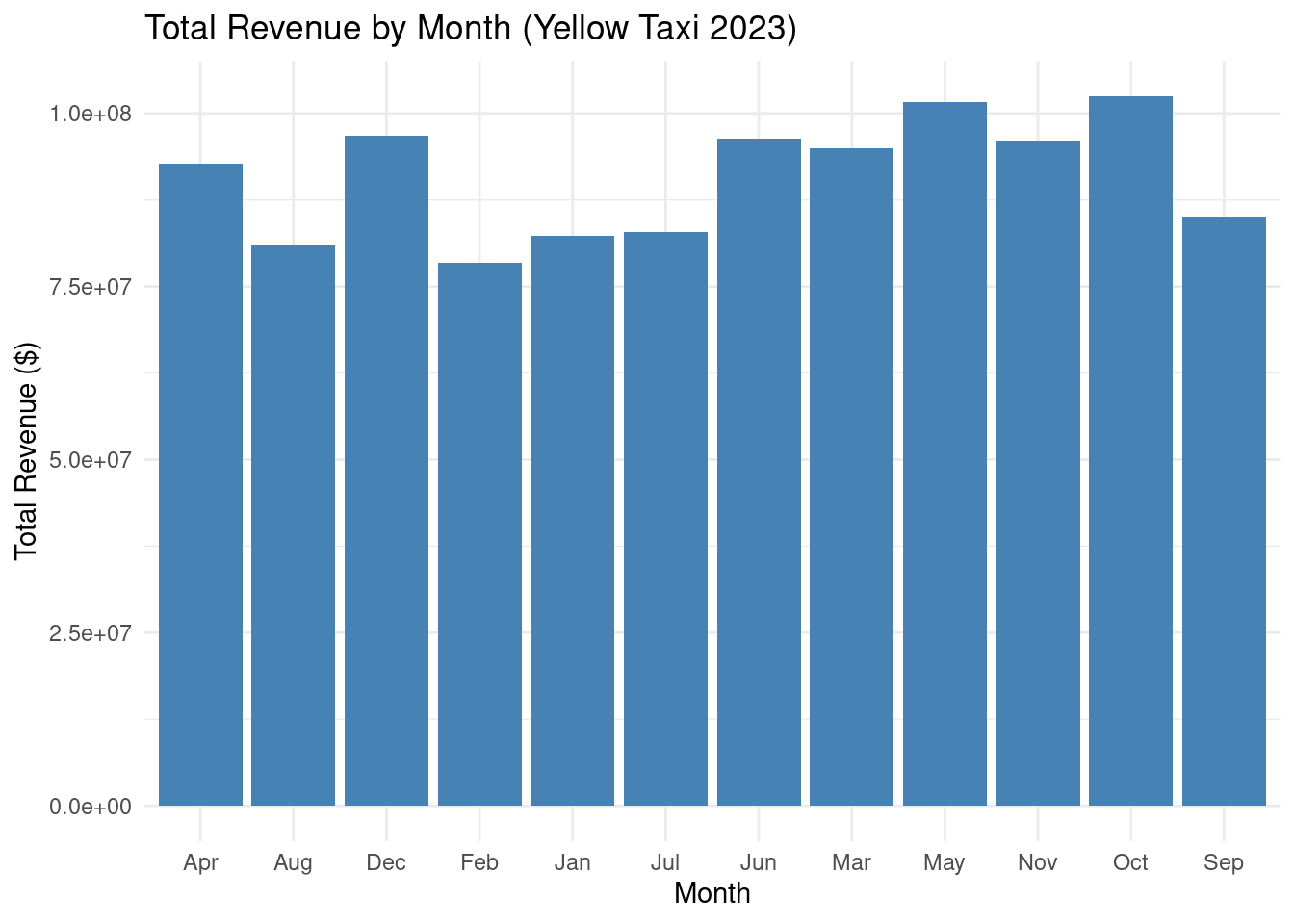
Suppose we want to save each month’s data as a CSV (e.g., for downstream use):
# Create output directory
dir.create("output/monthly_csv", showWarnings = FALSE, recursive = TRUE)

# Save each month in parallel
future_map2(taxi_by_month, seq(1, 12), ~ {
  filename <- glue("output/monthly_csv/yellow_tripdata_2023_{.y}.csv")
  write_csv(.x, filename)
  message(glue("Saved {.y}: {nrow(.x)} rows"))
})The {future} package provides a unified framework for parallel and distributed processing in R, making it easy to parallelize computations with minimal code changes. This tutorial adapts the statistical analysis of the NYC Yellow Taxi Trip Data (yellow_tripdata_2023-01.parquet) to use {future} and {future.apply} instead of {parallel}. We will perform:
The {future} package allows us to switch between sequential and parallel evaluation (e.g., multisession, multicore, or cluster) by setting the evaluation plan, making it ideal for scaling analyses on large datasets like the NYC taxi data (~3 million rows).
Load the {future} and {future.apply} packages and set the evaluation plan. We’ll use multisession for cross-platform compatibility (works on Windows, macOS, and Linux). Alternatively, you can use multicore (non-Windows) or cluster (for remote machines).
# Set the future plan to multisession (uses background R sessions)
plan(multisession, workers = availableCores() - 1)
# Alternatively, for macOS/Linux: plan(multicore, workers = availableCores() - 1)
# For cluster: plan(cluster, workers = c("node1", "node2"))

# Check available cores
print(availableCores())  # E.g., 8 cores
system
80 The workers argument specifies the number of parallel processes. We use availableCores() - 1 to reserve one core for system tasks.
Load the Parquet file using {arrow} and preprocess the data:
# Calculate trip duration and filter data
taxi_data <- taxi_data %>%
  mutate(trip_duration = as.numeric(difftime(tpep_dropoff_datetime, tpep_pickup_datetime, units = "mins"))) %>%
  filter(
    !is.na(trip_duration), !is.na(fare_amount), !is.na(trip_distance), !is.na(passenger_count),
    trip_duration > 0, fare_amount > 0, trip_distance > 0, passenger_count > 0
  ) %>%
  select(trip_duration, fare_amount, trip_distance, passenger_count)

# Inspect the data
glimpse(taxi_data)
Rows: 35,609,468
Columns: 4
$ trip_duration <dbl> 8.433333, 6.316667, 12.750000, 10.833333, 12.300000, 1…
$ fare_amount <dbl> 9.3, 7.9, 14.9, 11.4, 12.8, 12.1, 45.7, 17.7, 14.9, 11…
$ trip_distance <dbl> 0.97, 1.10, 2.51, 1.43, 1.84, 1.66, 11.70, 2.95, 3.01,…
$ passenger_count <dbl> 1, 1, 1, 1, 1, 1, 1, 1, 1, 1, 4, 1, 2, 1, 1, 1, 1, 3, …We compute trip_duration (in minutes) and filter out invalid rows to ensure data quality.
Split the data into chunks for parallel processing, similar to the {parallel} approach:
n_chunks <- availableCores() - 1
data_splits <- split(taxi_data, rep(1:n_chunks, each = ceiling(nrow(taxi_data) / n_chunks), length.out = nrow(taxi_data)))Compute mean, median, standard deviation, min, and max for trip_duration, fare_amount, and trip_distance.
process_descriptive <- function(chunk) {
  chunk %>%
    summarise(
      mean_duration = mean(trip_duration, na.rm = TRUE),
      median_duration = median(trip_duration, na.rm = TRUE),
      sd_duration = sd(trip_duration, na.rm = TRUE),
      min_duration = min(trip_duration, na.rm = TRUE),
      max_duration = max(trip_duration, na.rm = TRUE),
      mean_fare = mean(fare_amount, na.rm = TRUE),
      median_fare = median(fare_amount, na.rm = TRUE),
      sd_fare = sd(fare_amount, na.rm = TRUE),
      min_fare = min(fare_amount, na.rm = TRUE),
      max_fare = max(fare_amount, na.rm = TRUE),
      mean_distance = mean(trip_distance, na.rm = TRUE),
      median_distance = median(trip_distance, na.rm = TRUE),
      sd_distance = sd(trip_distance, na.rm = TRUE),
      min_distance = min(trip_distance, na.rm = TRUE),
      max_distance = max(trip_distance, na.rm = TRUE)
    ) %>%
    collect()
}plan(sequential) # Set to sequential for baseline
system.time({
serial_desc <- lapply(data_splits, process_descriptive)
serial_desc_summary <- do.call(rbind, serial_desc) %>%
summarise(across(everything(), mean, na.rm = TRUE))
})Warning: There was 1 warning in `summarise()`.
ℹ In argument: `across(everything(), mean, na.rm = TRUE)`.
Caused by warning:
! The `...` argument of `across()` is deprecated as of dplyr 1.1.0.
Supply arguments directly to `.fns` through an anonymous function instead.
# Previously
across(a:b, mean, na.rm = TRUE)
# Now
across(a:b, \(x) mean(x, na.rm = TRUE)) user system elapsed
4.814 2.386 7.201 print(serial_desc_summary)# A tibble: 1 × 15
mean_duration median_duration sd_duration min_duration max_duration mean_fare
<dbl> <dbl> <dbl> <dbl> <dbl> <dbl>
1 17.6 12.7 41.7 0.0173 2963. 19.8
# ℹ 9 more variables: median_fare <dbl>, sd_fare <dbl>, min_fare <dbl>,
# max_fare <dbl>, mean_distance <dbl>, median_distance <dbl>,
# sd_distance <dbl>, min_distance <dbl>, max_distance <dbl>future_lapplyplan(multisession, workers = availableCores() - 1)
system.time({
parallel_desc <- future_lapply(data_splits, process_descriptive)
parallel_desc_summary <- do.call(rbind, parallel_desc) %>%
summarise(across(everything(), mean, na.rm = TRUE))
}) user system elapsed
21.873 68.375 206.499 print(parallel_desc_summary)# A tibble: 1 × 15
mean_duration median_duration sd_duration min_duration max_duration mean_fare
<dbl> <dbl> <dbl> <dbl> <dbl> <dbl>
1 17.6 12.7 41.7 0.0173 2963. 19.8
# ℹ 9 more variables: median_fare <dbl>, sd_fare <dbl>, min_fare <dbl>,
# max_fare <dbl>, mean_distance <dbl>, median_distance <dbl>,
# sd_distance <dbl>, min_distance <dbl>, max_distance <dbl>The future_lapply() function is a drop-in replacement for lapply(), automatically handling parallel evaluation based on the plan() setting.
Compute the Pearson correlation matrix for trip_duration, fare_amount, and trip_distance.
process_correlation <- function(chunk) {
  cor_matrix <- cor(chunk[, c("trip_duration", "fare_amount", "trip_distance")], method = "pearson", use = "complete.obs")
  as.vector(cor_matrix)
}plan(sequential)
system.time({
serial_cor <- lapply(data_splits, process_correlation)
serial_cor_mean <- colMeans(do.call(rbind, serial_cor), na.rm = TRUE)
cor_matrix <- matrix(serial_cor_mean, nrow = 3, dimnames = list(
c("trip_duration", "fare_amount", "trip_distance"),
c("trip_duration", "fare_amount", "trip_distance")
))
}) user system elapsed
1.001 0.195 1.196 print(round(cor_matrix, 3)) trip_duration fare_amount trip_distance
trip_duration 1.000 0.263 0.071
fare_amount 0.263 1.000 0.249
trip_distance 0.071 0.249 1.000future_lapplyplan(multisession, workers = availableCores() - 1)
system.time({
parallel_cor <- future_lapply(data_splits, process_correlation)
parallel_cor_mean <- colMeans(do.call(rbind, parallel_cor), na.rm = TRUE)
parallel_cor_matrix <- matrix(parallel_cor_mean, nrow = 3, dimnames = list(
c("trip_duration", "fare_amount", "trip_distance"),
c("trip_duration", "fare_amount", "trip_distance")
))
}) user system elapsed
21.085 67.876 202.844 print(round(parallel_cor_matrix, 3)) trip_duration fare_amount trip_distance
trip_duration 1.000 0.263 0.071
fare_amount 0.263 1.000 0.249
trip_distance 0.071 0.249 1.000Model fare_amount as a function of trip_duration.
process_simple_regression <- function(chunk) {
  model <- lm(fare_amount ~ trip_duration, data = chunk)
  coef <- summary(model)$coefficients
  list(
    intercept = coef[1, 1],
    slope = coef[2, 1],
    r_squared = summary(model)$r.squared
  )
}plan(sequential)
system.time({
serial_reg <- lapply(data_splits, process_simple_regression)
serial_reg_summary <- do.call(rbind, lapply(serial_reg, as.data.frame)) %>%
summarise(
avg_intercept = mean(intercept, na.rm = TRUE),
avg_slope = mean(slope, na.rm = TRUE),
avg_r_squared = mean(r_squared, na.rm = TRUE)
)
}) user system elapsed
14.546 1.504 16.054 print(serial_reg_summary) avg_intercept avg_slope avg_r_squared
1 17.60915 0.1209458 0.07304362plan(multisession, workers = availableCores() - 1)
system.time({
parallel_reg <- future_lapply(data_splits, process_simple_regression)
parallel_reg_summary <- do.call(rbind, lapply(parallel_reg, as.data.frame)) %>%
summarise(
avg_intercept = mean(intercept, na.rm = TRUE),
avg_slope = mean(slope, na.rm = TRUE),
avg_r_squared = mean(r_squared, na.rm = TRUE)
)
}) user system elapsed
20.967 68.805 204.790 print(parallel_reg_summary) avg_intercept avg_slope avg_r_squared
1 17.60915 0.1209458 0.07304362Model fare_amount as a function of trip_duration, trip_distance, and passenger_count.
process_multiple_regression <- function(chunk) {
  model <- lm(fare_amount ~ trip_duration + trip_distance + passenger_count, data = chunk)
  coef <- summary(model)$coefficients
  list(
    intercept = coef[1, 1],
    slope_duration = coef[2, 1],
    slope_distance = coef[3, 1],
    slope_passenger = coef[4, 1],
    r_squared = summary(model)$r.squared
  )
}plan(sequential)
system.time({
serial_multi_reg <- lapply(data_splits, process_multiple_regression)
serial_multi_reg_summary <- do.call(rbind, lapply(serial_multi_reg, as.data.frame)) %>%
summarise(
avg_intercept = mean(intercept, na.rm = TRUE),
avg_slope_duration = mean(slope_duration, na.rm = TRUE),
avg_slope_distance = mean(slope_distance, na.rm = TRUE),
avg_slope_passenger = mean(slope_passenger, na.rm = TRUE),
avg_r_squared = mean(r_squared, na.rm = TRUE)
)
}) user system elapsed
15.689 1.868 17.561 print(serial_multi_reg_summary) avg_intercept avg_slope_duration avg_slope_distance avg_slope_passenger
1 15.10938 0.1046761 0.5276607 0.6830048
avg_r_squared
1 0.1888502plan(multisession, workers = availableCores() - 1)
system.time({
parallel_multi_reg <- future_lapply(data_splits, process_multiple_regression)
parallel_multi_reg_summary <- do.call(rbind, lapply(parallel_multi_reg, as.data.frame)) %>%
summarise(
avg_intercept = mean(intercept, na.rm = TRUE),
avg_slope_duration = mean(slope_duration, na.rm = TRUE),
avg_slope_distance = mean(slope_distance, na.rm = TRUE),
avg_slope_passenger = mean(slope_passenger, na.rm = TRUE),
avg_r_squared = mean(r_squared, na.rm = TRUE)
)
}) user system elapsed
21.108 68.614 201.264 print(parallel_multi_reg_summary) avg_intercept avg_slope_duration avg_slope_distance avg_slope_passenger
1 15.10938 0.1046761 0.5276607 0.6830048
avg_r_squared
1 0.1888502To visualize the relationship between fare_amount and trip_duration, we can create a scatter plot. Since you didn’t explicitly request a chart, I’ll confirm:
Would you like me to generate a scatter plot for fare_amount vs. trip_duration with the regression line using Chart.js? For now, here’s an R plot with {ggplot2}:
# Sample a subset for visualization
set.seed(123)
sample_data <- taxi_data %>% slice_sample(n = 1000)

library(ggplot2)
ggplot(sample_data, aes(x = trip_duration, y = fare_amount)) +
  geom_point(alpha = 0.3) +
  geom_smooth(method = "lm", color = "red") +
  labs(x = "Trip Duration (minutes)", y = "Fare Amount ($)", title = "Fare vs. Trip Duration")
`geom_smooth()` using formula = 'y ~ x'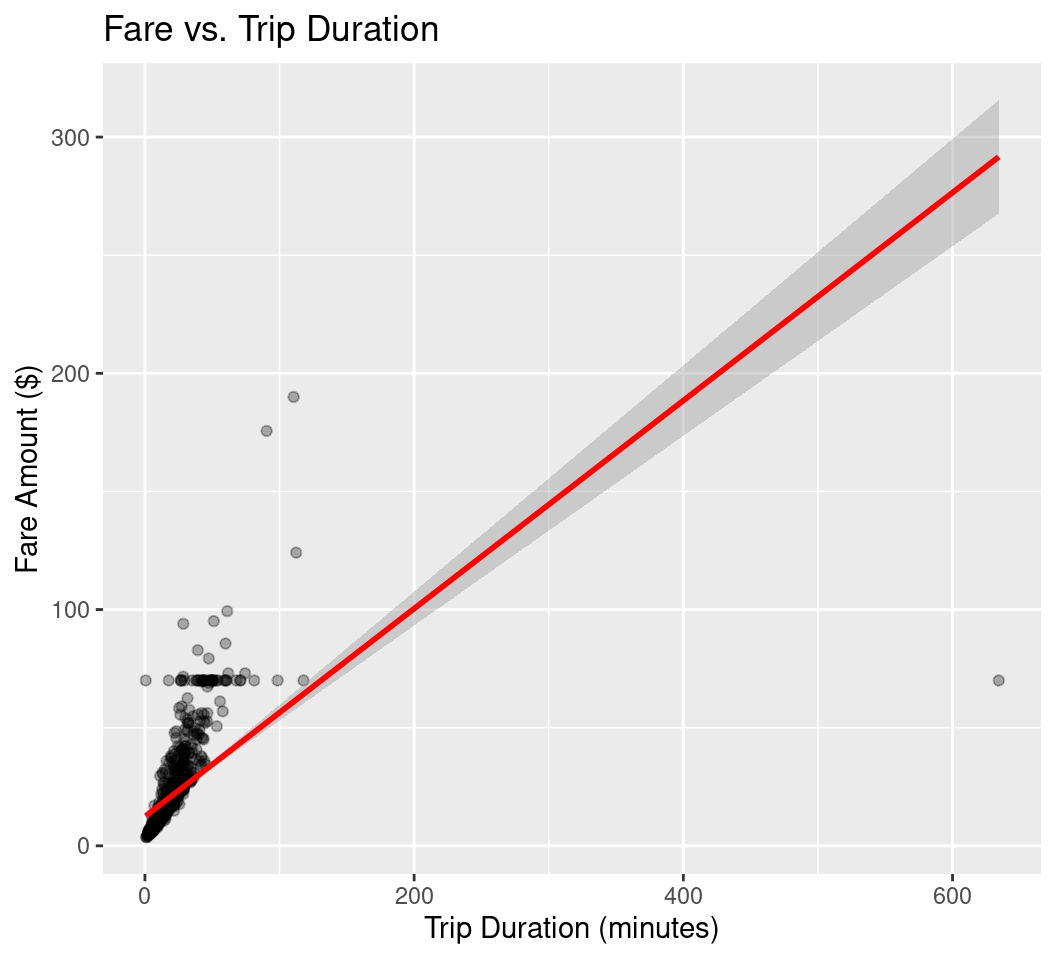
Parallel data processing is a critical technique for managing large-scale data and computationally intensive tasks. By distributing workloads across multiple processing units, it achieves significant speedups, scalability, and efficiency compared to sequential methods. It relies on effective data partitioning, task coordination, and robust frameworks like Spark or Hadoop. As data volumes grow and computational demands increase, parallel processing remains essential for industries and research fields requiring fast, scalable solutions.
The {future} package simplifies parallel processing for statistical analysis of large datasets like the NYC Yellow Taxi data. By replacing lapply() with future_lapply() and setting plan(multisession), we efficiently computed descriptive statistics, correlations, and regression models. The package’s flexibility and automatic handling of globals make it a powerful alternative to {parallel}, especially for users seeking a unified, cross-platform solution. For further exploration, consider using furrr for {purrr}-style workflows or future.batchtools for HPC clusters.