PostgreSQL is a powerful, open-source, object-relational database management system (ORDBMS) that has been actively developed for over 35 years. It is known for its robustness, extensibility, SQL standards compliance, and ability to handle large-scale data workloads — making it a favourite choice for analysts, engineers, and data scientists alike.
Unlike lightweight databases such as SQLite, PostgreSQL is a full-featured server-based database system designed for multi-user concurrency, complex queries, and terabyte-scale datasets.
Why Use PostgreSQL with R?
R is exceptional for statistical computing and data analysis. PostgreSQL excels at storing, querying, and managing large structured datasets. Together they form a powerful combination:
Offload heavy queries to the database engine, pulling only summarised results into R
Persist datasets that are too large to hold in R’s memory
Share data across teams and tools using a central database server
Leverage SQL for filtering, joining, grouping, and aggregating before analysis
What This Tutorial Covers
Section
Topic
1
Installing PostgreSQL on Ubuntu and Windows
2
Creating databases, users, and tables
3
Connecting from R using DBI + RPostgres
4
Basic CRUD operations
5
Importing CSV and Parquet datasets
6
Advanced SQL: JOINs, window functions, CTEs
7
Using dbplyr for dplyr-style queries
8
Performance tuning with indexes and EXPLAIN
9
Security best practices
10
Disconnecting and cleanup
Datasets Used
This tutorial uses two freely available NYC Taxi datasets:
Set a password for the postgres superuser — save this carefully.
Keep the default port 5432.
After installation, add the bin directory to your system PATH:
C:\Program Files\PostgreSQL\17\bin
Go to System Properties → Environment Variables → Path → Edit.
Start the service from Services (services.msc) — find postgresql-x64-17 and start it.
Verify from Command Prompt:
psql -U postgres -h localhost
Type \conninfo at the prompt to confirm.
Creating a Database and Schema
Via the psql Command Line
Connect to the PostgreSQL shell:
Ubuntu:sudo -u postgres psql
Windows:psql -U postgres -h localhost
Then run:
-- Create the databaseCREATEDATABASE taxi_db;-- Connect to it\c taxi_db-- Create a dedicated user (best practice — avoid using postgres superuser)CREATEUSER r_user WITHPASSWORD'r_secure_pass';-- Grant privileges on the databaseGRANTALLPRIVILEGESONDATABASE taxi_db TO r_user;-- Grant schema-level privileges (PostgreSQL 15+)GRANTALLONSCHEMApublicTO r_user;-- Exit\q
Via pgAdmin (GUI)
pgAdmin is the official graphical tool for PostgreSQL, installed alongside the server.
Open pgAdmin and connect to your local server.
Right-click Databases → Create → Database, name it taxi_db.
Under Login/Group Roles, create a new role r_user with a password and login permission.
Use the Query Tool (lightning bolt icon) to run SQL statements.
NotepgAdmin is Recommended for Beginners
pgAdmin provides point-and-click database management, a visual query editor with syntax highlighting, and tools to inspect table structure and data — much easier than working entirely in the terminal.
R Package Setup
Required Packages
Code
packages <-c("DBI", # Unified database interface"RPostgres", # PostgreSQL driver for R"tidyverse", # Data wrangling (includes dplyr, readr, ggplot2, etc.)"dbplyr", # Translate dplyr to SQL (installed with tidyverse)"arrow", # Read Parquet files efficiently"data.table", # High-performance data manipulation"glue", # Safe SQL string interpolation"keyring"# Securely store database passwords)
── Attaching core tidyverse packages ──────────────────────── tidyverse 2.0.0 ──
✔ dplyr     1.2.1     ✔ readr     2.2.0
✔ forcats   1.0.1     ✔ stringr   1.6.0
✔ ggplot2   4.0.3     ✔ tibble    3.3.1
✔ lubridate 1.9.5     ✔ tidyr     1.3.2
✔ purrr     1.2.2
── Conflicts ────────────────────────────────────────── tidyverse_conflicts() ──
✖ dplyr::filter() masks stats::filter()
✖ dplyr::lag()    masks stats::lag()
ℹ Use the conflicted package (<http://conflicted.r-lib.org/>) to force all conflicts to become errors
Code
library(dbplyr)
Attaching package: 'dbplyr'

The following objects are masked from 'package:dplyr':

    ident, sql
Code
library(arrow)
Attaching package: 'arrow'

The following object is masked from 'package:lubridate':

    duration

The following object is masked from 'package:utils':

    timestamp
Code
library(data.table)
Attaching package: 'data.table'

The following objects are masked from 'package:lubridate':

    hour, isoweek, isoyear, mday, minute, month, quarter, second, wday,
    week, yday, year

The following objects are masked from 'package:dplyr':

    between, first, last

The following object is masked from 'package:purrr':

    transpose

The following object is masked from 'package:base':

    %notin%
R uses a two-layer architecture for database connections:
DBI — Defines a standard interface (functions like dbConnect(), dbGetQuery(), dbWriteTable()) that works with any supported database.
RPostgres — Provides the PostgreSQL-specific driver. Built in C++ via Rcpp for high performance.
This means code using DBI functions is largely portable — you can switch databases (PostgreSQL → SQLite → MySQL) by changing only the driver.
Basic Connection
Code
con <-dbConnect(drv = RPostgres::Postgres(),dbname ="taxi_db",host ="localhost",port =5432,user ="r_user",password ="r_secure_pass"# See security section for better approaches)# Verify connectiondbGetQuery(con, "SELECT version();")
                                                                                                                                   version
1 PostgreSQL 14.22 (Ubuntu 14.22-0ubuntu0.22.04.1) on x86_64-pc-linux-gnu, compiled by gcc (Ubuntu 11.4.0-1ubuntu1~22.04.3) 11.4.0, 64-bit
Secure Connections Using .Renviron
Never hardcode passwords in scripts. Instead, store credentials in your .Renviron file:
# In ~/.Renviron (one entry per line, no spaces around =)PG_HOST=localhostPG_PORT=5432PG_DB=taxi_dbPG_USER=r_userPG_PASSWORD=r_secure_pass
Then in R:
#| label: connect-secure

con <- dbConnect(
  drv      = RPostgres::Postgres(),
  dbname   = Sys.getenv("PG_DB"),
  host     = Sys.getenv("PG_HOST"),
  port     = as.integer(Sys.getenv("PG_PORT")),
  user     = Sys.getenv("PG_USER"),
  password = Sys.getenv("PG_PASSWORD")
)
TipReload .Renviron Without Restarting R
readRenviron("~/.Renviron")
Using keyring for OS-Level Secret Storage
The keyring package stores secrets in your operating system’s secure credential store (macOS Keychain, Windows Credential Manager, Linux Secret Service):
```{r #| label: connect-keyring
library(keyring)
Store the password once (run interactively)
key_set(“postgresql”, username = “r_user”)
Then connect using the stored secret
con <- dbConnect( drv = RPostgres::Postgres(), dbname = “taxi_db”, host = “localhost”, port = 5432, user = “r_user”, password = key_get(“postgresql”, username = “r_user”) )
### Check Connection Status


::: {.cell}

```{.r .cell-code}
# List tables in the connected database
dbListTables(con)
character(0)
Code
# Check if a specific table existsdbExistsTable(con, "taxi_zones")
CRUD stands for Create, Read, Update, Delete — the four fundamental database operations.
Create a Table
Code
dbExecute(con, " CREATE TABLE IF NOT EXISTS employees ( id SERIAL PRIMARY KEY, name VARCHAR(100) NOT NULL, department VARCHAR(50), salary NUMERIC(10, 2), hired_on DATE DEFAULT CURRENT_DATE );")
employees <-dbGetQuery(con, "SELECT * FROM employees ORDER BY id;")print(employees)
  id        name  department salary   hired_on
1  1  Alice Chen   Analytics  85000 2022-03-15
2  2   Bob Smith Engineering  92000 2021-07-01
3  3 Carol White   Analytics  78000 2023-01-10
4  4   David Lee   Marketing  67000 2020-11-22
5  5 Eve Johnson Engineering  95000 2019-06-30
6  6 Frank Brown   Analytics  81000 2024-02-01
7  7   Grace Kim Engineering  88000 2024-03-15
Fetch with conditions:
Code
analytics_team <-dbGetQuery(con, " SELECT name, salary FROM employees WHERE department = 'Analytics' ORDER BY salary DESC;")print(analytics_team)
         name salary
1  Alice Chen  85000
2 Frank Brown  81000
3 Carol White  78000
Parameterised queries (safe against SQL injection):
Code
dept <-"Engineering"result <-dbGetQuery(conn = con,statement ="SELECT * FROM employees WHERE department = $1;",params =list(dept))print(result)
  id        name  department salary   hired_on
1  2   Bob Smith Engineering  92000 2021-07-01
2  5 Eve Johnson Engineering  95000 2019-06-30
3  7   Grace Kim Engineering  88000 2024-03-15
WarningAlways Use Parameterised Queries for User Input
Never build SQL strings using paste() with user-supplied values. This opens the door to SQL injection attacks. Use $1, $2, … placeholders with the params argument instead.
Fetch a single value:
Code
avg_salary <-dbGetQuery(con, "SELECT ROUND(AVG(salary), 2) AS avg_salary FROM employees;")cat("Average salary: $", avg_salary$avg_salary, "\n")
Average salary: $ 83714.29
Stream large results (low memory):
Code
# Use dbSendQuery + dbFetch for chunked readingquery <-dbSendQuery(con, "SELECT * FROM employees;")chunks <-list()while (!dbHasCompleted(query)) { chunk <-dbFetch(query, n =3) # Read 3 rows at a time chunks <-c(chunks, list(chunk))}dbClearResult(query)all_data <-bind_rows(chunks)print(all_data)
  id        name  department salary   hired_on
1  1  Alice Chen   Analytics  85000 2022-03-15
2  2   Bob Smith Engineering  92000 2021-07-01
3  3 Carol White   Analytics  78000 2023-01-10
4  4   David Lee   Marketing  67000 2020-11-22
5  5 Eve Johnson Engineering  95000 2019-06-30
6  6 Frank Brown   Analytics  81000 2024-02-01
7  7   Grace Kim Engineering  88000 2024-03-15
Update Data
Code
# Give all Analytics employees a 10% raiserows_affected <-dbExecute(con, " UPDATE employees SET salary = salary * 1.10 WHERE department = 'Analytics';")cat("Rows updated:", rows_affected, "\n")
Rows updated: 3
Code
# VerifydbGetQuery(con, "SELECT name, salary FROM employees WHERE department = 'Analytics';")
         name salary
1  Alice Chen  93500
2 Carol White  85800
3 Frank Brown  89100
Delete Data
Code
# Delete employees hired before 2021dbExecute(con, " DELETE FROM employees WHERE hired_on < '2021-01-01';")
[1] 2
Code
# Confirm deletiondbGetQuery(con, "SELECT COUNT(*) AS remaining FROM employees;")
  remaining
1         5
Drop a Table
Code
# Only drop if it exists (safe to re-run)dbExecute(con, "DROP TABLE IF EXISTS employees;")
[1] 0
Importing Real-World Datasets
We now import the two NYC taxi datasets into PostgreSQL.
Setup: File Paths
Code
data_folder <-"/home/zia207/WebSites/R_Website/High_Performance_Computing_R/R_Markdown/Data/"# Adjust to your pathtaxi_zones_file <-file.path(data_folder, "taxi_zone_lookup.csv")yellow_trips_file <-file.path(data_folder, "yellow_tripdata_2023-01.parquet")
Import taxi_zone_lookup.csv
This is a small reference table (~265 rows). Read with readr and write directly.
Code
# Read CSV into Rzones <-read_csv(taxi_zones_file, col_types =cols(LocationID =col_integer(),Borough =col_character(),Zone =col_character(),service_zone =col_character()))# Rename to snake_case for PostgreSQLnames(zones) <-tolower(names(zones))names(zones)[names(zones) =="locationid"] <-"location_id"# Create the table (explicit schema is better than letting DBI infer)dbExecute(con, "DROP TABLE IF EXISTS taxi_zones;")
NOTICE: table "taxi_zones" does not exist, skipping
# Insert datadbWriteTable(con, "taxi_zones", zones, append =TRUE, row.names =FALSE)# VerifydbGetQuery(con, "SELECT COUNT(*) AS n_zones FROM taxi_zones;")
  n_zones
1     265
Code
dbGetQuery(con, "SELECT * FROM taxi_zones LIMIT 5;")
  location_id       borough                    zone service_zone
1           1           EWR          Newark Airport          EWR
2           2        Queens             Jamaica Bay    Boro Zone
3           3         Bronx Allerton/Pelham Gardens    Boro Zone
4           4     Manhattan           Alphabet City  Yellow Zone
5           5 Staten Island           Arden Heights    Boro Zone
# Open Parquet as an Arrow Dataset (does NOT load into memory yet)dataset <- arrow::open_dataset(yellow_trips_file)cat("Total rows in Parquet file:", nrow(dataset), "\n")
# Define chunk size (rows per batch; adjust based on available RAM)chunk_size <-100000# Collect full data into R — for large files use batched approach belowtrips_df <- dataset |>collect() |>rename_with(tolower) # lowercase all column names# Insert in chunks to PostgreSQLn_rows <-nrow(trips_df)n_chunks <-ceiling(n_rows / chunk_size)cat("Inserting", n_rows, "rows in", n_chunks, "chunks...\n")
Inserting 3066766 rows in 31 chunks...
Code
for (i inseq_len(n_chunks)) { start_row <- (i -1) * chunk_size +1 end_row <-min(i * chunk_size, n_rows) chunk <- trips_df[start_row:end_row, ]dbWriteTable(con, "yellow_trips", chunk, append =TRUE, row.names =FALSE)cat(" Chunk", i, "/", n_chunks, "inserted (rows", start_row, "-", end_row, ")\n")}
trips_by_borough <-dbGetQuery(con, " SELECT z.borough, COUNT(*) AS trip_count, ROUND(AVG(t.fare_amount), 2) AS avg_fare, ROUND(AVG(t.trip_distance), 2) AS avg_distance_miles FROM yellow_trips t JOIN taxi_zones z ON t.pulocationid = z.location_id GROUP BY z.borough ORDER BY trip_count DESC;")print(trips_by_borough)
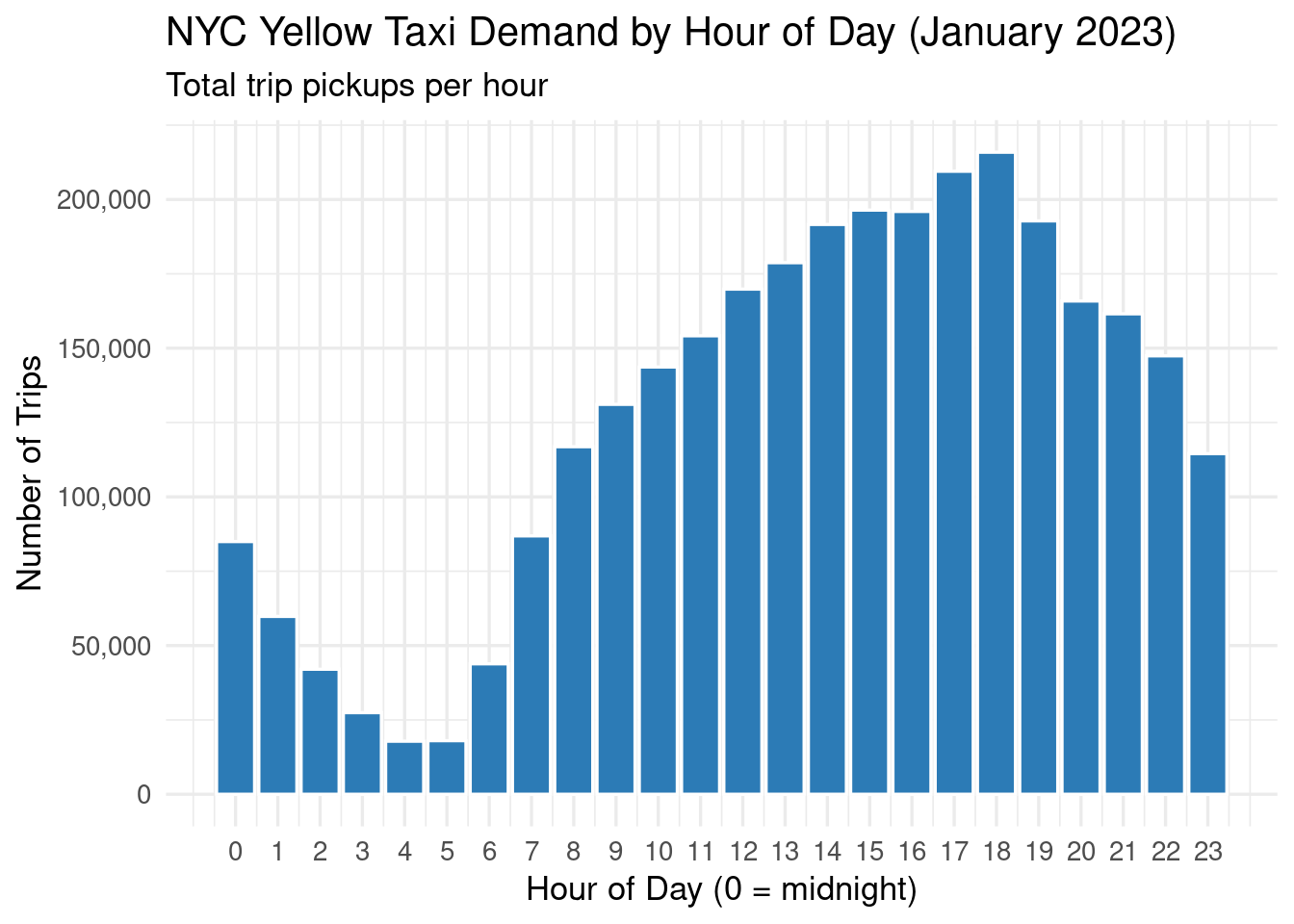
hourly_demand <-dbGetQuery(con, " SELECT EXTRACT(HOUR FROM tpep_pickup_datetime) AS pickup_hour, COUNT(*) AS trip_count FROM yellow_trips GROUP BY pickup_hour ORDER BY pickup_hour;")# Plotggplot(hourly_demand, aes(x = pickup_hour, y = trip_count)) +geom_col(fill ="#2C7BB6", colour ="white") +scale_x_continuous(breaks =0:23) +scale_y_continuous(labels = scales::comma) +labs(title ="NYC Yellow Taxi Demand by Hour of Day (January 2023)",subtitle ="Total trip pickups per hour",x ="Hour of Day (0 = midnight)",y ="Number of Trips" ) +theme_minimal(base_size =13)
Window Functions — Top Zones by Average Tip
Window functions let you compute rankings, running totals, and moving averages without collapsing rows:
Code
top_tip_zones <-dbGetQuery(con, " WITH zone_tips AS ( SELECT z.zone, z.borough, ROUND(AVG(t.tip_amount), 2) AS avg_tip, ROUND(AVG(t.fare_amount), 2) AS avg_fare, COUNT(*) AS trip_count FROM yellow_trips t JOIN taxi_zones z ON t.dolocationid = z.location_id WHERE t.payment_type = 1 -- Credit card (tips are recorded) AND t.trip_distance > 0 GROUP BY z.zone, z.borough HAVING COUNT(*) > 100 -- Minimum 100 trips for reliability ) SELECT zone, borough, avg_tip, avg_fare, trip_count, RANK() OVER (ORDER BY avg_tip DESC) AS rank_by_tip FROM zone_tips ORDER BY rank_by_tip LIMIT 15;")print(top_tip_zones)
Common Table Expressions (CTEs) — Peak vs Off-Peak Comparison
Code
peak_comparison <-dbGetQuery(con, " WITH trip_periods AS ( SELECT fare_amount, tip_amount, trip_distance, CASE WHEN EXTRACT(HOUR FROM tpep_pickup_datetime) BETWEEN 7 AND 9 THEN 'Morning Peak' WHEN EXTRACT(HOUR FROM tpep_pickup_datetime) BETWEEN 16 AND 19 THEN 'Evening Peak' ELSE 'Off-Peak' END AS period FROM yellow_trips WHERE fare_amount > 0 AND trip_distance > 0 ) SELECT period, COUNT(*) AS trips, ROUND(AVG(fare_amount), 2) AS avg_fare, ROUND(AVG(tip_amount), 2) AS avg_tip, ROUND(AVG(trip_distance), 2) AS avg_distance FROM trip_periods GROUP BY period ORDER BY avg_fare DESC;")print(peak_comparison)
payment_labels <-data.frame(payment_type =1:6,payment_name =c("Credit Card", "Cash", "No Charge","Dispute", "Unknown", "Voided Trip"))payment_summary <-dbGetQuery(con, " SELECT payment_type, COUNT(*) AS trip_count, ROUND(SUM(fare_amount), 2) AS total_fare, ROUND(AVG(tip_amount), 2) AS avg_tip FROM yellow_trips GROUP BY payment_type ORDER BY trip_count DESC;")payment_summary <- payment_summary |>left_join(payment_labels, by ="payment_type") |>select(payment_name, everything(), -payment_type)print(payment_summary)
dbplyr translates dplyr verbs into SQL automatically. This is ideal for analysts more comfortable with tidyverse syntax.
Create Lazy Table References
Code
# These don't load data — they just reference the tablestrips_tbl <-tbl(con, "yellow_trips")zones_tbl <-tbl(con, "taxi_zones")# Show dimensionstrips_tbl |>count() # Runs SELECT COUNT(*) ...
# Source:   SQL [?? x 1]
# Database: postgres  [r_user@localhost:5432/taxi_db]
        n
  <int64>
1 3066766
Filter, Select, and Summarise
Code
avg_fare_by_borough <- trips_tbl |>left_join(zones_tbl, by =c("pulocationid"="location_id")) |>filter(trip_distance >1, fare_amount >0) |>group_by(borough) |>summarise(trips =n(),avg_fare =mean(fare_amount, na.rm =TRUE),avg_distance =mean(trip_distance, na.rm =TRUE),avg_tip =mean(tip_amount, na.rm =TRUE) ) |>arrange(desc(trips)) |>collect() # <-- Executes query and pulls result into Rprint(avg_fare_by_borough)
query <- trips_tbl |>filter(trip_distance >5) |>group_by(payment_type) |>summarise(avg_fare =mean(fare_amount, na.rm =TRUE))# Print the SQL without executingshow_query(query)
<SQL>
SELECT "payment_type", AVG("fare_amount") AS "avg_fare"
FROM (
  SELECT "yellow_trips".*
  FROM "yellow_trips"
  WHERE ("trip_distance" > 5.0)
) AS "q01"
GROUP BY "payment_type"
Without indexes, PostgreSQL performs a full table scan for every query — slow for millions of rows. Add indexes on columns used in WHERE, JOIN, and ORDER BY clauses.
Code
# Index on pickup location (used in JOINs)dbExecute(con, " CREATE INDEX IF NOT EXISTS idx_trips_pulocationid ON yellow_trips (pulocationid);")
[1] 0
Code
# Index on dropoff locationdbExecute(con, " CREATE INDEX IF NOT EXISTS idx_trips_dolocationid ON yellow_trips (dolocationid);")
[1] 0
Code
# Index on pickup timestamp (for time-range queries)dbExecute(con, " CREATE INDEX IF NOT EXISTS idx_trips_pickup_datetime ON yellow_trips (tpep_pickup_datetime);")
[1] 0
Code
# Composite index for common filter + join patterndbExecute(con, " CREATE INDEX IF NOT EXISTS idx_trips_location_time ON yellow_trips (pulocationid, tpep_pickup_datetime);")
[1] 0
Code
cat("Indexes created.\n")
Indexes created.
EXPLAIN ANALYZE — Query Performance Diagnostics
EXPLAIN ANALYZE shows exactly how PostgreSQL executes a query, including whether indexes are used and how long each step takes.
Code
explain_result <-dbGetQuery(con, " EXPLAIN ANALYZE SELECT z.borough, COUNT(*) AS trips FROM yellow_trips t JOIN taxi_zones z ON t.pulocationid = z.location_id GROUP BY z.borough ORDER BY trips DESC;")cat(explain_result[[1]], sep ="\n")
# Reclaim storage from deleted rows (cannot run inside a transaction)# Run this outside of a transaction block in psql:# VACUUM ANALYZE yellow_trips;
Connection Pooling with pool
For Shiny apps or multi-user scenarios, use the pool package to manage multiple connections efficiently:
```{r #| label: connection-pooling
install.packages(“pool”)
library(pool)
pool <- dbPool( drv = RPostgres::Postgres(), dbname = Sys.getenv(“PG_DB”), host = Sys.getenv(“PG_HOST”), port = as.integer(Sys.getenv(“PG_PORT”)), user = Sys.getenv(“PG_USER”), password = Sys.getenv(“PG_PASSWORD”), minSize = 2, # Keep at least 2 connections open maxSize = 10 # Allow up to 10 concurrent connections )
Use just like a regular connection
result <- dbGetQuery(pool, “SELECT COUNT(*) FROM yellow_trips;“)
Close the pool when done (e.g., when Shiny app shuts down)
poolClose(pool)
## Transactions and Error Handling

Transactions group multiple statements into an atomic unit — either all succeed or all are rolled back.


::: {.cell}

```{.r .cell-code}
tryCatch({
  dbBegin(con)

  dbExecute(con, "
    UPDATE employees SET salary = salary * 1.05 WHERE department = 'Engineering';
  ")
  dbExecute(con, "
    INSERT INTO audit_log (event, logged_at)
    VALUES ('Engineering salary increase 5%', NOW());
  ")

  dbCommit(con)
  cat("Transaction committed successfully.\n")

}, error = function(e) {
  dbRollback(con)
  cat("Transaction rolled back due to error:", conditionMessage(e), "\n")
})
Transaction rolled back due to error: Failed to prepare query : ERROR:  relation "employees" does not exist
LINE 2:     UPDATE employees SET salary = salary * 1.05 WHERE depart...
                   ^
# Detailed column info via SQLdbGetQuery(con, " SELECT column_name, data_type, character_maximum_length, is_nullable FROM information_schema.columns WHERE table_name = 'yellow_trips' ORDER BY ordinal_position;")
             column_name                   data_type character_maximum_length
1               vendorid                     integer                       NA
2   tpep_pickup_datetime timestamp without time zone                       NA
3  tpep_dropoff_datetime timestamp without time zone                       NA
4        passenger_count                     integer                       NA
5          trip_distance                     numeric                       NA
6             ratecodeid                     integer                       NA
7     store_and_fwd_flag           character varying                        1
8           pulocationid                     integer                       NA
9           dolocationid                     integer                       NA
10          payment_type                     integer                       NA
11           fare_amount                     numeric                       NA
12                 extra                     numeric                       NA
13               mta_tax                     numeric                       NA
14            tip_amount                     numeric                       NA
15          tolls_amount                     numeric                       NA
16 improvement_surcharge                     numeric                       NA
17          total_amount                     numeric                       NA
18  congestion_surcharge                     numeric                       NA
19           airport_fee                     numeric                       NA
   is_nullable
1          YES
2          YES
3          YES
4          YES
5          YES
6          YES
7          YES
8          YES
9          YES
10         YES
11         YES
12         YES
13         YES
14         YES
15         YES
16         YES
17         YES
18         YES
19         YES
Code
# List indexesdbGetQuery(con, " SELECT indexname, indexdef FROM pg_indexes WHERE tablename = 'yellow_trips';")
                  indexname
1    idx_trips_pulocationid
2    idx_trips_dolocationid
3 idx_trips_pickup_datetime
4   idx_trips_location_time
                                                                                                      indexdef
1                        CREATE INDEX idx_trips_pulocationid ON public.yellow_trips USING btree (pulocationid)
2                        CREATE INDEX idx_trips_dolocationid ON public.yellow_trips USING btree (dolocationid)
3             CREATE INDEX idx_trips_pickup_datetime ON public.yellow_trips USING btree (tpep_pickup_datetime)
4 CREATE INDEX idx_trips_location_time ON public.yellow_trips USING btree (pulocationid, tpep_pickup_datetime)
Code
# Table size on diskdbGetQuery(con, " SELECT pg_size_pretty(pg_total_relation_size('yellow_trips')) AS total_size, pg_size_pretty(pg_relation_size('yellow_trips')) AS table_size, pg_size_pretty(pg_indexes_size('yellow_trips')) AS index_size;")
# Create a summary in Rborough_summary <-dbGetQuery(con, " SELECT z.borough, COUNT(*) AS trip_count, ROUND(AVG(t.fare_amount), 2) AS avg_fare, ROUND(SUM(t.total_amount), 2) AS total_revenue FROM yellow_trips t JOIN taxi_zones z ON t.pulocationid = z.location_id GROUP BY z.borough ORDER BY trip_count DESC;")# Write summary back as a new tabledbWriteTable(conn = con,name ="borough_summary",value = borough_summary,overwrite =TRUE,row.names =FALSE)# VerifydbGetQuery(con, "SELECT * FROM borough_summary;")
### Revoking Unnecessary Privileges

```sql
-- In psql as postgres superuser
REVOKE ALL ON DATABASE taxi_db FROM PUBLIC;
GRANT CONNECT ON DATABASE taxi_db TO r_user;
GRANT USAGE ON SCHEMA public TO r_user;
GRANT SELECT, INSERT, UPDATE, DELETE ON ALL TABLES IN SCHEMA public TO r_user;
Cleanup and Disconnecting
Code
# Drop working tables (in development / tutorial contexts)dbExecute(con, "DROP TABLE IF EXISTS yellow_trips;")
[1] 0
Code
dbExecute(con, "DROP TABLE IF EXISTS taxi_zones;")
[1] 0
Code
dbExecute(con, "DROP TABLE IF EXISTS borough_summary;")
[1] 0
Code
dbExecute(con, "DROP TABLE IF EXISTS employees;")
NOTICE: table "employees" does not exist, skipping
[1] 0
Code
# Always disconnect when done — releases the server connectiondbDisconnect(con)cat("Disconnected from PostgreSQL.\n")
Disconnected from PostgreSQL.
Quick Reference Cheat Sheet
DBI Functions
Function
Purpose
dbConnect()
Open a database connection
dbDisconnect()
Close the connection
dbGetQuery()
Run a SELECT query, return data frame
dbExecute()
Run INSERT/UPDATE/DELETE/DDL, return row count
dbWriteTable()
Write an R data frame to a table
dbReadTable()
Read a whole table into R
dbListTables()
List all tables in the database
dbListFields()
List columns in a table
dbExistsTable()
Check if a table exists
dbBegin()
Start a transaction
dbCommit()
Commit a transaction
dbRollback()
Roll back a transaction
dbSendQuery()
Send query (for streaming / batched fetch)
dbFetch()
Fetch rows from a sent query
dbClearResult()
Release resources from a sent query
Common PostgreSQL SQL Patterns
-- Count rowsSELECTCOUNT(*) FROM table_name;-- Distinct valuesSELECTDISTINCTcolumnFROM table_name;-- Top N rowsSELECT*FROM table_name ORDERBYcolumnDESCLIMIT10;-- Conditional aggregationSELECTSUM(CASEWHEN condition THENvalueELSE0END) AS conditional_sumFROM table_name;-- Date truncationSELECT DATE_TRUNC('hour', timestamp_col) AShour, COUNT(*)FROM table_name GROUPBY1;-- String formattingSELECTTO_CHAR(amount, 'FM$999,999.00') AS formatted_amount FROM table_name;-- Window function: running totalSELECTdate, amount,SUM(amount) OVER (ORDERBYdate) AS running_totalFROM table_name;
Summary
This tutorial covered the full workflow for using PostgreSQL with R:
Installation — Setting up PostgreSQL on Ubuntu and Windows
Database creation — Using psql and pgAdmin
R connection — DBI + RPostgres, secure credential management
CRUD operations — Create, Read, Update, Delete with dbExecute() and dbGetQuery()
Data import — CSV with readr, Parquet with arrow, chunked insertion for large files