Code
packages <- c(
          'tidyverse',
          'data.table',
          'feather',
          'arrow',
          'vroom',
          'nycflights13'
) 

When working with large and complex datasets in R, it is essential to have effective techniques for importing and exporting data. Since these datasets can be enormous, standard techniques for data transfer can often be insufficient and may result in inefficient and time-consuming processes. Therefore, it is crucial to use efficient data management methods to handle the size and complexity of the datasets involved. Doing so ensures that your data analysis is accurate, reliable, and fast, which is essential when working with big data in R. In this tutorial we will explore four packages: data.table, feather, vrrom, and arrow. These packages are designed to handle large datasets efficiently, making them ideal for big data analysis in R.
R offers several packages tailored for Big Data import/export:
data.table: Known for its speed and memory efficiency, the fread() and fwrite() functions in the data.table package are ideal for reading and writing large CSV files.
vroom: A fast package for reading delimited files, offering lazy loading and memory-efficient parsing of large datasets.
arrow: Facilitates working with Apache Arrow, enabling efficient handling of columnar data formats like Parquet and Feather for Big Data applications.
*Feather**: Provides a fast binary columnar storage format that is language-agnostic, making it suitable for sharing data between R and other programming languages.
DBI and RPostgres/RMariaDB: These packages allow seamless interaction with SQL databases, enabling R users to query and import large datasets directly from relational database management systems.
sparklyr: Integrates R with Apache Spark, allowing users to import and export data from distributed systems like Hadoop HDFS or cloud-based storage.
spakR: Provides an interface to Apache Spark, enabling R users to work with large datasets in a distributed computing environment.
Handling Big Data in R comes with challenges, such as memory constraints, processing speed, and data format compatibility. To address these, users must consider:
Memory Management: Leveraging packages like arrow or sparklyr to process data in chunks or offload computation to distributed systems.
File Formats: Choosing efficient formats like Parquet or Feather, which offer compression and faster read/write operations compared to traditional CSV files.
Parallel Processing: Utilizing parallel computing capabilities in R to speed up data import/export tasks.
Scalability: Integrating R with distributed frameworks like Spark to handle datasets that exceed local machine memory.
To optimize Big Data import/export in R:
Use memory-efficient packages like data.table or vroom for flat file operations.
Employ the arrow package for handling columnar data formats to improve performance.4. Prefer columnar storage formats (e.g., Parquet) for large datasets to reduce I/O bottlenecks.
Leverage database connections for querying only the necessary data, minimizing memory usage.
Profile and benchmark import/export operations to identify performance bottlenecks.
Consider cloud-based or distributed systems for extremely large datasets that cannot be processed locally.
By combining R’s robust ecosystem with these tools and strategies, users can efficiently manage Big Data import and export tasks, enabling scalable and high-performance data analysis workflows.
packages <- c(
'tidyverse',
'data.table',
'feather',
'arrow',
'vroom',
'nycflights13'
) #| warning: false
#| error: false
# Install missing packages
new_packages <- packages[!(packages %in% installed.packages()[,"Package"])]
if(length(new_packages)) install.packages(new_packages)# Verify
cat("Installed packages:\n")Installed packages:print(sapply(packages, requireNamespace, quietly = TRUE)) tidyverse data.table feather arrow vroom nycflights13
TRUE TRUE TRUE TRUE TRUE TRUE # Load packages with suppressed messages
invisible(lapply(packages, function(pkg) {
suppressPackageStartupMessages(library(pkg, character.only = TRUE))
}))# Check loaded packages
cat("Successfully loaded packages:\n")Successfully loaded packages:print(search()[grepl("package:", search())]) [1] "package:nycflights13" "package:vroom" "package:arrow"
[4] "package:feather" "package:data.table" "package:lubridate"
[7] "package:forcats" "package:stringr" "package:dplyr"
[10] "package:purrr" "package:readr" "package:tidyr"
[13] "package:tibble" "package:ggplot2" "package:tidyverse"
[16] "package:stats" "package:graphics" "package:grDevices"
[19] "package:utils" "package:datasets" "package:methods"
[22] "package:base" The NYC Yellow Taxi Trip Data 2023 is a comprehensive dataset from the New York City Taxi and Limousine Commission (TLC), containing approximately 30–40 million trip records from yellow taxis for the year 2023. Stored in 12 monthly Parquet files (yellow_tripdata_2023-01.parquet to yellow_tripdata_2023-12.parquet), it includes details such as pickup and dropoff times, locations, trip distances, passenger counts, fare amounts, and other trip-related variables. This dataset, available at https://www.nyc.gov/site/tlc/about/tlc-trip-record-data.page, is widely used for urban mobility analysis, statistical modeling, and big data processing, offering insights into transportation patterns in New York City.
The ‘yellow_tripdata_2023-01.parquet’ file is available from the NYC Taxi & Limousine Commission (TLC) website. It includes columns such as:
VendorID: Integer code for the technology provider.
tpep_pickup_datetime: Datetime of trip start.
tpep_dropoff_datetime: Datetime of trip end.
passenger_count: Integer number of passengers.
trip_distance: Float distance in miles.
RatecodeID: Integer rate code.
store_and_fwd_flag: String flag for store-and-forward trips.
PULocationID: Integer pickup location ID.
DOLocationID: Integer dropoff location ID.
payment_type: Integer payment method.
fare_amount: Float base fare.
extra: Float extras and surcharges.
mta_tax: Float MTA tax.
tip_amount: Float tip (credit card only).
tolls_amount: Float tolls.
improvement_surcharge: Float improvement surcharge.
total_amount: Float total charged.
congestion_surcharge: Float congestion surcharge.
airport_fee: Float airport fee.
To download the NYC Yellow Taxi Trip Data for 2023 (yellow_tripdata_2023-*.parquet files), follow steps bellow. The data is provided by the New York City Taxi and Limousine Commission (TLC) and is available on their official website. Below, I’ll guide you through the process of accessing and downloading the data, focusing on the 2023 datasets, which are stored in Parquet format.
###  Download Data
# Base URL for TLC data
base_url <- "https://d37ci6vzurychx.cloudfront.net/trip-data/"

# List of months for 2023
months <- sprintf("%02d", 1:12)  # "01", "02", ..., "12"

# Directory to save files (update with your local path)
save_dir <- "/home/zia207/Dropbox/WebSites/R_Website/Quarto_Projects/Big_Data_R/Data/"  # E.g., "C:/Data/" or "~/Data/"
dir.create(save_dir, showWarnings = FALSE, recursive = TRUE)

# Download each month's file
for (month in months) {
  file_name <- paste0("yellow_tripdata_2023-", month, ".parquet")
  url <- paste0(base_url, file_name)
  dest_file <- file.path(save_dir, file_name)

  if (!file.exists(dest_file)) {
    message("Downloading ", file_name, "...")
    GET(url, write_disk(dest_file, overwrite = TRUE))
  } else {
    message(file_name, " already exists, skipping download.")
  }
}Once the files are downloaded and verified, combine them into a single Parquet file without preprocessing, preserving all original columns.
### Combine the Monthly Files into a Single Parquet File
# Directory containing the monthly Parquet files
save_dir <- "/home/zia207/WebSites/R_Website/High_Performance_Computing_R/R_Markdown/Data/"  # Update with your local path

# List all 2023 Parquet files
file_paths <- list.files(save_dir, pattern = "yellow_tripdata_2023-.*\\.parquet$", full.names = TRUE)

# Verify that all 12 files exist
if (length(file_paths) != 12) {
  stop("Expected 12 Parquet files for 2023, found ", length(file_paths), ". Please check the directory.")
}

# Open as a single Arrow dataset
taxi_dataset <- open_dataset(file_paths, format = "parquet")

# Write the combined dataset to a single Parquet file
output_file <- file.path(save_dir, "yellow_tripdata_2023.parquet")
write_parquet(taxi_dataset, output_file)

# Verify the combined file
message("Combined file saved to: ", output_file)
combined_data <- read_parquet(output_file)
glimpse(combined_data)In this tutorial we will use the only January data set (yellow_tripdata_2023_01). The dataset includes columns like VendorID, tpep_pickup_datetime, tpep_dropoff_datetime, passenger_count, trip_distance, PULocationID, DOLocationID, fare_amount, total_amount, etc.
All data set use in this exercise can be downloaded from my Dropbox accounts.
# define data folder
dataFolder<-"/home/zia207/WebSites/R_Website/High_Performance_Computing_R/R_Markdown/Data/"
#dataFolder<-"D:\\Dropbox\\R_Website\\R_Beginner\\Data\\"
We will use read_csv() function to yellow_tripdata_2023.csv as data.frame
# read with read_csv()
df<-readr::read_csv(paste0(dataFolder,"yellow_tripdata_2023_01.csv")) |>
  glimpse()
Rows: 2,913,955
Columns: 19
$ VendorID <dbl> 1, 2, 2, 1, 2, 1, 1, 1, 2, 2, 2, 2, 2, 2, 2, 2, …
$ tpep_pickup_datetime <dttm> 2023-02-01 00:32:53, 2023-02-01 00:35:16, 2023-…
$ tpep_dropoff_datetime <dttm> 2023-02-01 00:34:34, 2023-02-01 00:35:30, 2023-…
$ passenger_count <dbl> 2, 1, 1, 0, 1, 1, 1, 1, 1, 1, 1, 1, 1, 1, 5, 5, …
$ trip_distance <dbl> 0.30, 0.00, 0.00, 18.80, 3.22, 5.10, 8.90, 1.20,…
$ RatecodeID <dbl> 1, 1, 1, 1, 1, 1, 1, 1, 1, 1, 1, 1, 1, 1, 1, 1, …
$ store_and_fwd_flag <chr> "N", "N", "N", "N", "N", "N", "N", "N", "N", "N"…
$ PULocationID <dbl> 142, 71, 71, 132, 161, 148, 137, 263, 48, 114, 1…
$ DOLocationID <dbl> 163, 71, 71, 26, 145, 236, 244, 141, 243, 211, 2…
$ payment_type <dbl> 2, 4, 4, 1, 1, 1, 1, 1, 1, 1, 1, 1, 1, 1, 1, 1, …
$ fare_amount <dbl> 4.4, -3.0, 3.0, 70.9, 17.0, 21.9, 41.5, 7.2, 30.…
$ extra <dbl> 3.50, -1.00, 1.00, 2.25, 1.00, 3.50, 3.50, 3.50,…
$ mta_tax <dbl> 0.5, -0.5, 0.5, 0.5, 0.5, 0.5, 0.5, 0.5, 0.5, 0.…
$ tip_amount <dbl> 0.00, 0.00, 0.00, 0.00, 3.30, 5.35, 3.50, 2.44, …
$ tolls_amount <dbl> 0.00, 0.00, 0.00, 0.00, 0.00, 0.00, 0.00, 0.00, …
$ improvement_surcharge <dbl> 1, -1, 1, 1, 1, 1, 1, 1, 1, 1, 1, 1, 1, 1, 1, 1,…
$ total_amount <dbl> 9.40, -5.50, 5.50, 74.65, 25.30, 32.25, 50.00, 1…
$ congestion_surcharge <dbl> 2.5, 0.0, 0.0, 0.0, 2.5, 2.5, 2.5, 2.5, 2.5, 2.5…
$ airport_fee <dbl> 0.00, 0.00, 0.00, 1.25, 0.00, 0.00, 0.00, 0.00, …The data.table is a powerful tool that offers a high-performance alternative to the standard “data.frame” object in base R. With a range of syntax and feature enhancements, this package provides unparalleled ease of use, convenience, and programming speed. Whether you’re working with large datasets or complex queries, “data.table” is a versatile and efficient solution for all your data manipulation needs. With its intuitive syntax, powerful indexing capabilities, and seamless integration with other R packages, “data.table” is a must-have tool for any data scientist or analyst looking to optimize their workflow and get the most out of their data.

install.packages(“data.table”)
The latest development version (only if newer available)
data.table::update_dev_pkg()
The atest development version (force install)
install.packages(“data.table”, repos=“https://rdatatable.gitlab.io/data.table”)
Importan Features of data.table
fast and friendly delimited file reader: ?fread, see also convenience features for small data
fast and feature rich delimited file writer: ?fwrite
low-level parallelism: many common operations are internally parallelized to use multiple CPU threads
fast and scalable aggregations; e.g. 100GB in RAM (see benchmarks on up to two billion rows)
fast and feature rich joins: ordered joins (e.g. rolling forwards, backwards, nearest and limited staleness), overlapping range joins (similar to IRanges::findOverlaps), non-equi joins (i.e. joins using operators >, >=, <, <=), aggregate on join (by=.EACHI), update on join
fast add/update/delete columns by reference by group using no copies at all
fast and feature rich reshaping data: ?dcast (pivot/wider/spread) and ?melt (unpivot/longer/gather)
any R function from any R package can be used in queries not just the subset of functions made available by a database backend, also columns of type list are supported
has no dependencies at all other than base R itself, for simpler production/maintenance
the R dependency is as old as possible for as long as possible, dated April 2014, and we continuously test against that version; e.g. v1.11.0 released on 5 May 2018 bumped the dependency up from 5 year old R 3.0.0 to 4 year old R 3.1.0
We can create data.table object using the data.table() function. Here is an example:
DT= data.table(
    Variety =c("BR1","BR3", "BR16", "BR17", "BR18", "BR19","BR26",
          "BR27","BR28","BR29","BR35","BR36"),
    Yield = c(5.2,6.0,6.6,5.6,4.7,5.2,5.7,
                5.9,5.3,6.8,6.2,5.8))
class(DT)
[1] "data.table" "data.frame"You can also convert existing objects to data.table using, setDT() for data.frame
DT<-setDT(df)
class(DT)
[1] "data.table" "data.frame"fread() and fwrite()If you’re dealing with large datasets and looking for an efficient way to read files into R as data tables, the data.table package has got you covered with its highly efficient function called fread(). This function outperforms other alternatives like read.csv or read.table and is specifically designed to handle large datasets. So, if you want to save time and increase your productivity, consider using fread() for your file reading needs.
The fread() function in data.table offers a great level of versatility when it comes to efficiently reading various types of delimited files. You can easily specify delimiters, select specific columns, and even set particular data types while reading to optimize memory usage. This function proves to be especially powerful when dealing with large datasets due to its exceptional speed and memory efficiency.
fread(input, file,….)
# read with fread()
df.DT<-data.table::fread(paste0(dataFolder,"yellow_tripdata_2023_01.csv"), header= TRUE)
str(df.DT)
Classes 'data.table' and 'data.frame': 2913955 obs. of 19 variables:
$ VendorID : int 1 2 2 1 2 1 1 1 2 2 ...
$ tpep_pickup_datetime : POSIXct, format: "2023-02-01 00:32:53" "2023-02-01 00:35:16" ...
$ tpep_dropoff_datetime: POSIXct, format: "2023-02-01 00:34:34" "2023-02-01 00:35:30" ...
$ passenger_count : int 2 1 1 0 1 1 1 1 1 1 ...
$ trip_distance : num 0.3 0 0 18.8 3.22 5.1 8.9 1.2 7.49 0.51 ...
$ RatecodeID : int 1 1 1 1 1 1 1 1 1 1 ...
$ store_and_fwd_flag : chr "N" "N" "N" "N" ...
$ PULocationID : int 142 71 71 132 161 148 137 263 48 114 ...
$ DOLocationID : int 163 71 71 26 145 236 244 141 243 211 ...
$ payment_type : int 2 4 4 1 1 1 1 1 1 1 ...
$ fare_amount : num 4.4 -3 3 70.9 17 21.9 41.5 7.2 30.3 5.8 ...
$ extra : num 3.5 -1 1 2.25 1 3.5 3.5 3.5 1 1 ...
$ mta_tax : num 0.5 -0.5 0.5 0.5 0.5 0.5 0.5 0.5 0.5 0.5 ...
$ tip_amount : num 0 0 0 0 3.3 5.35 3.5 2.44 8.82 1.62 ...
$ tolls_amount : num 0 0 0 0 0 0 0 0 0 0 ...
$ improvement_surcharge: num 1 -1 1 1 1 1 1 1 1 1 ...
$ total_amount : num 9.4 -5.5 5.5 74.7 25.3 ...
$ congestion_surcharge : num 2.5 0 0 0 2.5 2.5 2.5 2.5 2.5 2.5 ...
$ airport_fee : num 0 0 0 1.25 0 0 0 0 0 0 ...
- attr(*, ".internal.selfref")=<pointer: 0x5ecf2addfc40> #DT<-fread("usa_geochemical.csv", header= TRUE) In the data.table package of R, fwrite() serves as the counterpart to fread(). It is primarily utilized for writing data tables to files, usually in CSV or other delimited formats. With a focus on speed and efficiency, fwrite() is optimized to handle large datasets effectively. Therefore, it is an excellent option for saving such datasets.
# read with fread()
data.table::fwrite(df.DT, paste0(dataFolder, "DT.csv"), row.names=F, quote=TRUE)The feather is a binary columnar serialization tool that is specifically designed to make reading and writing data frames highly efficient, while also making it easier to share data across various data analysis languages. It offers bindings for both Python (written by Wes McKinney) and R (written by Hadley Wickham) and uses the Apache Arrow columnar memory specification to represent binary data on disk, which results in fast read and write operations. This feature is particularly useful when it comes to encoding null/NA values and variable-length types like UTF8 strings. Feather is an integral part of the Apache Arrow project and defines its own simplified schemas and metadata for on-disk representation.

Feather is a fast, lightweight, and easy-to-use binary file format for storing data frames. It has a few specific design goals:
Lightweight, minimal API: make pushing data frames in and out of memory as simple as possible
Language agnostic: Feather files are the same whether written by Python or R code. Other languages can read and write Feather files, too.
Feather is extremely fast. Since Feather does not currently use any compression internally, it works best when used with solid-state drives as come with most of today’s laptop computers. For this first release, we prioritized a simple implementation and are thus writing unmodified Arrow memory to disk source.
Feather currently supports the following column types:
A wide range of numeric types (int8, int16, int32, int64, uint8, uint16, uint32, uint64, float, double).
Logical/boolean values.
Dates, times, and timestamps.
Factors/categorical variables that have fixed set of possible values.
UTF-8 encoded strings.
Arbitrary binary data.
All column types support NA/null values.
install.packages(“feather”)
The feather package in R provides functions to read and write data in the Feather file format. Feather is a fast, lightweight, and cross-language columnar storage file format designed for efficient data interchange between programming languages.
First, we create heather object using write_feather() function:
# write_feather()
feather::write_feather(df, paste0(dataFolder, "yellow_tripdata_2023_01.feather"))Then we use read_feather() function specifically reads data from a Feather file into an R data frame.
df.feather <- feather::read_feather(paste0(dataFolder, "yellow_tripdata_2023_01.feather"))
str(df.feather)
tibble [2,913,955 × 19] (S3: tbl_df/tbl/data.frame)
$ VendorID : num [1:2913955] 1 2 2 1 2 1 1 1 2 2 ...
$ tpep_pickup_datetime : POSIXct[1:2913955], format: "2023-02-01 00:32:53" "2023-02-01 00:35:16" ...
$ tpep_dropoff_datetime: POSIXct[1:2913955], format: "2023-02-01 00:34:34" "2023-02-01 00:35:30" ...
$ passenger_count : num [1:2913955] 2 1 1 0 1 1 1 1 1 1 ...
$ trip_distance : num [1:2913955] 0.3 0 0 18.8 3.22 5.1 8.9 1.2 7.49 0.51 ...
$ RatecodeID : num [1:2913955] 1 1 1 1 1 1 1 1 1 1 ...
$ store_and_fwd_flag : chr [1:2913955] "N" "N" "N" "N" ...
$ PULocationID : num [1:2913955] 142 71 71 132 161 148 137 263 48 114 ...
$ DOLocationID : num [1:2913955] 163 71 71 26 145 236 244 141 243 211 ...
$ payment_type : num [1:2913955] 2 4 4 1 1 1 1 1 1 1 ...
$ fare_amount : num [1:2913955] 4.4 -3 3 70.9 17 21.9 41.5 7.2 30.3 5.8 ...
$ extra : num [1:2913955] 3.5 -1 1 2.25 1 3.5 3.5 3.5 1 1 ...
$ mta_tax : num [1:2913955] 0.5 -0.5 0.5 0.5 0.5 0.5 0.5 0.5 0.5 0.5 ...
$ tip_amount : num [1:2913955] 0 0 0 0 3.3 5.35 3.5 2.44 8.82 1.62 ...
$ tolls_amount : num [1:2913955] 0 0 0 0 0 0 0 0 0 0 ...
$ improvement_surcharge: num [1:2913955] 1 -1 1 1 1 1 1 1 1 1 ...
$ total_amount : num [1:2913955] 9.4 -5.5 5.5 74.7 25.3 ...
$ congestion_surcharge : num [1:2913955] 2.5 0 0 0 2.5 2.5 2.5 2.5 2.5 2.5 ...
$ airport_fee : num [1:2913955] 0 0 0 1.25 0 0 0 0 0 0 ...Apache Arrow is a cross-language development platform for processing data, both in-memory and larger-than-memory. It provides a standardized, language-independent columnar memory format for flat and hierarchical data, organized to support fast analytic operations on modern hardware. Additionally, it offers computational libraries and zero-copy streaming, messaging, and interprocess communication.

The arrow R package exposes an interface to the Arrow C++ library, allowing access to many of its features in R. It provides not only low-level access to the Arrow C++ library API but also higher-level access through a dplyr backend and familiar R functions.
The arrow package boasts several key features, including interoperability, columnar data representation, and high performance. Arrow offers seamless communication between different systems and languages, making it easy to exchange data between R and other programming languages such as Python, Julia, and C++. Arrow uses a columnar memory layout, which can be more efficient for many analytical tasks than traditional row-based formats. Arrow is designed for high-performance data processing, making it suitable for big data and parallel computing environments.
The arrow package also provides several functionalities. It allows importing data from various sources into R and exporting R data to Arrow files. Arrow data can be manipulated in R for various tasks such as filtering, sorting, and aggregating. Arrow can be integrated with other R packages for advanced data analysis and visualization tasks.
Apache Arrow relies on its in-memory columnar format, a standardized, programming language-independent definition for representing structured, table-like datasets in memory. The arrow R package employs the Table class to store these objects, which behave like data frames. You can use the arrow_table() function to create new Arrow Tables, much like how data. frame() is utilized to produce new data frames.
dat <- arrow_table(x = 1:4, y = c("a", "b", "c", "d"))
dat
Table
4 rows x 2 columns
$x <int32>
$y <string>We can also convert exiting data.frame to arrow.table:
arrow.df <- arrow_table(name = rownames(df), df)
dim(arrow.df)
[1] 2913955 20You can use [ to specify subsets of Arrow Table in the same way you would for a data frame:
dat[1:3, 1:2]Table
3 rows x 2 columns
$x <int32>
$y <string>Along the same lines, the $ operator can be used to extract named columns:
dat$yChunkedArray
<string>
[
[
"a",
"b",
"c",
"d"
]
]as.data.frame(dat) x y
1 1 a
2 2 b
3 3 c
4 4 dWe can also convert exiting data.frame to arrow.table:
df.arrow <- arrow_table(name = rownames(df), df)
dim(df.arrow)
[1] 2913955 20One of the critical features of Arrow is its ability to handle data in different formats, including CSV, Parquet, and Arrow (also called Feather). While many packages support CSV, Arrow’s high-speed CSV reading and writing capabilities make it stand out. Additionally, Arrow supports data formats like Parquet and Arrow, which are not widely supported in other packages, making it an excellent choice for handling complex data structures.
Another unique feature of Arrow is its support for multi-file datasets. It can store a single rectangular dataset across multiple files, thus making it possible to work with large datasets that cannot fit into memory. This feature is handy for data scientists and analysts who work with big data and must process large datasets efficiently.
When the goal is to read a single data file into memory, there are several functions you can use:
read_parquet(): read a file in Parquet format
read_feather(): read a file in Arrow/Feather format
read_delim_arrow(): read a delimited text file
read_csv_arrow(): read a comma-separated values (CSV) file
read_tsv_arrow(): read a tab-separated values (TSV) file
read_json_arrow(): read a JSON data file
For writing data to single files, the arrow package provides the following functions, which can be used with both R data frames and Arrow Tables:
write_parquet(): write a file in Parquet format
write_feather(): write a file in Arrow IPC format
write_csv_arrow(): write a file in CSV format
We will write it to a Parquet file using write_parquet() function:
arrow::write_parquet(df, paste0(dataFolder, "yellow_tripdata_2023_01.parquet"))We can then use read_parquet() to load the data from this file. As shown below, the default behavior is to return a data frame but when we set as_data_frame = FALSE the data are read as an Arrow Table:
df.parquet<- arrow::read_parquet(paste0(dataFolder, "yellow_tripdata_2023_01.parquet"))The vroom is a fast package for reading and writing delimited files in R, such as CSV and TSV. It excels in speed by lazily loading data, meaning you only load what you need into memory. Released in version 1.0.0 in 2019, vroom has since evolved and is part of the tidyverse ecosystem. It automatically detects delimiters, supports compressed files, remote URLs, and multiple files
data<-vroom(paste0(dataFolder, "yellow_tripdata_2023_01.csv"))Rows: 2913955 Columns: 19
── Column specification ────────────────────────────────────────────────────────
Delimiter: ","
chr (1): store_and_fwd_flag
dbl (16): VendorID, passenger_count, trip_distance, RatecodeID, PULocationI...
dttm (2): tpep_pickup_datetime, tpep_dropoff_datetime
ℹ Use `spec()` to retrieve the full column specification for this data.
ℹ Specify the column types or set `show_col_types = FALSE` to quiet this message.spec(data)cols(
VendorID = col_double(),
tpep_pickup_datetime = col_datetime(format = ""),
tpep_dropoff_datetime = col_datetime(format = ""),
passenger_count = col_double(),
trip_distance = col_double(),
RatecodeID = col_double(),
store_and_fwd_flag = col_character(),
PULocationID = col_double(),
DOLocationID = col_double(),
payment_type = col_double(),
fare_amount = col_double(),
extra = col_double(),
mta_tax = col_double(),
tip_amount = col_double(),
tolls_amount = col_double(),
improvement_surcharge = col_double(),
total_amount = col_double(),
congestion_surcharge = col_double(),
airport_fee = col_double()
)One feature new to vroom is built-in support for reading sets of files with the same columns into one table. Just pass the filenames to be read directly to vroom().
# Combine Files with Matching Columns
files <- c("yellow_tripdata_2023_01.csv", "yellow_tripdata_2023_02.csv")  # Same structure
multi_data <- vroom(paste0(dataFolder, files))
Rows: 5827910 Columns: 19
── Column specification ────────────────────────────────────────────────────────
Delimiter: ","
chr (1): store_and_fwd_flag
dbl (16): VendorID, passenger_count, trip_distance, RatecodeID, PULocationI...
dttm (2): tpep_pickup_datetime, tpep_dropoff_datetime
ℹ Use `spec()` to retrieve the full column specification for this data.
ℹ Specify the column types or set `show_col_types = FALSE` to quiet this message.spec(multi_data)cols(
VendorID = col_double(),
tpep_pickup_datetime = col_datetime(format = ""),
tpep_dropoff_datetime = col_datetime(format = ""),
passenger_count = col_double(),
trip_distance = col_double(),
RatecodeID = col_double(),
store_and_fwd_flag = col_character(),
PULocationID = col_double(),
DOLocationID = col_double(),
payment_type = col_double(),
fare_amount = col_double(),
extra = col_double(),
mta_tax = col_double(),
tip_amount = col_double(),
tolls_amount = col_double(),
improvement_surcharge = col_double(),
total_amount = col_double(),
congestion_surcharge = col_double(),
airport_fee = col_double()
)TSV files are text files where columns are separated by tabs \(t\) instead of commas (as in CSV). The vroom package can handle TSV files seamlessly, automatically detecting the delimiter (tab or comma) based on the file’s content. In the vroomdocumentation you provided, examples like flights.tsv demonstrate reading tab-separated data, but your specific error relates to CSV files, not TSVs.
The flights.tsv file is likely based on the flights dataset from the nycflights13 package, which contains flight data for NYC airports in 2013. You can access this data and save it as a TSV file:
# load flights data from nycflights13 package
data(flights)
# Save as TSV
vroom_write(flights, paste0(dataFolder,"flights.tsv"), delim = "\t")# Read the TSV file
data_tsv <- vroom(paste0(dataFolder,"flights.tsv"))Rows: 336776 Columns: 19
── Column specification ────────────────────────────────────────────────────────
Delimiter: "\t"
chr (4): carrier, tailnum, origin, dest
dbl (14): year, month, day, dep_time, sched_dep_time, dep_delay, arr_time, ...
dttm (1): time_hour
ℹ Use `spec()` to retrieve the full column specification for this data.
ℹ Specify the column types or set `show_col_types = FALSE` to quiet this message.vroom_write(flights, paste0(dataFolder, "flights.tsv.gz"))vroom_write(data, paste0(dataFolder, "yellow_tripdata_2023_01.tsv.gz"))# Read the file back in
data_tsv <- vroom(paste0(dataFolder, "flights.tsv.gz"))Rows: 336776 Columns: 19
── Column specification ────────────────────────────────────────────────────────
Delimiter: "\t"
chr (4): carrier, tailnum, origin, dest
dbl (14): year, month, day, dep_time, sched_dep_time, dep_delay, arr_time, ...
dttm (1): time_hour
ℹ Use `spec()` to retrieve the full column specification for this data.
ℹ Specify the column types or set `show_col_types = FALSE` to quiet this message.# Filter flights.tsv for United Airlines (UA) using grep and read with vroom
data_ua <- vroom(pipe(paste0("grep -w UA ", dataFolder, "flights.tsv")), col_names = names(flights))Rows: 58665 Columns: 19
── Column specification ────────────────────────────────────────────────────────
Delimiter: "\t"
chr (4): carrier, tailnum, origin, dest
dbl (14): year, month, day, dep_time, sched_dep_time, dep_delay, arr_time, ...
dttm (1): time_hour
ℹ Use `spec()` to retrieve the full column specification for this data.
ℹ Specify the column types or set `show_col_types = FALSE` to quiet this message.# Preview the data
glimpse(data_ua)Rows: 58,665
Columns: 19
$ year <dbl> 2013, 2013, 2013, 2013, 2013, 2013, 2013, 2013, 2013, 2…
$ month <dbl> 1, 1, 1, 1, 1, 1, 1, 1, 1, 1, 1, 1, 1, 1, 1, 1, 1, 1, 1…
$ day <dbl> 1, 1, 1, 1, 1, 1, 1, 1, 1, 1, 1, 1, 1, 1, 1, 1, 1, 1, 1…
$ dep_time <dbl> 517, 533, 554, 558, 558, 559, 607, 611, 623, 628, 643, …
$ sched_dep_time <dbl> 515, 529, 558, 600, 600, 600, 607, 600, 627, 630, 646, …
$ dep_delay <dbl> 2, 4, -4, -2, -2, -1, 0, 11, -4, -2, -3, 8, 1, 1, -4, -…
$ arr_time <dbl> 830, 850, 740, 924, 923, 854, 858, 945, 933, 1016, 922,…
$ sched_arr_time <dbl> 819, 830, 728, 917, 937, 902, 915, 931, 932, 947, 940, …
$ arr_delay <dbl> 11, 20, 12, 7, -14, -8, -17, 14, 1, 29, -18, -9, -6, -7…
$ carrier <chr> "UA", "UA", "UA", "UA", "UA", "UA", "UA", "UA", "UA", "…
$ flight <dbl> 1545, 1714, 1696, 194, 1124, 1187, 1077, 303, 496, 1665…
$ tailnum <chr> "N14228", "N24211", "N39463", "N29129", "N53441", "N765…
$ origin <chr> "EWR", "LGA", "EWR", "JFK", "EWR", "EWR", "EWR", "JFK",…
$ dest <chr> "IAH", "IAH", "ORD", "LAX", "SFO", "LAS", "MIA", "SFO",…
$ air_time <dbl> 227, 227, 150, 345, 361, 337, 157, 366, 229, 366, 146, …
$ distance <dbl> 1400, 1416, 719, 2475, 2565, 2227, 1085, 2586, 1416, 24…
$ hour <dbl> 5, 5, 5, 6, 6, 6, 6, 6, 6, 6, 6, 6, 6, 6, 7, 7, 7, 7, 7…
$ minute <dbl> 15, 29, 58, 0, 0, 0, 7, 0, 27, 30, 46, 36, 45, 45, 0, 0…
$ time_hour <dttm> 2013-01-01 10:00:00, 2013-01-01 10:00:00, 2013-01-01 1…Or using multi-threaded compression programs like pigz, which can greatly reduce the time to write compressed files combined with workout() from the bench package to time the operation. For below commands, pigz must be installed in your system. The pigz stands for “parallel implementation of gzip” and is designed to take advantage of multiple CPU cores to speed up the compression process.
To install it:
- sudo apt-get install pigz (for Debian/Ubuntu)bench::workout({
vroom_write(flights, paste0(dataFolder, "flights.tsv.gz"))
vroom_write(flights, pipe("pigz > flights.tsv.gz"))
})# A tibble: 2 × 3
exprs process real
<bch:expr> <bch:tm> <bch:>
1 "vroom_write(flights, paste0(dataFolder, \"flights.tsv.gz\"))" 5.5s 2.72s
2 "vroom_write(flights, pipe(\"pigz > flights.tsv.gz\"))" 3.37s 1.04scol_select() function vroom uses the same interface as dplyr::select(), so we can do flexible selection operations.
data_col <- vroom( paste0(dataFolder,"flights.tsv"), col_select = c(year, flight, tailnum))Rows: 336776 Columns: 3
── Column specification ────────────────────────────────────────────────────────
Delimiter: "\t"
chr (1): tailnum
dbl (2): year, flight
ℹ Use `spec()` to retrieve the full column specification for this data.
ℹ Specify the column types or set `show_col_types = FALSE` to quiet this message.head(data_col)# A tibble: 6 × 3
year flight tailnum
<dbl> <dbl> <chr>
1 2013 1545 N14228
2 2013 1714 N24211
3 2013 1141 N619AA
4 2013 725 N804JB
5 2013 461 N668DN
6 2013 1696 N39463 data_col <- vroom( paste0(dataFolder,"flights.tsv"), col_select = c(-dep_time, -air_time:-time_hour))Rows: 336776 Columns: 13
── Column specification ────────────────────────────────────────────────────────
Delimiter: "\t"
chr (4): carrier, tailnum, origin, dest
dbl (9): year, month, day, sched_dep_time, dep_delay, arr_time, sched_arr_ti...
ℹ Use `spec()` to retrieve the full column specification for this data.
ℹ Specify the column types or set `show_col_types = FALSE` to quiet this message.head(data_col)# A tibble: 6 × 13
year month day sched_dep_time dep_delay arr_time sched_arr_time arr_delay
<dbl> <dbl> <dbl> <dbl> <dbl> <dbl> <dbl> <dbl>
1 2013 1 1 515 2 830 819 11
2 2013 1 1 529 4 850 830 20
3 2013 1 1 540 2 923 850 33
4 2013 1 1 545 -1 1004 1022 -18
5 2013 1 1 600 -6 812 837 -25
6 2013 1 1 558 -4 740 728 12
# ℹ 5 more variables: carrier <chr>, flight <dbl>, tailnum <chr>, origin <chr>,
# dest <chr>In this section, we will compare the performance of different file formats (data frame, Parquet, Feather, and data table) in terms of file size, reading time, and writing time. We will use the same dataset for all formats to ensure a fair comparison.
Comparing file sizes among different file formats (data frame, Parquet, Feather, and data table) can be insightful in understanding their efficiency in storage. However, please note that the actual file size depends on various factors such as the data type, compression settings, and the nature of the data itself.
Now, check disk space of these three format:
# Calculate file sizes in KB
file_sizes <- data.frame(
  Format = c("CSV", "Feather", "Parquet", "TSV.gz"),
  Size_KB = c(
    file.info(paste0(dataFolder, "yellow_tripdata_2023_01.csv"))$size/1000,
    file.info(paste0(dataFolder, "yellow_tripdata_2023_01.feather"))$size/1000,
    file.info(paste0(dataFolder, "yellow_tripdata_2023.parquet"))$size/1000,
    file.info(paste0(dataFolder, "yellow_tripdata_2023.tsv.gz"))$size/1000
  )
)
file_sizes
Format Size_KB
1 CSV 281584.07
2 Feather 435925.29
3 Parquet 782137.44
4 TSV.gz 57550.96# Create bar plot using ggplot2
ggplot(data = file_sizes, aes(x = Format, y = Size_KB, fill = Format)) +
geom_bar(stat = "identity") +
labs(title = "File Sizes by Format (2023 Yellow Trip Data)",
x = "File Format",
y = "Size (KB)") +
theme_minimal() +
scale_fill_manual(values = c("CSV" = "#1f77b4",
"Feather" = "#ff7f0e",
"Parquet" = "#2ca02c",
"TSV.gz" = "#d62728")) +
theme(legend.position = "none") # Hide legend since x-axis labels are clear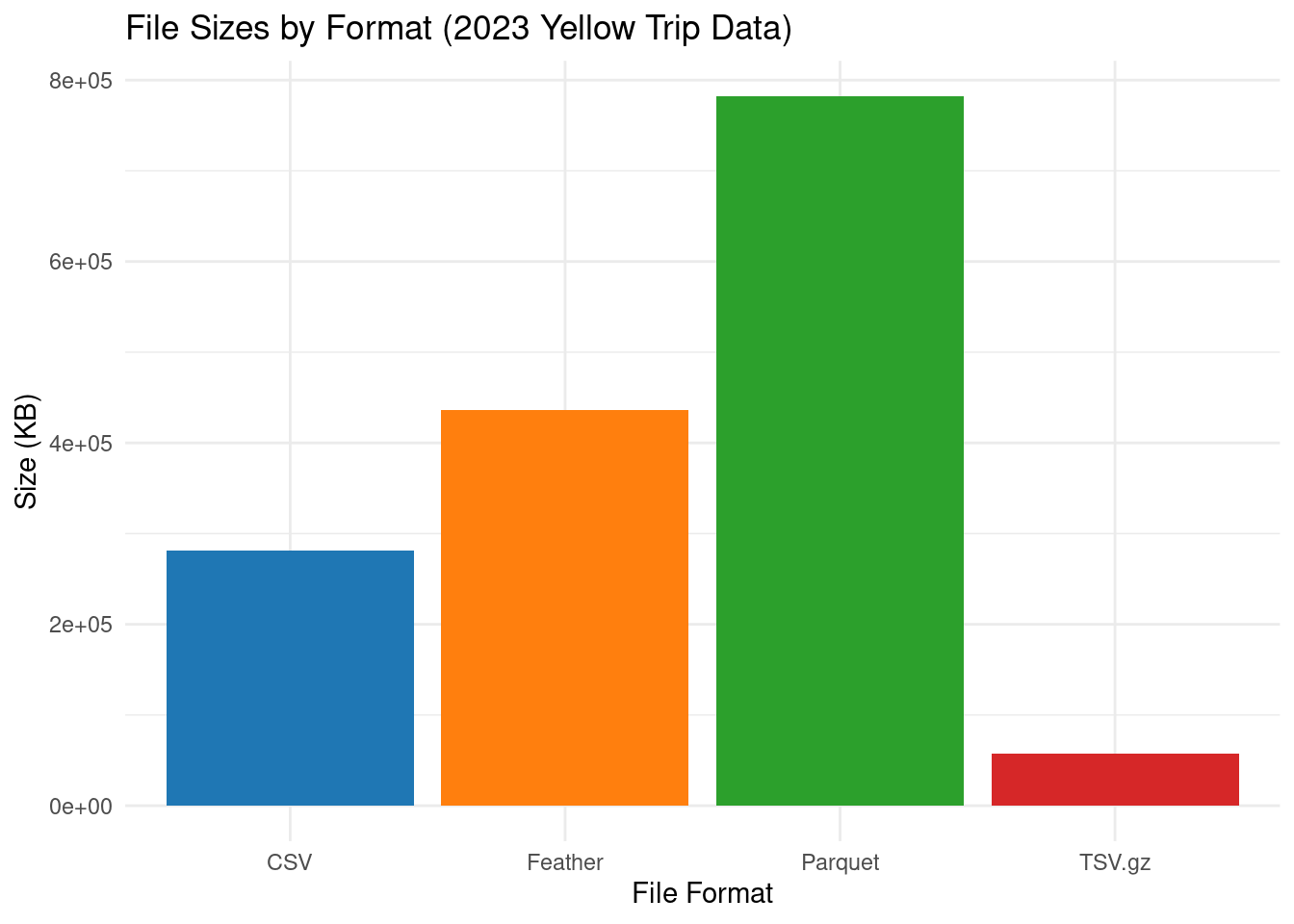
# Measure file reading times
csv_time <- system.time(read.csv(paste0(dataFolder, "yellow_tripdata_2023_01.csv"), header = TRUE))[3]
fread_time <- system.time(data.table::fread(paste0(dataFolder, "yellow_tripdata_2023_01.csv"), header = TRUE))[3]
parquet_time <- system.time(arrow::read_parquet(paste0(dataFolder, "yellow_tripdata_2023-01.parquet")))[3]
vroom_time <- system.time(vroom::vroom(paste0(dataFolder, "yellow_tripdata_2023_01.tsv.gz")))[3]
Rows: 2913955 Columns: 19
── Column specification ────────────────────────────────────────────────────────
Delimiter: "\t"
chr (1): store_and_fwd_flag
dbl (16): VendorID, passenger_count, trip_distance, RatecodeID, PULocationI...
dttm (2): tpep_pickup_datetime, tpep_dropoff_datetime
ℹ Use `spec()` to retrieve the full column specification for this data.
ℹ Specify the column types or set `show_col_types = FALSE` to quiet this message.# Create data frame with reading times
reading_times <- data.frame(
Method = c("read.csv", "fread", "read_parquet", "vroom"),
Time_Seconds = c(csv_time, fread_time, parquet_time, vroom_time)
)
reading_times Method Time_Seconds
1 read.csv 17.729
2 fread 0.174
3 read_parquet 0.165
4 vroom 5.928# Create bar plot
ggplot(data = reading_times, aes(x = Method, y = Time_Seconds, fill = Method)) +
geom_bar(stat = "identity") +
labs(title = "File Reading Times for 2023 Yellow Trip Data",
x = "Reading Method",
y = "Time (Seconds)") +
theme_minimal() +
scale_fill_manual(values = c("read.csv" = "#1f77b4",
"fread" = "#ff7f0e",
"read_parquet" = "#2ca02c",
"vroom" = "#d62728")) +
theme(legend.position = "none") # Hide legend since x-axis labels are clear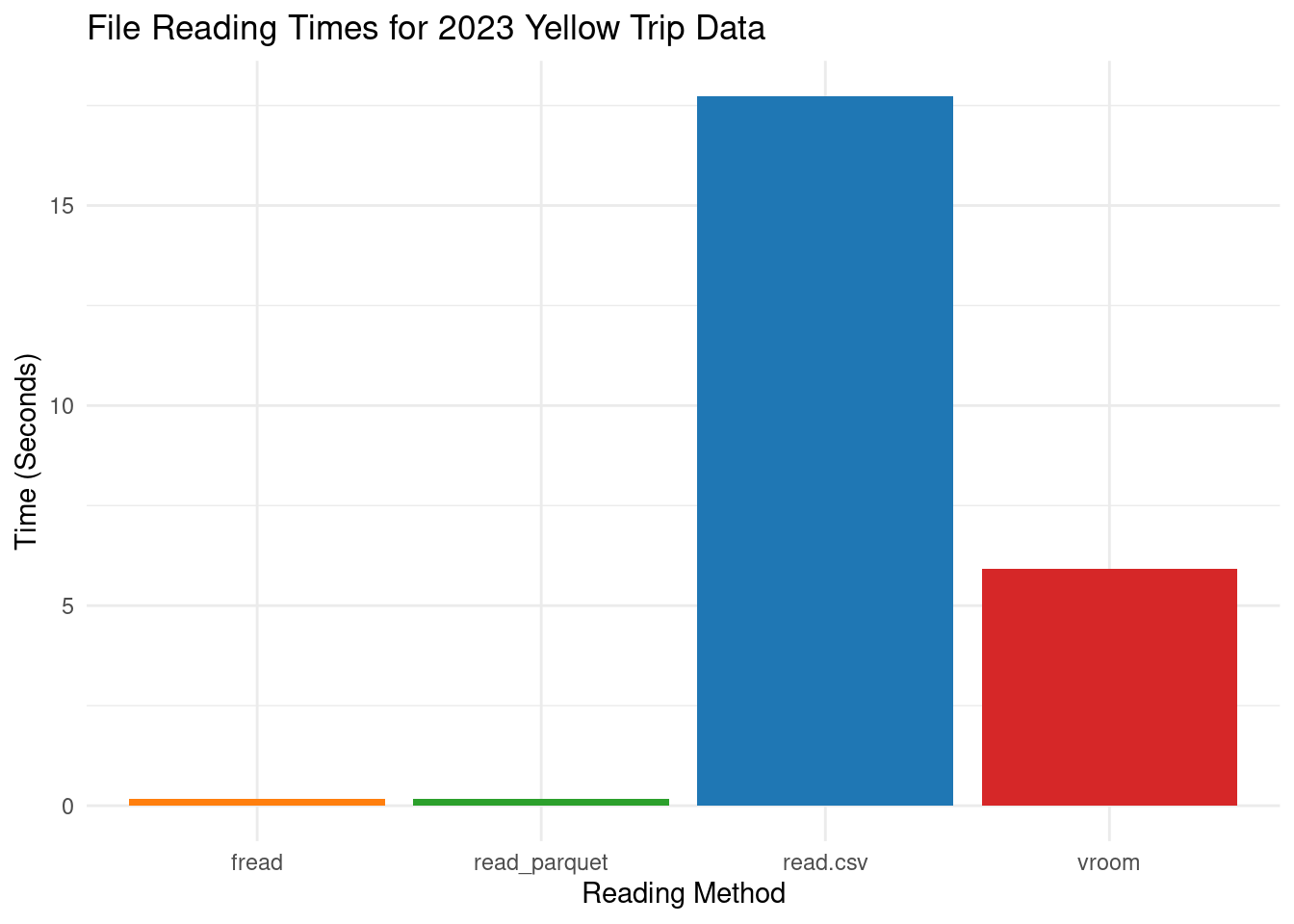
# Measure file writing times
csv_time <- system.time(write.csv(df, paste0(dataFolder, "yellow_tripdata_2023_01.csv"), row.names = FALSE))[3]
fwrite_time <- system.time(data.table::fwrite(df.DT, paste0(dataFolder, "yellow_tripdata_2023_01.csv"), row.names = FALSE, quote = TRUE))[3]
parquet_time <- system.time(arrow::write_parquet(df.feather, paste0(dataFolder, "yellow_tripdata_2023_01.parquet")))[3]
vroom_time <- system.time(vroom::vroom_write(data, paste0(dataFolder, "yellow_tripdata_2023_01.tsv.gz")))[3]

# Create data frame with writing times
writing_times <- data.frame(
  Method = c("write.csv", "fwrite", "write_parquet", "vroom_write"),
  Time_Seconds = c(csv_time, fwrite_time, parquet_time, vroom_time)
)
writing_times
Method Time_Seconds
1 write.csv 56.168
2 fwrite 0.544
3 write_parquet 1.515
4 vroom_write 16.371# Create bar plot
ggplot(data = writing_times, aes(x = Method, y = Time_Seconds, fill = Method)) +
geom_bar(stat = "identity") +
labs(title = "File Writing Times for 2023 Yellow Trip Data",
x = "Writing Method",
y = "Time (Seconds)") +
theme_minimal() +
scale_fill_manual(values = c("write.csv" = "#1f77b4",
"fwrite" = "#ff7f0e",
"write_parquet" = "#2ca02c",
"vroom_write" = "#d62728")) +
theme(legend.position = "none") # Hide legend since x-axis labels are clear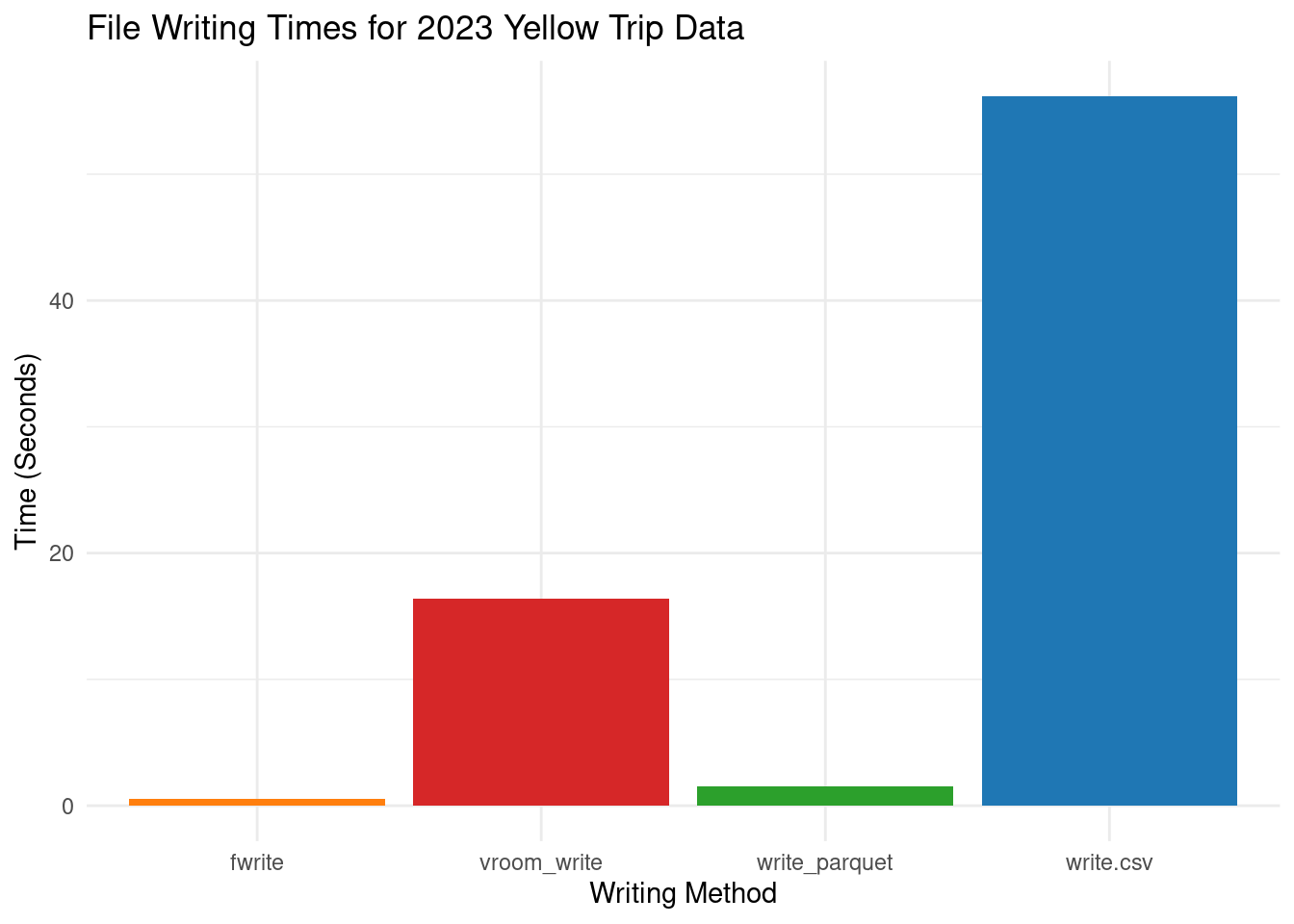
Dealing with big data in R requires efficient import and export methods to ensure performance and scalability. Utilizing columnar storage formats like Parquet and Feather, along with database connections and distributed computing frameworks, can help you effectively handle and analyze large datasets in R. Additionally, compression can further optimize storage and transfer of big data files.
This tutorial covers efficient data export-import processes using the R packages data.table, Arrow and Feather, which handle large datasets with speed and ease. We explore data.table’s syntax for importing and exporting data and feather’s binary columnar data format for seamless data exchange between R and other programming languages. Using these packages, data scientists can handle large datasets efficiently, ensuring, storage, speed and readability in data operations.
To optimize data manipulation workflows, consider exploring advanced features of data.table, and experimenting with feather’s compatibility with various data science ecosystems. On the other hand, the arrow package provides a powerful platform for efficient analytic operations on data, with its standardized columnar memory format, computational libraries, and zero-copy streaming capabilities. Its interoperability, columnar data representation, and high performance make it a valuable tool for big data and parallel computing environments.
Compared to other formats like CSV and Feather, Parquet files have a significantly smaller size on disk, making them an excellent option for handling big data. Although Feather files have a faster read and write speed than Parquet, they take up more space on disk. However, the Parquet format supports compression, which helps to reduce the file sizes even further significantly. The actual size of files can depend on various factors, such as the compression codec used (e.g., Snappy, Gzip) and the nature of the data itself. With all these advantages, the Parquet format is an excellent choice for storing large datasets efficiently while keeping their storage costs low.
1 Feather